
Do you struggle to get blurry backgrounds in your photos? Are your indoor shots dark or grainy? You might wonder which lens will fix this problem. Many beginners blame their camera body when a photo looks bad. In most cases, the real secret is the opening inside your lens.
Understanding what is a camera aperture helps you pick the right gear and take sharp, bright shots. You do not need a degree in art to master this tool. Once you learn how it works, you will save money on lenses and gain full control over every shot you take.
Quick Answer
A camera aperture is the adjustable physical opening inside a lens that controls how much light reaches the camera sensor. Measured in f-stops like f/1.8 or f/8, it also controls depth of field. A wide opening lets in more light and creates soft, blurry backgrounds.
What Is a Camera Aperture Explained in Plain English
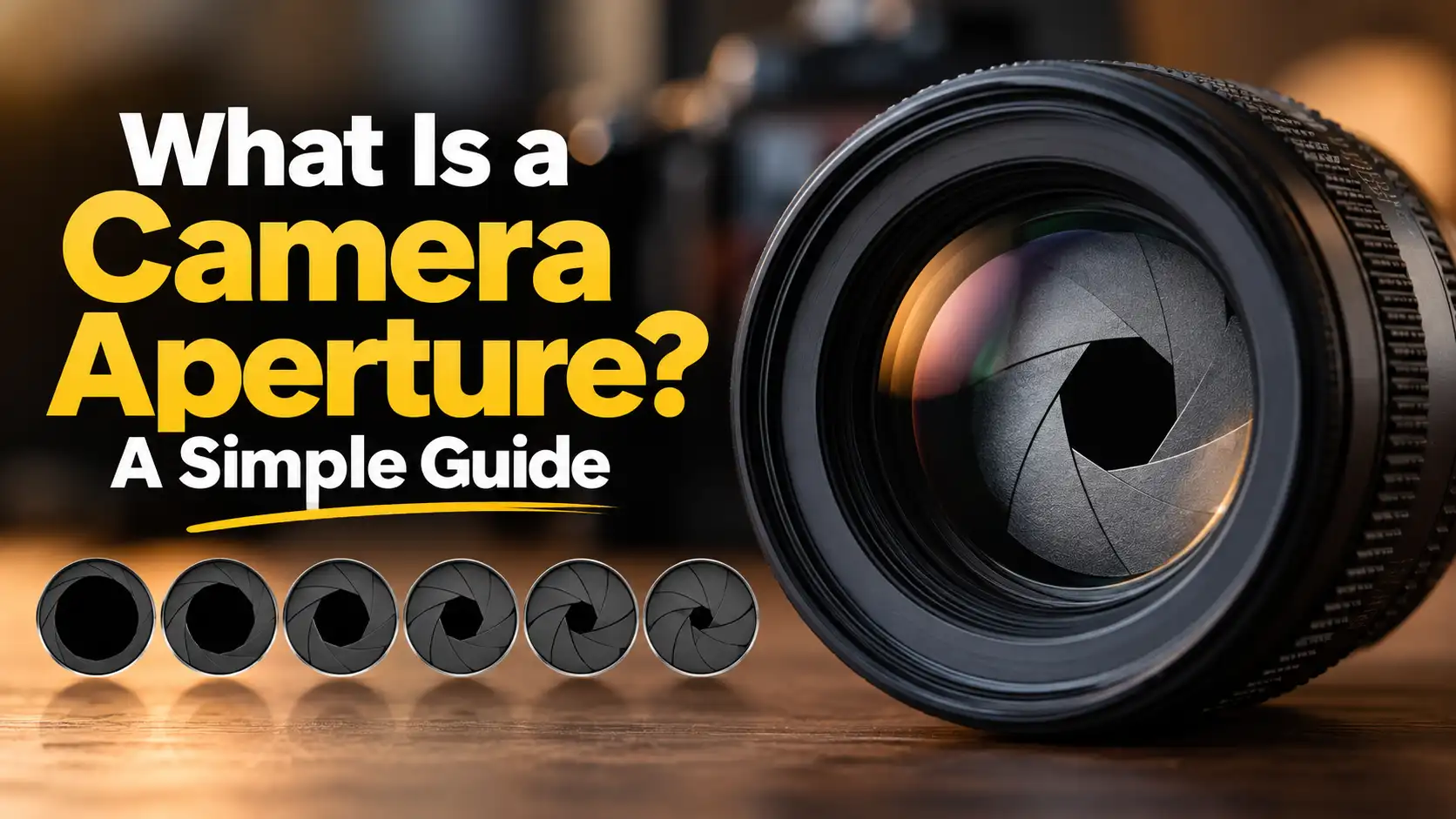
Every camera lens has an adjustable hole made of tiny metal blades. This hole works just like the pupil of a human eye. When you walk into a dark room, your pupil widens to let in more light. When you step outside into bright sunlight, your pupil shrinks to keep out extra light.
The aperture of lens elements does the exact same thing. When you press the shutter button, the blades open to a set width. Light travels through this hole and hits your digital sensor to form an image.
The size of this hole is measured in something called an f-stop. On your screen, you will see numbers like:
-
f/1.4
-
f/2
-
f/2.8
-
f/4
-
f/5.6
-
f/8
-
f/11
-
f/16
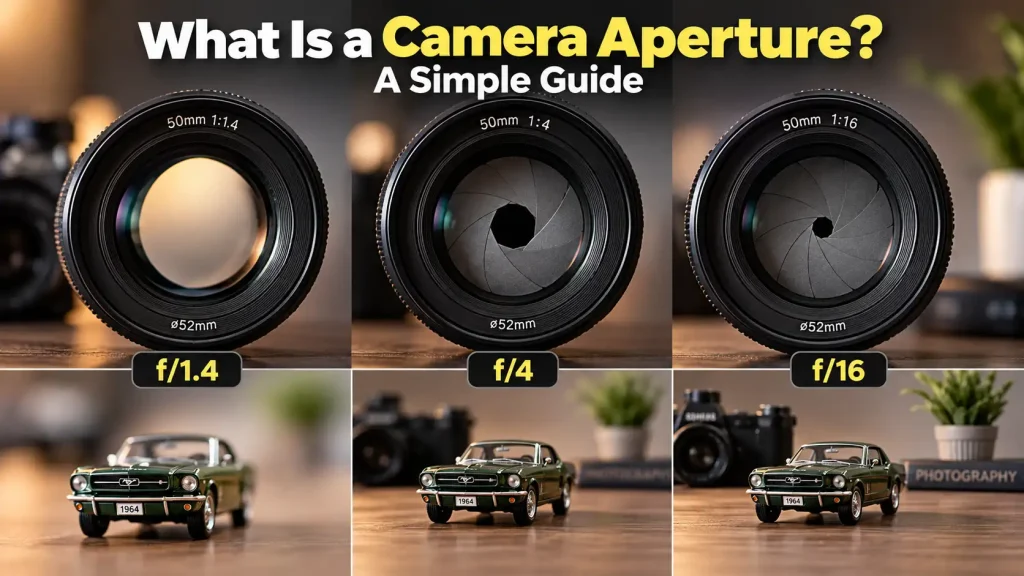
Here is the part that tricks almost every new photographer: A smaller number means a bigger hole. For example, f/1.8 is a very wide opening. In contrast, f/16 is a tiny pinhole. Think of it like a fraction. Half of a pizza (1/2) is much bigger than an eighth of a pizza (1/8). In the same way, f/2 lets in far more light than f/8.
[Wide Opening: f/1.8]   -->   Lets in LOTS of light   -->   Blurry Background
[Narrow Opening: f/16]  -->   Lets in LITTLE light   -->   Sharp Background
Official lens guides from manufacturers like Canon’s lens educational resource show how mechanical iris blades expand and contract to form these distinct physical openings.
What Is Aperture in Physics?
If you like science, the core aperture meaning is quite simple. In classical optics and physics, an aperture is any opening through which light waves or radiation pass.
The f-stop is not an arbitrary number. It is a mathematical ratio:
If you use a 50mm lens and the physical opening is 25mm wide, 50 divided by 25 gives you 2. That means your setting is f/2. When you change your focal length or adjust the blades, you change the cone of light reaching your focal plane.
The Two Main Jobs of Aperture
Your aperture controls two key elements in every picture: exposure and depth of field.
1. Exposure (Brightness)
Your opening controls how much light enters the camera body:
-
Wide settings (f/1.4 to f/2.8): These settings let in a flood of light. They are perfect for dim rooms, night streets, and sunset portraits.
-
Narrow settings (f/8 to f/16): These settings block excess light. They help prevent washed-out shots under bright mid-day sun.
2. Depth of Field (Background Blur)
Depth of field describes how much of your picture looks sharp from front to back:
-
Shallow depth of field: Only your main subject stays sharp. The background turns into a soft, creamy blur. You get this look with wide settings like f/1.8 or f/2.8.
-
Deep depth of field: Everything from foreground rocks to distant mountain peaks looks crisp. You get this look with narrow settings like f/8 or f/11.
Aperture Photography Examples in Real Life
To help you choose the right setting on your camera dial, review these practical aperture photography examples:
-
Portraits of people (f/1.8 – f/2.8): Keeps the eyes tack-sharp while smoothing out messy backgrounds.
-
Pet photography (f/2.8 – f/4): Gives you a soft background while keeping both the pet’s nose and eyes in clear focus.
-
Street and documentary (f/5.6 – f/8): Keeps your moving subject and their immediate environment recognizable and crisp.
-
Landscapes and architecture (f/8 – f/11): Ensures mountain ranges, trees, and foreground rocks remain sharp across the entire scene.
-
Group family photos (f/5.6 – f/8): Ensures people in the front and back rows stay equally sharp without anyone blurring out.
What Is Aperture in iPhone and Mobile Cameras?
Many people ask about aperture in mobile camera setups. On smartphones like an iPhone, Samsung Galaxy, or Google Pixel, the primary camera lens has a fixed physical opening, usually around f/1.6 to f/1.8.
Because phones are very thin, the lens cannot fit moving mechanical blades. Instead, smartphones mimic shallow depth of field using software and depth sensors.
When you use “Portrait Mode,” computational algorithms detect your subject’s edges and blur the background digitally. In contrast, a dedicated mirrorless or DSLR lens creates this blur naturally through pure optical glass and physical physics. That natural optical fall-off is why dedicated camera lenses deliver richer textures and cleaner outlines than mobile filters.
How to Set Your Aperture Camera Setting: Step-by-Step
Adjusting your settings does not need to feel scary. Follow these simple steps on your mirrorless or DSLR camera:
-
Turn the mode dial to “A” or “Av”: This stands for Aperture Priority Mode.
-
Understand what the camera does: In this mode, you pick the f-stop. The camera automatically selects the matching shutter speed to give you a balanced exposure.
-
Turn the main control wheel: Scroll left to lower the f-number for blurry backgrounds. Scroll right to raise the f-number for sharper scenes.
-
Take a test shot: Check your screen. If your subject’s face is sharp but the background is too busy, lower your f-number.
-
Watch your shutter speed: If your camera chooses a speed below 1/60s in low light, use a tripod or raise your ISO to prevent camera shake.
You can inspect detailed optical benchmarks across modern lenses through DxOMark lens and sensor lab tests, which show how light transmission changes across different f-stops.
Aperture vs Lens Buying Guide: Which Should You Buy?
When shopping for lenses, the f-number printed on the front barrel is the most important spec you will see. It tells you the maximum aperture (the widest the lens can open).
| Lens Type | Typical Aperture Range | Best Use Case | Price Tier | Weight & Portability |
| Fast Prime Lens | f/1.4 – f/1.8 | Portraits, night street shots, low light | Budget to Mid-Range ($100 – $600) | Very light, compact |
| Budget Kit Zoom | f/3.5 – f/5.6 | Daylight family trips, beginner practice | Very Low (often bundled) | Light plastic build |
| Pro Zoom Lens | Constant f/2.8 | Weddings, sports, events, studio work | High ($1,000 – $2,500+) | Heavy, weather-sealed |
| Landscape Zoom | Constant f/4 | Hiking, travel, daytime landscapes | Mid-Range ($600 – $1,200) | Moderate, easy to pack |
Lenses marked with wide openings like f/1.8 or f/2.8 are called “fast lenses.” They let you shoot in dark rooms without a flash. Standard kit zoom lenses have “variable apertures” like f/3.5-5.6. As you zoom in, the physical hole shrinks, letting in less light. That is why your indoor shots often turn dark or noisy when zooming in on budget gear.
Expert Tip:
If you want professional-looking blurry backgrounds without spending a fortune, buy a "nifty fifty" 50mm f/1.8 prime lens. It is inexpensive, ultra-sharp, and outperforms almost any budget kit zoom in low light.

Warning Signs Your Lens Aperture Needs Attention
Camera gear is mechanical. Over time, internal parts can wear down. Watch for these common warning signs:
-
Stuck aperture blades: If you press your depth-of-field preview button and your view stays dark, the internal blades may be jammed with dried lubricant.
-
Oily iris blades: If you shine a penlight through your lens and see a shiny film on the black metal leaves, oil has leaked onto them. This makes the mechanism sluggish.
-
Lens fungus and haze: White web-like threads inside the elements will scatter light and ruin contrast. Keep your gear in a dry box to prevent mold.
-
Error codes (e.g., Canon Err 01, Sony Lens Communication Error): This often means your camera body cannot signal the lens diaphragm to close down. Clean the metal contact pins with a dry microfiber cloth.
Also See: Best Manual Focus Camera Android: 5 Top Picks
When to Get Professional Help or a Second Opinion
Never take apart a camera lens at home. Modern lenses contain delicate floating glass elements, fragile ribbon cables, and precision springs.
You should visit an authorized repair center if:
-
The iris blades do not click shut during exposure.
-
You see visible oil, haze, or mold inside the glass.
-
The manual aperture ring feels gritty or locked.
-
Your camera shows lens communication errors even after cleaning the golden contact pins.
Opening a lens body without cleanroom tools can ruin its optical alignment permanently. Professional servicing protects your investment and maintains factory resale value.
Common Mistakes Camera Buyers Should Avoid
-
Buying an expensive body with a cheap, slow lens: Your lens impacts image quality more than your camera body. Pair a modest body with a bright f/1.8 lens rather than buying an elite body with an f/5.6 kit lens.
-
Shooting everything at f/1.4: Wide apertures are fun, but the focal plane is razor-thin. If your subject turns slightly, their nose might be sharp while their eyes blur out.
-
Stopping down past f/16 for landscapes: While f/22 sounds like it gives maximum sharpness, it causes an optical issue called diffraction. Light bends around the small edges of the iris, making the whole image look soft. Stick to f/8 or f/11 for peak sharpness.
-
Ignoring the tripod in low light: A small f/8 aperture keeps scenes sharp, but it starves your sensor of light. Always carry a sturdy tripod when shooting landscapes at dusk.
-
Leaving gear in humid basements: Damp closets encourage lens fungus, which attacks the aperture mechanism and eats through glass coatings.
FAQs
What does the “f” stand for in f-stop?
The “f” stands for focal ratio. It represents the ratio between your lens focal length and the physical diameter of the entrance pupil.
Is f/1.8 better than f/4?
Neither is universally better; they serve different goals. An f/1.8 setting lets in more light and creates strong background blur. An f/4 setting keeps more of your subject in focus and is ideal for travel, street, and daytime scenes.
Why are f/2.8 zoom lenses so expensive?
Building a zoom lens that maintains a wide f/2.8 opening across its entire focal range requires large, heavy, high-grade glass elements. These pro-grade lenses require complex engineering and precision manufacturing.
Does aperture affect video the same way it affects photos?
Yes. Aperture controls brightness and depth of field in video just like in still photography. However, video shooters often use variable ND filters to shoot wide open at f/1.8 in bright daylight without overexposing their footage.
Can I change the aperture on my smartphone?
Most smartphones have fixed physical lenses, meaning you cannot change the physical opening. However, software features like “Portrait Mode” allow you to adjust simulated depth of field after taking the shot.
Make Smarter Camera and Lens Choices
Mastering what is a camera aperture is the fastest way to improve your photography. The aperture inside your lens dictates how bright your shots appear and whether your backgrounds melt into soft blur or stay sharp.
Before you invest in your next camera or lens upgrade, review how you shoot. If you struggle in dark rooms or crave soft portrait backgrounds, skip the expensive camera bodies. Instead, pick up an affordable, fast prime lens like a 35mm or 50mm f/1.8. It is the most cost-effective upgrade any beginner can make. Grab your camera, switch your dial to Aperture Priority mode, and test different f-stops on a nearby subject today.

5 thoughts on “What Is a Camera Aperture? A Simple Guide”