
Do your photos look too dark? Are they too bright? You are not alone. Many new camera buyers ask what is exposure in photography to fix this exact issue. Exposure is simply the amount of light in your photo. It is the most vital part of a good picture. If you get it wrong, you lose details. This guide will show you how to get it right. You will learn simple terms. You will learn easy tricks. You will take better photos today. Let us start learning.
Quick Answer
Exposure in photography is the total amount of light that reaches your camera sensor. It controls how bright or dark your photo looks. A good exposure shows clear details in both dark and light areas. You control it using three main settings: aperture, shutter speed, and ISO.
What Is Correct Exposure In Photography?
Correct exposure means your photo looks natural. It is not too dark. It is not too bright. You can see details in the shadows. You can see details in the bright spots.
Your camera tries to guess the best light for you. But it can make mistakes. The CIPA guidelines on digital camera standards explain how modern cameras measure this light accurately. The camera meter reads the light. Then, it sets the brightness. But you, the photographer, always have the final say.
What Is Exposure In Photography Examples
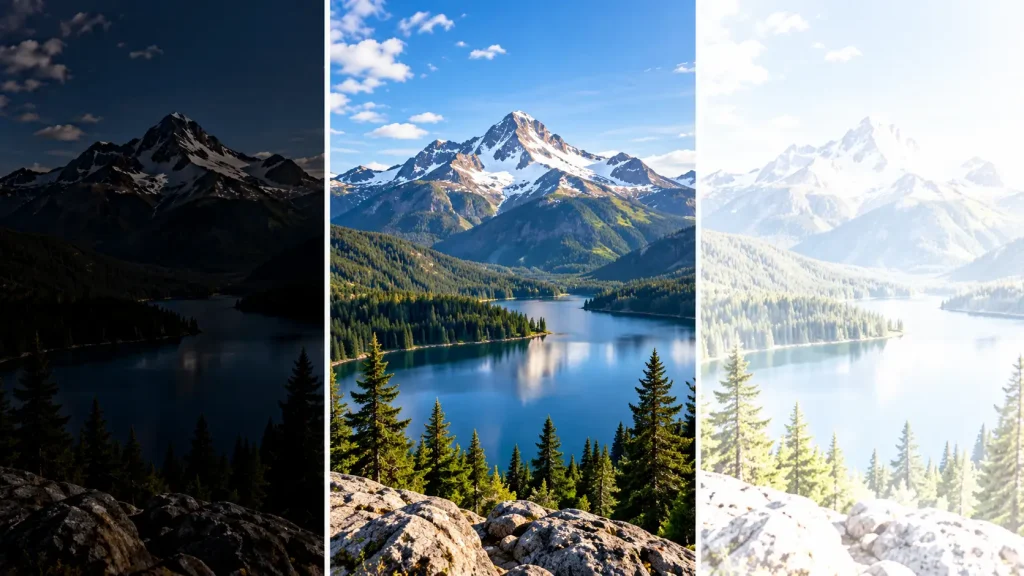
Let us look at three real cases. These show how light changes a photo completely.
-
Underexposed: The photo is very dark. The shadows are black. You cannot see details. There was not enough light.
-
Overexposed: The photo is very bright. The sky is pure white. The details are gone. Too much light hit the sensor.
-
Correctly Exposed: The brightness is just right. You see blue skies. You see details in the dark trees.
What Is Exposure In Photography Explain
How does light get into the camera? Think of your camera as a dark room with a window. The window has tight blinds.
When you press the button, the blinds open. Light comes in. The light hits the back wall. The wall is your camera sensor. The longer the blinds stay open, the more light comes in. The bigger the window, the more light comes in. This is the core of taking a picture.
What Is Exposure Triangle In Photography?
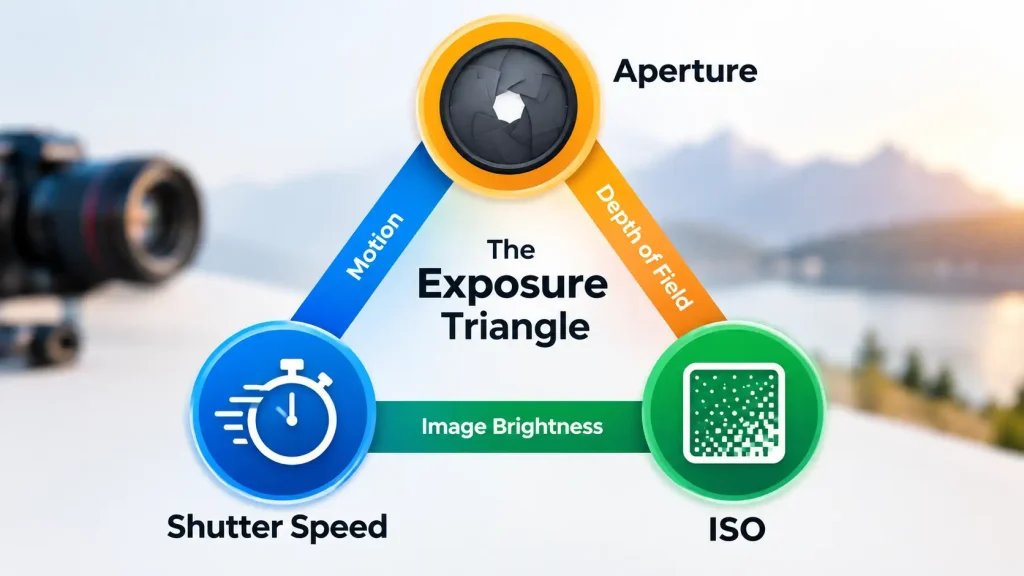
Three settings control the light. We call them the exposure triangle. They always work together. If you change one, you must change another to keep the light the same.
1. Aperture (The Window Size)
Aperture is the hole in your lens. It lets light in.
-
A big hole lets in a lot of light.
-
A small hole lets in less light.
-
A big hole also blurs the background.
-
A small hole keeps the whole view sharp.
2. Shutter Speed (The Time)
Shutter speed is how long the sensor sees light.
-
A fast speed stops action. It lets in less light.
-
A slow speed blurs motion. It lets in more light.
3. ISO (The Sensor Boost)
ISO makes the sensor more sensitive to the light.
-
A low ISO needs more light. It gives clean photos.
-
A high ISO needs less light. It can make photos grainy.
Types Of Exposure In Photography
There are a few main ways to shoot. Cameras have simple dials for these types.
-
Auto Mode: The camera does all the work.
-
Manual Mode: You set everything yourself.
-
Aperture Priority: You pick the lens hole size. The camera sets the time.
-
Shutter Priority: You pick the time. The camera sets the lens hole.
Long exposure is a fun, special type. You leave the shutter open for seconds or minutes. It makes moving water look like soft milk. It shows long star trails in the night sky.
What Is Exposure Compensation In Photography?
Sometimes, the camera meter gets confused. White snow looks dull gray. A black dog looks flat gray. Exposure compensation fixes this fast.
It is a small button with a +/- sign.
-
Dial to +1: Makes the photo brighter.
-
Dial to -1: Makes the photo darker.
You tell the camera to add or remove light. It is a very handy tool for bright days.
Camera Exposure iPhone and Mobile Phones
Can you control light on a phone? Yes. Modern phones are very smart. But they still need help sometimes.
On an iPhone, tap the screen. A yellow box appears. Slide the small sun icon up or down. Sliding up makes the photo bright. Sliding down makes it dark.
This works on Android too. If you use a flagship like the Samsung Galaxy S24 Ultra, you get a special “Pro” mode. This mode lets you change ISO and shutter speed just like a real camera.
Also See: Best Manual Focus Camera Android: 5 Top Picks 2026
When To Get Professional Help Or A Second Opinion
Taking photos is very safe. But cameras are delicate tools. Pointing your camera directly at the bright sun for too long can burn the sensor inside.
If your photos always look too dark, or if they have weird spots, your sensor might be dirty. Do not try to clean a bad sensor with a rough cloth. Do not open the camera body with tools.
Take your gear to an authorized service center. A pro can clean the sensor safely. They can check if the light meter is broken. Fixing it yourself can break the camera forever.
Expert Tip:
Always check your camera screen after a test shot. Look at the histogram graph. If the graph touches the far right edge, your photo is too bright. Turn your exposure compensation down to save the details!
Helpful Exposure Guide
Here is a simple table to help you remember the settings.
| Setting | What It Controls | High Value Result | Low Value Result |
| Aperture | Lens opening | Less light, sharp background | More light, blurry background |
| Shutter Speed | Time | Stops action, less light | Blurs action, more light |
| ISO | Sensor boost | Brighter, but grainy | Darker, but very clean |
Common Mistakes Camera Buyers Should Avoid
Do not make these simple errors when learning about light.
-
Using high ISO in the day: This makes photos grainy for no reason. Keep ISO low in the bright sun.
-
Trusting the camera screen too much: The screen is very bright. The photo might actually be dark on a PC.
-
Ignoring the sun: Never shoot directly into the bright sun unless you want a dark silhouette. Keep the sun behind your back.
-
Forgetting to reset settings: If you changed the +/- dial yesterday, reset it today. Or your new photos will look bad.
FAQs
What is correct exposure in photography?
It is a photo that has a natural level of light. The dark parts are not pure black. The bright parts are not pure white. You can see all the details clearly.
What is exposure in photography examples?
An overexposed photo looks washed out and totally white. An underexposed photo looks very dark and muddy. A good exposure looks just like real life.
What is exposure triangle in photography?
It is the mix of three camera settings. These are ISO, aperture, and shutter speed. They work together to control the light.
What is exposure compensation in photography?
It is a simple camera tool to fix bad light guesses. You use a dial to force the camera to make the photo brighter or darker.
How do I fix camera exposure iPhone?
Tap the screen where you want to focus. A box with a sun icon will pop up. Drag the sun up for more light. Drag it down for less light.
Can a bad lens ruin my exposure?
Yes. A dirty lens blocks good light. Fungus inside a lens will make photos soft and dark. Keep your gear clean. According to official lens care tips from Canon, using proper microfiber cloths protects the glass safely.
Should I always use manual mode?
No. Manual mode is great for learning. But auto modes are very fast. Use what works best for your own skill level.
Conclusion
Learning what is exposure in photography changes everything. It is the true secret to great photos. Remember the three big settings. ISO, aperture, and shutter speed control all the light. Do not let your camera make all the choices. Practice using the exposure compensation dial. Try taking photos in different lights. Grab your camera today and start testing these easy tips!
