

Do your action photos look blurry? Do you miss the best parts of a soccer game? You might need to change your camera settings. Many new buyers ask, what is camera continuous shooting? It is a great tool. It takes many photos very fast. It helps you save the perfect moment in time.
In this guide, I will show you how this works. I am Ellis Evans. I test cameras and gear here at TechToGoal. I want to help you take better photos. I will explain camera speeds. I will tell you which memory cards to buy. I will also show you how to use your phone for fast action. Let us dive right in and fix your blurry photos.
Quick Answer
What is camera continuous shooting? It is a camera setting that takes many photos in a row. You simply hold down the shutter button. The camera keeps taking pictures until you let go. People also call this burst mode. It is the best mode for sports, pets, and fast action.
How Continuous Shooting Mode Works
Your camera has a small part called a shutter. The shutter opens to let light inside. Light hits the camera sensor. This is how a picture is made.
In a normal setting, the shutter opens one time. You press the button. You get one photo. This is called single-shot mode.
In continuous shooting mode, things change. You hold the shutter button down. The shutter opens and closes many times. It does this very fast. The camera keeps working until you take your finger off the button.
Some cameras take three photos in one second. Some take ten. Brand new pro cameras can take forty. This rapid fire helps you freeze time. You will not miss the exact moment a bird takes flight.
Why You Need Burst Mode
Fast action is hard to see. Human eyes can easily miss a quick movement. A camera working in burst mode sees everything.
Think about a dog running. The dog moves its legs very fast. If you take one photo, the legs might look weird. The dog might blink. The photo might be ruined.
If you take twenty photos, you get choices. One of those photos will look perfect. The dog will look sharp. The lighting will be just right. This is why sports shooters love this mode. It gives you the best chance to win.
Kids also move all the time. They do not sit still for portraits. Burst mode helps you catch their quick smiles. It turns a hard task into an easy one.
Continuous Shooting Canon Cameras
Canon makes very popular action cameras. Their mode is easy to turn on.
First, look at the back of your camera. Find a button with an icon of stacked squares. This is the drive mode button. Press it to turn on continuous shooting canon settings.
You can pick a high speed or a low speed. High speed is for sports. Low speed is for family events. Canon mirrorless cameras are very fast today. They use electronic shutters. This means they can shoot totally silent. You can take photos at a wedding without making a sound.
What is Camera Continuous Shooting Nikon?
Nikon users also have this amazing tool. So, what is camera continuous shooting Nikon style?
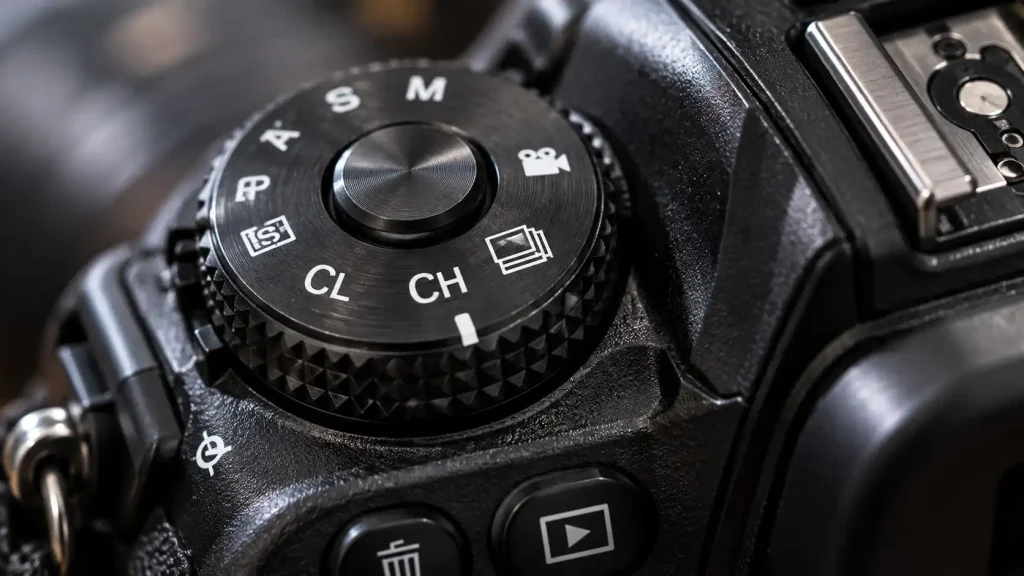
It works just like Canon. Nikon often puts a dial on top of their cameras. You turn the dial to change the mode.
Look for the letters “CH” or “CL” on the dial. “CH” stands for Continuous High. “CL” stands for Continuous Low.
Continuous High gives you the max speed. It is for very fast action. Continuous Low gives you a medium speed. It is good for people walking or slow pets. The official Nikon continuous shooting guide says you should always match your speed to your moving subject.
Phone Cameras: Burst Mode iPhone and Android
You do not need a big, heavy camera to shoot fast. Mobile phones do this very well today.
Using burst mode iPhone is very simple. On older iPhones, you just tap and hold the big white button. On newer iPhones, you swipe the white button to the left. You hold it there. The phone will take ten photos every second.
The iPhone saves all these shots in a neat stack. You open your photo app. You look at the stack. You pick the best picture and delete the rest. This saves phone space.
Camera burst mode Android works in a similar way. Most Android phones let you tap and hold the camera button.
If you want to use burst mode Samsung, you swipe the shutter button down toward the bottom of the screen. Hold it down. The phone will fire away fast.
If your phone is very old, do not worry. You can download a burst mode camera app from the app store. These apps give old phones new tricks. They let you change the speed. They give you pro tools for free.
How to Set Up Your Camera for Fast Action
Turning on burst mode is not enough. You must change other settings too. If you do not, your photos will still be blurry.
Here is how you set up your camera:
-
Set a fast shutter speed. Your shutter speed must be fast to stop motion. Try 1/1000th of a second for sports. Try 1/2000th of a second for birds.
-
Open your aperture. A fast shutter speed needs a lot of light. Open your lens wide. Use a small f-number like f/2.8 or f/4.
-
Raise your ISO. If the photo is too dark, raise the ISO. Do not be afraid of grain. A sharp photo with grain is better than a blurry photo.
-
Change your focus mode. Your camera must track the moving subject. Change your focus mode to AF-C (Continuous Autofocus) or Servo AF.
If you use AF-S (Single Autofocus), the camera will only focus once. If the subject moves, the rest of your burst photos will be out of focus.
The Role of Memory Cards and Buffers
Your camera takes photos very fast. But it must save them fast, too.
The camera has an internal memory. This is called the buffer. The buffer is like a waiting room. Photos wait in the buffer before they go to the memory card.
If the waiting room gets full, the camera stops working. You press the button, but nothing happens. You must wait for the camera to move the files. The experts at DPReview camera testing lab test these buffer speeds on all new gear to see which camera is best.
To fix this, you must buy a fast SD card. Look for cards with high write speeds. A high read speed does not help you shoot fast. Write speed is what matters.
Warning Signs of a Dying Shutter
Using burst mode all the time wears out your camera. A camera shutter is a real moving part. Moving parts break down over time.
Here are the warning signs your shutter is failing:
-
Strange sounds: The camera makes a harsh grinding noise when taking a photo.
-
Dark bands: Your photos have a dark line or shadow across the top or bottom.
-
Error codes: The camera shows an error word on the back screen.
-
Slow speeds: The burst mode is much slower than it used to be.
The CIPA testing standards state that basic camera shutters last for 100,000 clicks. Professional cameras can last for 500,000 clicks. If you buy a used camera, always check the shutter count first.
When to Get Professional Help or a Second Opinion
Camera parts are very small. They are also very fragile inside.
If your shutter breaks, do not fix it yourself. Opening a camera body is dangerous. You can scratch the main sensor. You can also get a bad electric shock from the flash capacitor.
Always take a broken camera to an authorized service center. They have clean rooms free of dust. They have the right small tools.
Replacing a broken shutter costs money. But it is always cheaper than buying a whole new camera body. If you see signs of shutter wear, get a second opinion from a pro repair shop right away.
Expert Tip:
Expert Tip: Always buy memory cards with a “V60” or “V90” label for fast continuous shooting. These cards write data very fast. They keep your camera buffer empty. A slow card will make you miss the best shots.
Camera Speed Comparison Table
Here is a simple table. It shows how fast different cameras shoot. This helps you pick the right gear.
| Camera Type | Average Speed (FPS) | Best Used For |
| Phone Camera | 10 FPS | Kids, pets, fun day trips |
| Point and Shoot | 5 to 10 FPS | Family events, slow action |
| Basic DSLR Camera | 3 to 5 FPS | Portraits, basic school sports |
| Pro Mirrorless | 20 to 120 FPS | Pro sports, fast wild birds |

Common Mistakes Camera Buyers Should Avoid
Buyers often make simple mistakes with fast modes. Avoid these common traps to take better photos.
-
Buying slow memory cards: This is the biggest error. Slow cards choke the camera buffer. Your camera will freeze in the middle of the game.
-
Leaving burst mode on all day: This fills up your memory card very fast. It also kills your battery life. Only turn it on when the action starts.
-
Using slow shutter speeds: Burst mode just takes many photos. If your shutter speed is too slow, all the photos will just be blurry.
-
Forgetting to focus right: You must set your camera to track moving things. Use continuous autofocus so the camera follows the subject.
FAQs
What is the difference between burst mode and continuous shooting?
They are the exact same thing. Phone makers like to say burst mode. Camera makers like to say continuous shooting. They both take many photos fast.
Does continuous shooting ruin the camera?
No, it does not ruin it. But it does wear out the parts faster. A mechanical shutter can only click so many times before it breaks down.
Why is my burst mode so slow?
Your memory card is likely too slow. Or, your camera battery is very low. A very slow shutter speed can also slow down the overall burst rate.
Can I use a flash in continuous mode?
Most basic cameras turn the flash off in this mode. The flash needs time to power up after each pop. Only very expensive pro flashes can keep up with fast burst speeds.
Should I use RAW or JPEG for burst photos?
JPEG files are smaller and faster. Your camera can take more JPEGs in a row. RAW files are very big. They will fill your camera buffer very fast. Use JPEG for long sports bursts.
Do mirrorless cameras shoot faster than DSLRs?
Yes, they do. Mirrorless cameras do not have a moving mirror inside. They can use an electronic shutter. This lets them shoot way faster than older DSLR cameras.
How do I stop my memory card from filling up?
Only hold the button for short bursts. Shoot for two seconds, then stop. Do not hold the button down for ten seconds. Delete bad photos when you get home.
Conclusion
So, what is camera continuous shooting? It is your best tool for action photos. It lets you freeze fast moments in time. It helps you catch the perfect smile or the winning goal.
Whether you use a Canon, a Nikon, or a smartphone, this mode helps you win. Just remember to buy a fast memory card. Use a fast shutter speed to stop the blur. Set your focus mode to track moving subjects.
Do not leave the mode on all day. Use it only when the action starts. Now grab your camera. Go outside and shoot some fast sports. Practice makes perfect. Test your new skills today!
