

Everyone takes photos every day. We snap pictures of family, pets, and vacations. But finding those photos later can be very hard. If you are new to digital photography, you might ask: what is a camera roll?
This complete guide will explain everything you need to know. We will look at where your photos live. We will also cover how to manage them safely. By the end, you will know how to keep your memories organized and secure.
Quick Answer
What is a camera roll? A camera roll is a digital folder on your phone or tablet. It automatically saves all your new photos and videos. This folder acts as the main storage space for your media before you sort, edit, or back up the files.
What Camera Roll Means Today
In the past, a camera roll was a physical roll of film. You loaded it into a camera, shot your photos, and took it to a lab.
Today, what camera roll means is entirely digital. It is simply a continuous feed of your images. Every time you press the shutter button, the image goes to this feed. It sorts your photos by date and time. This makes it easy to find your most recent pictures.
Where Camera Photos Are Stored
It is important to know where camera photos are stored. The location depends on your device.
The iPhone Camera Roll
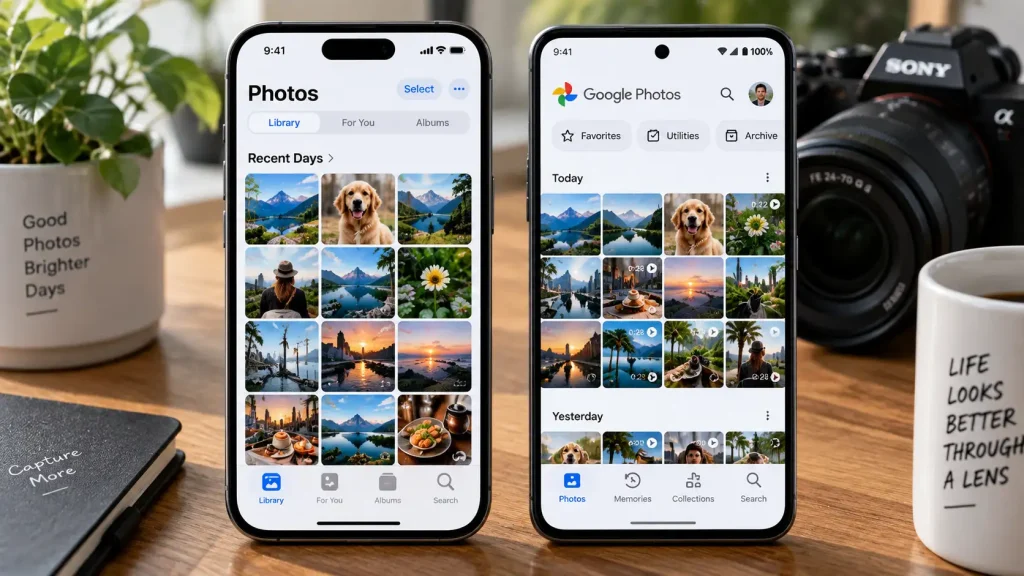
Apple changed how it names things in recent years. The iPhone Camera Roll is now part of the Photos app.
-
Open your Photos app.
-
Tap on the “Library” or “Recents” tab.
-
This view acts exactly like a traditional camera roll.
It shows every photo you take, download, or save.
The Android Photo Gallery
Android devices work a bit differently. They use an Android photo gallery app or Google Photos.
-
Open your Gallery app.
-
Look for a folder named “Camera.”
-
This folder holds all the shots you take with your phone lens.
Traditional digital cameras also use a specific folder. When you use an SD card, cameras save images in a folder called DCIM. This follows the SD Association’s guidelines on file systems for digital media.
Camera Roll vs Photos App
Many beginners get confused between the camera roll and the photos app. They are connected, but they serve different purposes.
The camera roll is just the raw feed of your images. The Photos app is the entire software program. The app holds your camera roll, your custom albums, your editing tools, and your cloud settings.
Feature Comparison
| Feature | Camera Roll | Photos App |
| Main Purpose | Stores newly captured images. | Manages all media and albums. |
| Organization | Sorts by date and time only. | Allows custom albums and tags. |
| Editing | No built-in editing tools. | Includes crop, filter, and color tools. |
| Sharing | Hard to share large groups. | Easy to share custom albums. |
How to Organize Camera Roll Files
A messy camera roll is frustrating. Learning how to organize camera roll files saves you time. It also saves storage space on your device.
Follow these simple numbered steps to take control of your photos:
-
Delete bad shots daily. Remove blurry photos right away.
-
Favor your best photos. Tap the heart icon on your favorite shots.
-
Create specific albums. Make albums for “Family,” “Pets,” or “Vacation 2026.”
-
Move photos to albums. Sort your favorite images into these new folders.
-
Set up cloud backup. Keep a safe copy of your organized files online.
Expert Tip:
Spend five minutes every Sunday cleaning out your camera roll. Delete screenshots, receipts, and blurry photos. This small habit prevents massive digital clutter from building up over the year.
How to Recover/Delete Photos
Sometimes we delete a photo by accident. Other times, we need to clear space fast. You must know how to recover/delete photos safely.
To safely delete photos:
-
Select the images you do not want.
-
Tap the trash can icon.
-
Warning: This moves them to a temporary folder. It does not free up space instantly.
To recover deleted photos:
Most modern phones have a safety net. They hold deleted photos in a “Recently Deleted” folder for 30 days.
-
Go to your Albums menu.
-
Scroll down to “Recently Deleted.”
-
Select the photo and tap “Recover.”
For detailed steps on Apple devices, you can read Apple’s official guide on deleting and recovering photos. If you use an Android, you can follow Google’s documentation for backing up photos to ensure you never lose a file.
When to Get Professional Help or a Second Opinion
Sometimes, DIY fixes are a bad idea. Your digital photos hold precious memories. You must protect them.
You should get professional help if your phone or camera breaks completely. Do not try to open your phone casing to save the memory chip. Do not plug a damaged phone into a computer. This can cause a short circuit and destroy your data forever.
Take the broken device to an authorized service center. Data recovery experts have clean rooms and special tools. They can safely extract your camera roll data without ruining the files.

Common Mistakes Camera Buyers Should Avoid
Many new photographers make the same storage errors. Avoid these common mistakes to keep your camera roll clean and safe:
-
Relying only on internal storage. Phones break and get lost. Always back up your files.
-
Never deleting duplicates. Taking ten photos of the same thing wastes space. Keep the best one and delete the rest.
-
Ignoring cloud sync warnings. If your phone says your cloud storage is full, pay attention. Your new photos are not safe until they sync.
-
Keeping old screenshots. Screenshots clutter your camera roll fast. Delete them after you use them.
-
Using low-quality SD cards. Cheap memory cards in digital cameras can corrupt your files. Always buy trusted brands.
FAQs
What does camera roll mean?
It is the main digital folder on a phone or tablet. It automatically stores all the new photos and videos you take with the device.
Where is the iPhone camera roll located?
Apple replaced the old camera roll name. You can find your photos in the Apple Photos app under the “Library” or “Recents” tab.
How do I find my Android photo gallery?
Look for the app named “Gallery” or “Google Photos” on your Android home screen. Inside, look for the “Camera” folder to see your main photo feed.
Is the camera roll the same as an album?
No. The camera roll holds every single picture you take. An album is a custom folder you create to organize specific photos.
Why did my photos disappear from my camera roll?
You might have deleted them by accident. They might also be hidden, or your cloud sync might have moved them to save local space.
How long do deleted photos stay in the trash?
Both iPhone and Android devices usually keep deleted photos in a “Recently Deleted” or “Trash” folder for 30 days before erasing them forever.
Conclusion
Understanding what is a camera roll is the first step to better photography. Your camera roll is simply the digital home for all your new pictures.
We looked at how iPhone and Android devices store these files. We also learned how to organize, delete, and safely recover your images. Remember, a messy digital gallery makes it hard to enjoy your photos.
Take a few minutes today to delete your blurry shots. Set up a cloud backup to keep your memories safe. Making these smart choices now will protect your photography for years to come.
Also read: Basic part of camera

1 thought on “What Is a Camera Roll? Meaning, How It Works & Where Photos Are Stored”