

Do you miss fast shots? A pet runs by fast. You press the button. But the photo is just a blur. This is a big problem for many.
You might ask, what is camera burst mode? It is a great tool on your phone or camera. It stops the blurry photo problem. This mode takes many shots in a row. It is very fast.
In my experience as a camera tester, this is the best way to shoot fast action. In this guide, I will show you how it works. You will learn to use it on your phone. You will also learn to use it on a big digital camera. Let us make your fast photos look great today.
Quick Answer
What is camera burst mode? It is a fast setting on your camera or phone. You press and hold the button down. The camera takes many pictures in a row. It stops when you let go. This helps you get one perfect clear shot of fast moving things.
Burst Mode Meaning: What Does It Do?
Let us talk about the burst mode meaning. Most times, your camera takes one photo. You press the button once. You get one picture. This is single shot mode.
But life moves fast. Kids run. Dogs jump. Cars zoom by. One shot is not enough to catch the best part. You need more photos. Burst mode changes your camera to fix this.
When you press and hold the button, the camera fires fast. It might take 10 photos in one short second. We call this frames per second. It is also known as FPS.
If a camera has 10 FPS, it takes 10 photos every single second. This gives you many good choices. You can pick the one sharp shot. You can just delete the rest of them.
How to Take Fast Shots on Your Phone
Phone cameras are very smart today. You can take these fast shots on almost any phone. It is quick. It is simple to do.
Burst Mode iPhone
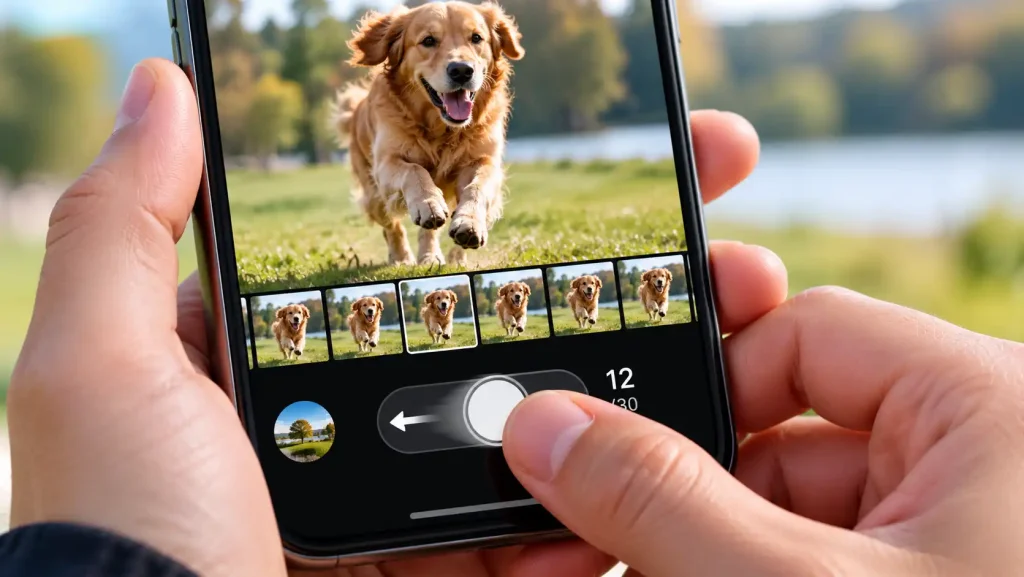
Apple makes this very easy. Do you want to know how to take burst photos on iPhone 16? Here are the clear steps.
-
Open your phone camera app.
-
Look at the white round button.
-
Tap the white button and slide it to the left.
-
Hold your finger there.
The phone will take many fast photos. You will see a small number count up. This number shows how many shots you took.
Let go of the screen to stop. Later, you can look at the photos. Pick the best one. You can learn more details in the official Apple guide on taking burst photos.
Burst Mode in Samsung
Samsung phones also have this great tool. Burst mode in Samsung works a lot like the iPhone. Here is how you use it.
First, open your camera app. Next, press the white shutter button. But do not lift your finger up. Slide the button down toward the bottom edge.
Hold it down tight. The phone will fire fast shots. Keep holding it until the action stops. This works very well for fast sports.
Camera Burst Mode Android
Other Android phones work in a like way. Some phones let you just press and hold the button. This is true for a lot of camera burst mode Android phones.
If a long press does not work, try to slide down or left. You can also look in your camera settings menu. You might need to turn the fast setting on first.
What Is Camera Burst Mode App?
Some old phones do not have this fast mode. In that case, you might ask, what is camera burst mode app?
This is an extra tool you download. You can find them in your phone app store. These apps add new camera tools to your old phone.
They force the phone to take fast shots. They are a quick fix for older phone models.
Using Fast Mode on Real Cameras
Big cameras have very strong fast modes. DSLRs and mirrorless cameras take amazing action shots. They are built for real speed.
What Is Camera Burst Mode Nikon?
If you own a Nikon camera, look for a dial. What is camera burst mode Nikon buyers should know? Look for a small dial or button on top.
It will have an icon of a stack of squares. This icon means fast shooting. Turn the dial to this clear icon.
Now, press and hold the main top button. The camera will fire fast. You can learn cool tips in this helpful Nikon continuous shooting guide.
Canon, Sony, and Other Top Brands
Other big camera brands use the same small icon. It looks like a tall stack of photos. You must change your drive mode setting.
You change it from single shot to the fast setting. Some cameras have a slow fast mode and a high fast mode. High speed is for fast sports. Low speed is fine for walking people.
Why “Burst Shooting Is Unavailable In This Mode”?
Sometimes, your camera says no. You might see a text warning on the screen. It might say: “burst shooting is unavailable in this mode.” Why does this happen?
-
Your flash is on. A flash needs time to load power. It cannot fire fast. Turn the flash off to fix this.
-
You use a special scene. Some night modes lock the fast feature. Switch to a manual mode.
-
Your battery is low. Fast shooting uses lots of battery power. Charge your battery up full.
-
Your memory card is slow. Fast photos need a very fast card. If the card is slow, the camera stops.
Expert Tip:
Always delete bad fast shots right after you take them. Fast mode fills up your memory card very fast. Keep the one best shot and toss the rest to save space.
The Camera Buffer Explained
What is a camera buffer? It is like a waiting room for your photos. Fast shots go into the buffer first. Then they go to the real memory card.
If you take too many shots, the waiting room gets full. The camera will slow down or stop. It must wait for the card to save the shots.
This is why card speed is key. A fast card clears the waiting room quickly.
Pros and Cons of This Fast Mode
Here is a quick look at the good and bad points.
| The Good Points | The Bad Points |
| Helps catch the perfect exact moment. | Fills up your memory card very fast. |
| Great for fast sports and active pets. | Uses up lots of camera battery power. |
| Gives you more choices for a good photo. | Takes more time to sort the bad shots out. |
| Cuts down on blurry action photos. | The camera waiting room gets full fast. |
Raw vs JPEG in Fast Mode
Your camera can save files in two ways. It can save Raw files. Or it can save JPEG files. This matters a lot for fast shots.
Raw files are very big. They hold lots of data. This makes them look great. But big files fill up the camera waiting room very fast. Your fast shots will stop quickly.
JPEG files are much smaller. The camera squishes the data down. Smaller files move very fast inside the camera.
If you shoot in JPEG, you can hold the button longer. The camera can take many more shots before it stops. For the most fast shots, set your camera to JPEG mode.
Using Focus Tools with Fast Mode
Taking fast photos is only half the job. The shots must also be in focus. If the subject moves, the focus must move too.
You need to set your focus to track moving things. On Nikon, this is called AF-C. On Canon, it is called AI Servo.
This setting tells the camera to keep finding focus. As a dog runs at you, the lens keeps shifting. It keeps the dog sharp in every single frame.
If you use single focus, only the first shot is sharp. The rest will be blurry. Always pair your fast shooting mode with tracking focus.
Best Times to Use Fast Shooting
When should you turn this fast mode on? Here are the best times to use it.
-
Fast Sports: When kids play soccer or baseball. The ball moves fast. You need lots of shots to catch the hit.
-
Active Pets: Dogs do not sit still. They run and jump. Fast shots catch them in the air.
-
Water Splashes: Droplets fall fast. Fast shots freeze the water in the air.
-
Flying Birds: Birds dart around fast. You need many shots to get one sharp bird photo.
-
Group Jumps: When friends jump in the air for a fun photo. You want the shot at the top of the jump.

How to Hold the Camera for Fast Shots
Holding the camera right is very key. You must stay steady. If you shake, the shots will blur.
Keep your elbows tucked in close to your chest. Hold the camera tight with both hands. Keep your feet set wide apart on the ground.
When the subject moves, turn your whole top body. Do not just twist your wrists. This keeps the camera smooth and steady as you track the action.
When to Get Professional Help or a Second Opinion
Fast mode makes your camera work very hard. The parts inside move fast. Over time, these parts can wear out or break.
If your camera stops firing fast, do not open it. Do not try to fix the inside parts by yourself. You can ruin the camera.
The shutter inside is very fragile. If it breaks, a trained tech must fix it. Take it to a real service center.
Also, if your camera gets very hot while shooting fast, stop using it. Let it cool down in the shade. If it always gets hot, take it to a repair shop.
Always buy fast memory cards for fast action. A slow card will choke your camera big time. If you do not know what card to buy, look at the SD Association speed class guide. This guide helps you buy the right fast card.
Common Mistakes Camera Buyers Should Avoid
Here are things to avoid when you use fast mode.
-
Holding the button too long. Do not hold it for ten whole seconds. You will get too many bad shots. Hold it for just two seconds.
-
Keeping all the photos. Do not keep every shot. Pick one good shot and delete the rest right away.
-
Using a cheap slow card. Cheap cards make your camera stop. Buy a fast card for fast action.
-
Leaving the mode on all day. Do not use fast mode for still things. Change it back to single shot for still portraits.
FAQs
What is camera burst mode good for?
It is best for fast action. You use it for sports, pets, kids, and cars. It helps you get one sharp shot from a fast scene.
Does fast mode use more battery power?
Yes, it uses a lot of battery. The camera works hard to process many shots. Turn it off when you do not need it.
Why are my fast photos blurry?
Your shutter speed might be too slow. You need a fast shutter speed to freeze the action. Also, make sure you hold the camera very steady.
How many shots can a camera take in one second?
It depends on the camera. Some phones take 10 shots in one second. Some pro cameras can take up to 30 or more shots in a single second.
Will fast mode damage my camera?
It will not break a new camera. But it does add wear to the moving parts over a long time. Use it only when you need to catch fast action.
How do I stop my phone from taking fast shots?
On an iPhone, do not slide the button. Just tap it once. On an Android, do not hold the button down. Just tap it quickly for one shot.
Conclusion
In the end, you now know the clear answer. You know what this fast setting does. It is your best tool for fast action shots.
Use it when kids run. Use it when dogs jump. You know how to use it on phones and big cameras. Remember to use a fast memory card to keep the camera moving.
Also, always delete the extra bad shots. This keeps your phone or card clean. Go out and try this fast mode today. You will take amazing action photos.

1 thought on “What Is Camera Burst Mode: A Simple Guide for Better Action Photos”