

Introduction
A security camera in the United States typically costs $20 to $500 for the camera itself, depending on whether it is an indoor Wi-Fi model, outdoor camera, video doorbell, pan-and-tilt camera, or professional network camera. A complete system can cost $100 to $2,000 or more, while professional installation may add $100 to $300 per camera.
The purchase price is only part of the cost. Storage subscriptions, installation, memory cards, cables, mounting hardware, replacement batteries, and monitoring can significantly change the final amount.
For most U.S. homes, a realistic budget is:
- Basic one-camera setup: $25–$100
- Better one-camera setup: $100–$250
- Four-camera DIY system: $200–$800
- Professionally installed system: $800–$3,000 or more
- Business-grade or monitored system: $1,000–$5,000 or more
These are typical planning ranges, not fixed prices. Retail prices, promotions, local labor rates, storage plans, and equipment specifications vary by manufacturer and location.
Source: Bing
Security Camera Cost at a Glance
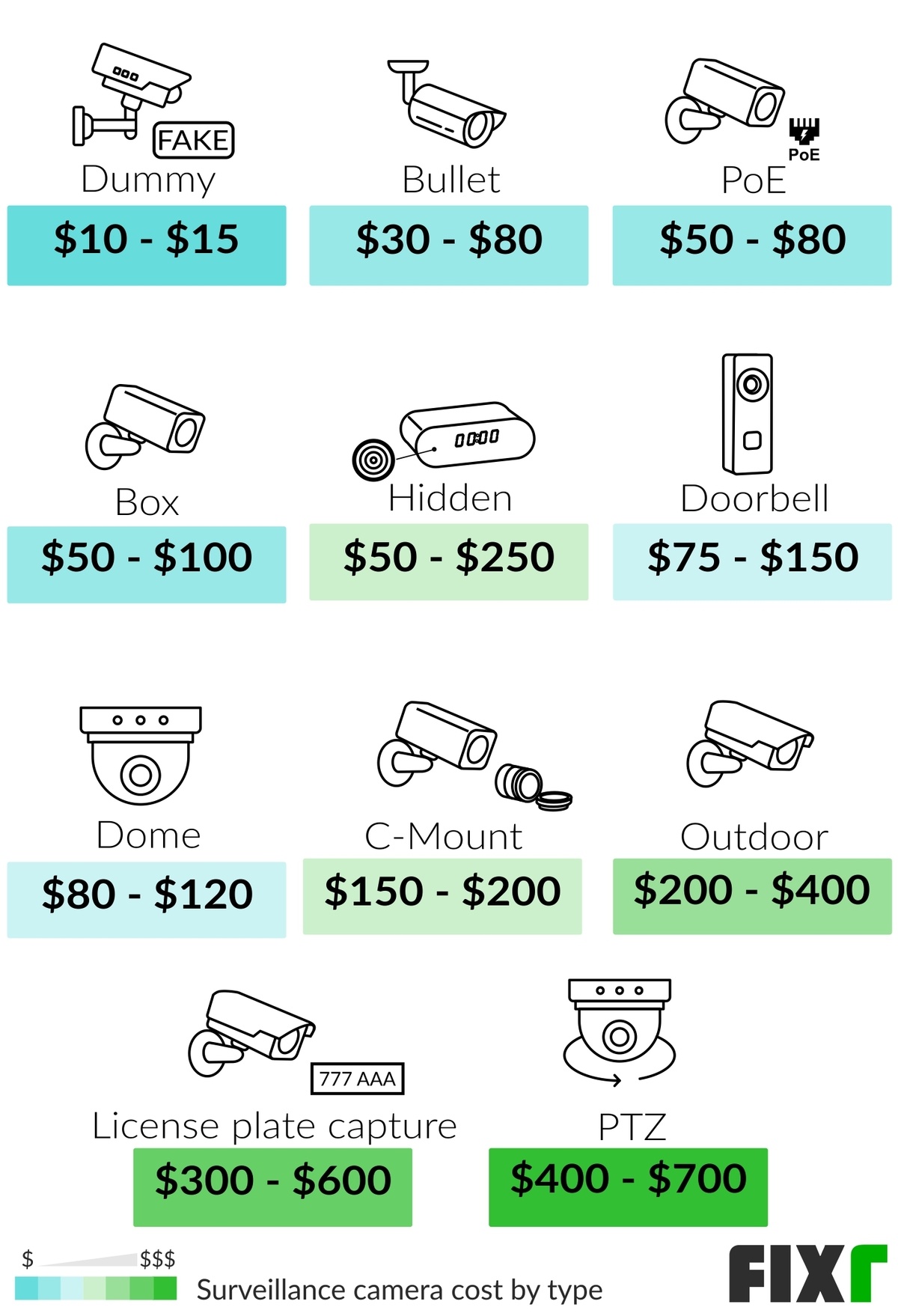
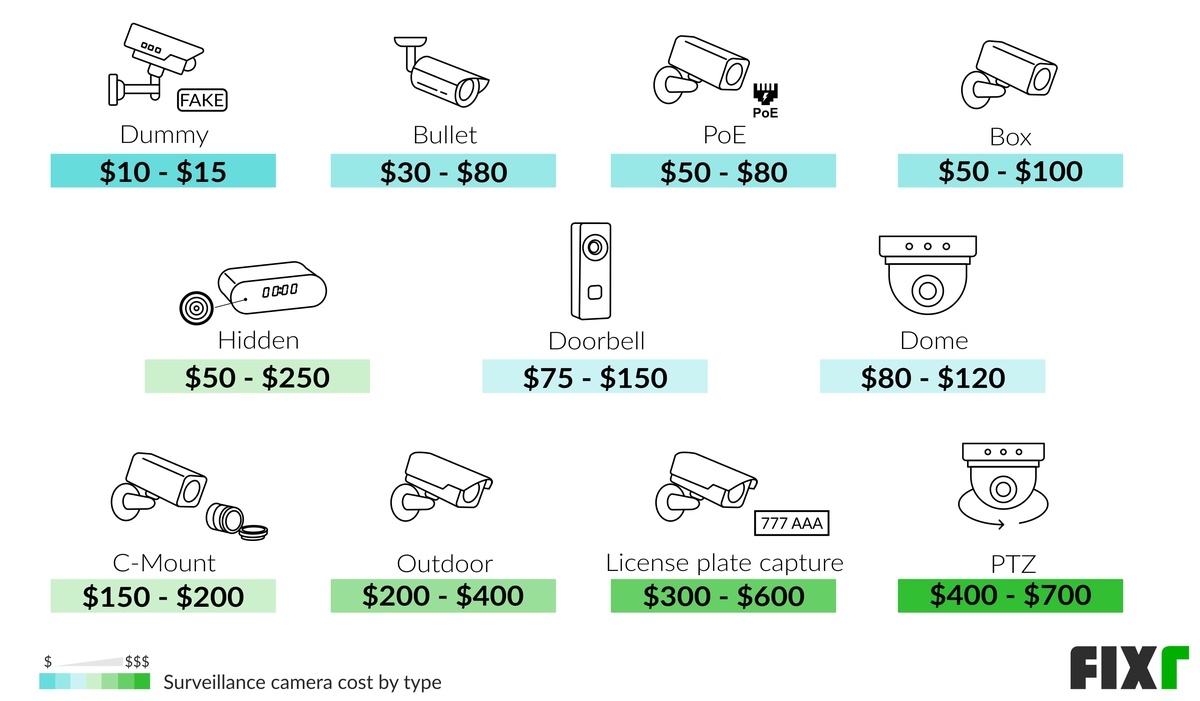
The table below separates common camera types so you can compare the equipment price before adding installation or recurring fees.
| Camera type | Typical U.S. camera price | Common use | Possible extra costs |
|---|---|---|---|
| Basic indoor Wi-Fi camera | $20–$60 | Rooms, pets, entry areas | Cloud storage, microSD card |
| Advanced indoor camera | $60–$150 | Pan-and-tilt monitoring, higher-quality video | Subscription, wall mount |
| Outdoor Wi-Fi camera | $50–$250 | Driveways, yards, exterior doors | Weatherproof installation, battery replacement |
| Video doorbell | $50–$350 | Front-door visitors and packages | Doorbell wiring, chime, cloud storage |
| Battery-powered camera | $50–$250 | Locations without nearby power | Rechargeable battery or solar panel |
| Wired PoE camera | $80–$400 | Reliable outdoor or business surveillance | Ethernet cable, network switch, installation |
| PTZ camera | $100–$1,000 or more | Large areas requiring remote movement | Mount, wiring, professional setup |
| Four-camera consumer system | $200–$800 | Basic whole-home coverage | Storage drive, installation |
| Professional NVR system | $500–$3,000 or more | Larger homes and businesses | Cabling, recorder, labor, maintenance |
PoE means Power over Ethernet: one Ethernet cable carries both power and data. An NVR, or network video recorder, stores footage from network cameras, often on a local hard drive.
The most important cost distinction is whether you are pricing one camera, a complete camera system, or a fully installed and monitored solution. A $40 camera and a $40 installed camera are not the same purchase.

Source: Bing
What Determines the Price of a Security Camera?
The largest price differences come from hardware capability, installation requirements, and storage.
Resolution and image quality
Many inexpensive cameras offer 1080p video, which can be sufficient for identifying activity at a short distance. Cameras with 2K, 4K, or higher resolution generally cost more and use more storage and internet bandwidth.
Higher resolution does not automatically guarantee better evidence. Night lighting, lens quality, camera placement, motion blur, and the distance from the subject also affect what the camera records.
Indoor or outdoor use
Outdoor cameras usually cost more because they need protection from rain, dust, temperature changes, and physical impact. Look for an ingress-protection rating, such as IP65 or IP66, when comparing outdoor models.
An indoor camera should not be placed outside simply because it is under a roof. Humidity, condensation, insects, and temperature changes can damage equipment or create unreliable operation.
Wired or wireless installation
“Wireless camera” usually means the camera transmits video over Wi-Fi. It may still require a power cable unless it uses a battery or solar accessory.
- Plug-in Wi-Fi cameras are usually inexpensive and easy to install.
- Battery cameras are easier to place but require charging or battery replacement.
- PoE cameras require cable installation but generally provide a stable connection.
- Traditional wired cameras may use coaxial cable and a digital video recorder.
Wired systems can cost more initially because of cabling and labor, but they may reduce Wi-Fi problems and recurring battery maintenance.
Night vision and low-light performance
Basic infrared night vision is common even in lower-cost cameras. More advanced cameras may offer color night vision, integrated lighting, wider dynamic range, or improved sensors.
When comparing prices, check the manufacturer’s stated night-vision distance and whether that specification applies to a dark area, a partially lit area, or ideal test conditions. Real-world recognition distance can be shorter.
Smart detection
Motion detection is available on many budget cameras. More advanced models may distinguish between people, vehicles, animals, packages, or familiar faces.
Some detection features work on the camera itself, while others require cloud processing and a paid subscription. Confirm what works without a subscription before buying.
Storage method
A camera can store video in several ways:
- Cloud storage: Footage is uploaded to the manufacturer’s servers.
- Local microSD storage: Video is saved to a memory card inside the camera.
- NVR storage: Multiple wired or network cameras save footage to a recorder.
- Network-attached storage: A compatible camera saves video to a storage device on the home network.
Local storage may reduce monthly fees, but it can be lost or damaged if someone takes the camera or recorder. Cloud storage may preserve footage after equipment theft, but it depends on internet service, account access, and a provider’s subscription terms.
How Much Does a Complete Security Camera System Cost?
A complete U.S. home security camera setup commonly costs $200 to $1,500, depending on the number of cameras and whether installation is DIY or professional.
Example: one-camera DIY setup
This hypothetical setup could include:
- Outdoor Wi-Fi camera: $100
- Compatible memory card: $15
- Mounting hardware: $10
- Optional cloud storage: $0–$120 per year
- Total before subscription: approximately $125
The camera may be inexpensive to install if an exterior outlet and strong Wi-Fi signal are already available.
Example: four-camera DIY setup
A hypothetical four-camera system might include:
- Four outdoor cameras at $100 each: $400
- Local storage or recorder: $100–$300
- Cables, mounts, and accessories: $50–$150
- Optional subscription: $0–$300 per year
- Total before recurring fees: approximately $550–$850
A bundled kit may reduce the hardware cost, but confirm whether all cameras require the same recorder, app, power supply, or subscription.
Example: professionally installed system
A professional installation may include:
- Four cameras: $400–$1,600
- Recorder and storage: $200–$700
- Cable runs and mounting: $300–$1,200
- Labor and configuration: $400–$1,500
- Total: approximately $1,300–$5,000
The wide range reflects the property layout. Running cable through an accessible unfinished basement is usually less labor-intensive than routing cable through finished walls, brick, concrete, or a multi-story building.
Source: Bing
Monthly and Ongoing Security Camera Costs
The ongoing cost can range from $0 to more than $50 per month, depending on storage, monitoring, and the number of cameras.
Cloud storage subscriptions
Many consumer brands offer free basic functionality but charge for longer video history, advanced detection, extended warranties, or multiple cameras.
Typical planning ranges are:
- Free plan: Live view and limited alerts, sometimes with no saved video
- Single-camera plan: About $3–$10 per month
- Multi-camera plan: About $10–$30 per month
- Business or advanced storage: $30 or more per month
Subscription terms change frequently. Check the manufacturer’s current U.S. pricing page for storage duration, camera limits, cancellation terms, and whether premium detection is included.
Local storage
Local storage can reduce or eliminate monthly cloud fees. Costs may include:
- microSD card: approximately $10–$40
- hard drive for an NVR: approximately $50–$250
- dedicated recorder: approximately $100–$600
- replacement storage media over time
A memory card is not a permanent archive. It can wear out, become corrupted, or overwrite older footage when full. If recordings matter for insurance, workplace security, or legal documentation, use a storage plan with an appropriate retention period and regularly verify that footage can be retrieved.
Internet and electricity
Most Wi-Fi cameras need an internet connection for remote viewing and cloud uploads. A camera generally uses little electricity, but multiple cameras, a recorder, network switch, and backup equipment add to household consumption.
If the internet connection goes down, a camera may lose remote access or cloud recording. Some systems continue recording locally, while others do not. This is a key difference to check before purchase.
Battery and maintenance costs
Battery cameras may require charging every few weeks or months, depending on motion activity, temperature, signal strength, and recording settings. Heavy traffic near a driveway can drain a battery faster than a quiet backyard.
Solar panels can reduce charging frequency but add approximately $30–$100 or more per camera. They do not guarantee operation during extended cloudy weather or when the camera is shaded.

Source: Bing
Security Camera Installation Costs
DIY installation can cost nothing beyond equipment, while professional installation often costs $100–$300 per camera. Complex wiring, high mounting locations, masonry, attic access, and electrical work can increase the price.
DIY installation is usually practical when:
- The camera is plug-in or battery-powered.
- A suitable outlet already exists.
- The Wi-Fi signal reaches the camera location.
- The mounting surface is accessible and structurally sound.
- You can safely use a ladder and follow the manufacturer’s instructions.
- No new electrical circuit or exterior wiring is required.
Professional installation is more appropriate when:
- The camera requires new electrical wiring.
- Ethernet cable must be routed through walls or ceilings.
- Cameras will be mounted high above ground level.
- The property has brick, stucco, concrete, or difficult access.
- You need a multi-camera PoE or NVR system.
- The installation involves an alarm panel, access control, or business network.
- Local rules, landlord requirements, or condominium policies apply.
Do not use a camera installation as a reason to perform unsafe electrical work. A licensed electrician may be necessary when adding outlets, modifying line-voltage wiring, or routing cables in a way that falls under local code requirements.
Source: Bing
How Much Does Security Camera Monitoring Cost?
Camera monitoring can cost $0 for self-monitoring or approximately $10–$60 per month for services that include professional review, alarms, or emergency dispatch options.
Self-monitoring means you receive alerts and decide what to do. It may be adequate for a small home camera system, but it depends on your ability to notice and respond to notifications.
Professional monitoring may involve:
- Human review of selected alerts
- Alarm verification
- Emergency contact procedures
- Integration with door and window sensors
- Cellular backup
- Professional installation or equipment rental
Read the agreement carefully. Monitoring contracts may include activation charges, equipment fees, cancellation terms, response limitations, and different prices after an introductory period. A camera system is not the same as a guaranteed police, fire, or medical response service.
No camera can prevent every break-in or identify every person. A camera is a detection and recording tool, not a substitute for locks, lighting, alarm sensors, safe entry practices, and emergency planning.
Which Security Camera Is the Best Value?
The best value depends on the location and the cost you are trying to control.
| Your priority | Usually suitable | Main trade-off |
|---|---|---|
| Lowest upfront price | Basic indoor Wi-Fi camera | Fewer features and possible subscription limits |
| Simple front-door coverage | Video doorbell | May require wiring or a compatible chime |
| No monthly storage fee | Local-storage camera or NVR | More setup and responsibility for backups |
| Reliable coverage across a property | Wired PoE system | Higher installation effort |
| No nearby power outlet | Battery camera | Charging and motion-related battery drain |
| Person or vehicle alerts | Camera with smart detection | Advanced features may require a subscription |
| Remote viewing during internet outages | System with local recording or cellular backup | Higher equipment or service cost |
| Several cameras on one property | Bundled multi-camera system | Possible vendor lock-in and recorder compatibility |
For a small apartment or rental, one or two plug-in cameras may be enough. For a detached house, consider the front entry, driveway, rear entry, and any side passage before deciding how many cameras to buy. More cameras are not automatically better if they create blind spots, excessive alerts, weak Wi-Fi connections, or privacy concerns.
Source: Bing
Common Costs People Forget to Include
A low advertised camera price may exclude several necessary items:
- Power adapter or longer power cable
- Outdoor-rated cable conduit
- Junction box or mounting plate
- microSD card
- NVR hard drive
- Wi-Fi extender or mesh node
- PoE switch
- Replacement batteries
- Cloud recording
- Professional installation
- Internet service upgrades
- Surge protection
- Backup power
- Repairs or replacement after weather damage
A useful calculation is:
Total first-year cost = equipment + accessories + installation + first-year subscriptions + expected maintenance
For example, a $75 camera with a $6 monthly storage plan costs:
- Camera: $75
- Accessories: $20
- Subscription: $6 × 12 = $72
- First-year total before installation: $167
A $150 camera with free local storage could cost less over several years, even though its upfront price is higher.
Privacy, Legal, and Security Considerations in the United States
Camera owners should avoid recording areas where people reasonably expect privacy, such as bathrooms, bedrooms, or a neighbor’s private interior space. Point outdoor cameras toward your own property as much as practical and use privacy masking if the camera supports it.
Audio recording can raise additional legal concerns. Federal law and state laws differ, and some states impose stricter consent requirements for recorded conversations. If a camera captures audio beyond your private property, consult applicable state law or a qualified attorney rather than assuming that video-camera rules also apply to audio.
Also secure the camera account:
- Use a unique password.
- Enable multifactor authentication where available.
- Install firmware and app updates.
- Avoid sharing the main account unnecessarily.
- Review who can view live video or recordings.
- Use a strong, secured Wi-Fi network.
- Remove old users and devices when moving or selling equipment.
For businesses, schools, landlords, and employers, additional privacy, notice, workplace, tenant, or data-retention obligations may apply.
Source: Bing
Mistakes to Avoid When Buying a Security Camera
Comparing camera prices without comparing total ownership cost
A cheap camera can become expensive if it requires a subscription for recording, has short battery life, or needs extra accessories.
Assuming wireless means wire-free
Most Wi-Fi cameras still need power. Confirm whether the camera is plug-in, battery-powered, or compatible with a solar accessory.
Buying a camera with weak Wi-Fi coverage
A camera installed at the far end of a property may disconnect even when phones work normally inside the house. Test signal strength at the planned location or use a wired connection.
Choosing resolution instead of coverage
A 4K camera pointed at the wrong angle may be less useful than a lower-resolution camera correctly covering an entry point. Plan the field of view, lighting, height, and distance first.
Ignoring account and storage security
A camera that records sensitive areas should receive the same security attention as email, banking, and smart-home accounts.
Installing equipment where it can be easily tampered with
Mounting height, protective housings, cable routing, and local recording placement can affect whether footage remains available after an attempted theft.
Frequently Asked Questions
Is $100 enough for a security camera?
Yes. A $100 budget can usually cover one basic or midrange indoor or outdoor camera, depending on features and current U.S. pricing. It may not cover installation, a storage subscription, a memory card, or additional power equipment.
Are wired security cameras cheaper than wireless cameras?
Wireless cameras are often cheaper and easier to install initially. Wired PoE cameras can cost more because of cabling and labor, but they may provide a more stable connection and avoid battery charging. The cheaper option depends on the property and installation conditions.
Do all security cameras require a monthly fee?
No. Some cameras provide live viewing and local recording without a monthly subscription. However, cloud storage, longer video history, advanced detection, cellular backup, and professional monitoring may require recurring payments.
How many security cameras does a house need?
Many homes start with two to four cameras covering the main entry, driveway, rear entry, and another vulnerable access point. The right number depends on the property layout, camera viewing angle, lighting, and whether indoor areas need coverage.
Can I install security cameras myself?
Often, yes, when the camera is plug-in or battery-powered and the mounting location is accessible. Use a professional for new electrical work, difficult cable routing, high-risk ladder work, or complex multi-camera systems.
Do security cameras work without Wi-Fi?
Some wired systems and cameras with local storage can continue recording without Wi-Fi or internet access. Remote viewing and cloud recording generally require an active network connection. Check the exact model’s offline capabilities before purchasing.
Final Cost Checklist
Before buying, calculate:
- Number of cameras required
- Indoor or outdoor rating
- Power method
- Wi-Fi, Ethernet, or coaxial connection
- Resolution and night vision
- Local or cloud storage
- Monthly subscription
- Installation labor
- Mounting and cabling accessories
- Battery or hard-drive replacement
- Privacy and account-security requirements
For many U.S. homeowners, a reasonable starting budget is $100–$250 for one capable camera or $500–$1,500 for a multi-camera setup, excluding unusually complex construction work. The lowest purchase price is not always the lowest long-term cost. Compare the first-year total and the expected cost over several years before choosing a system.
