
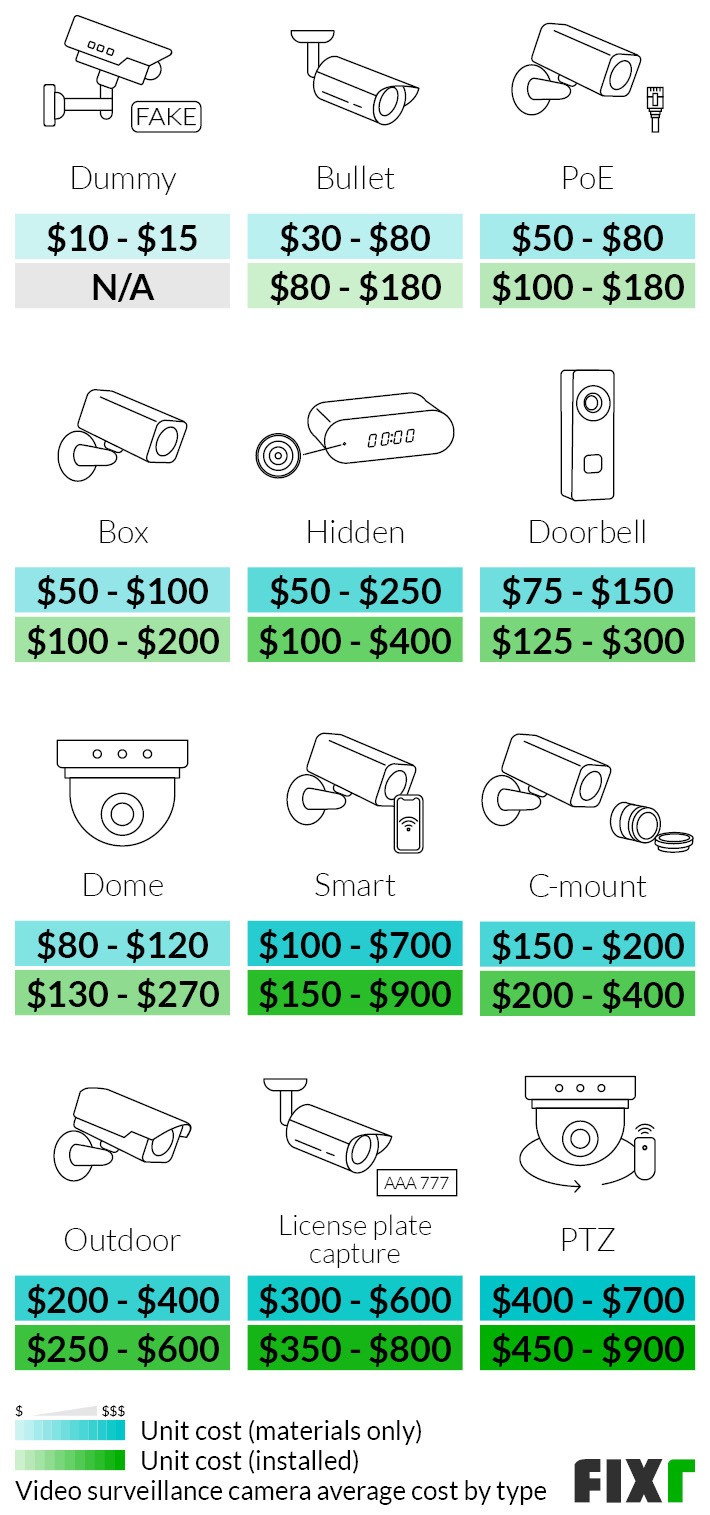
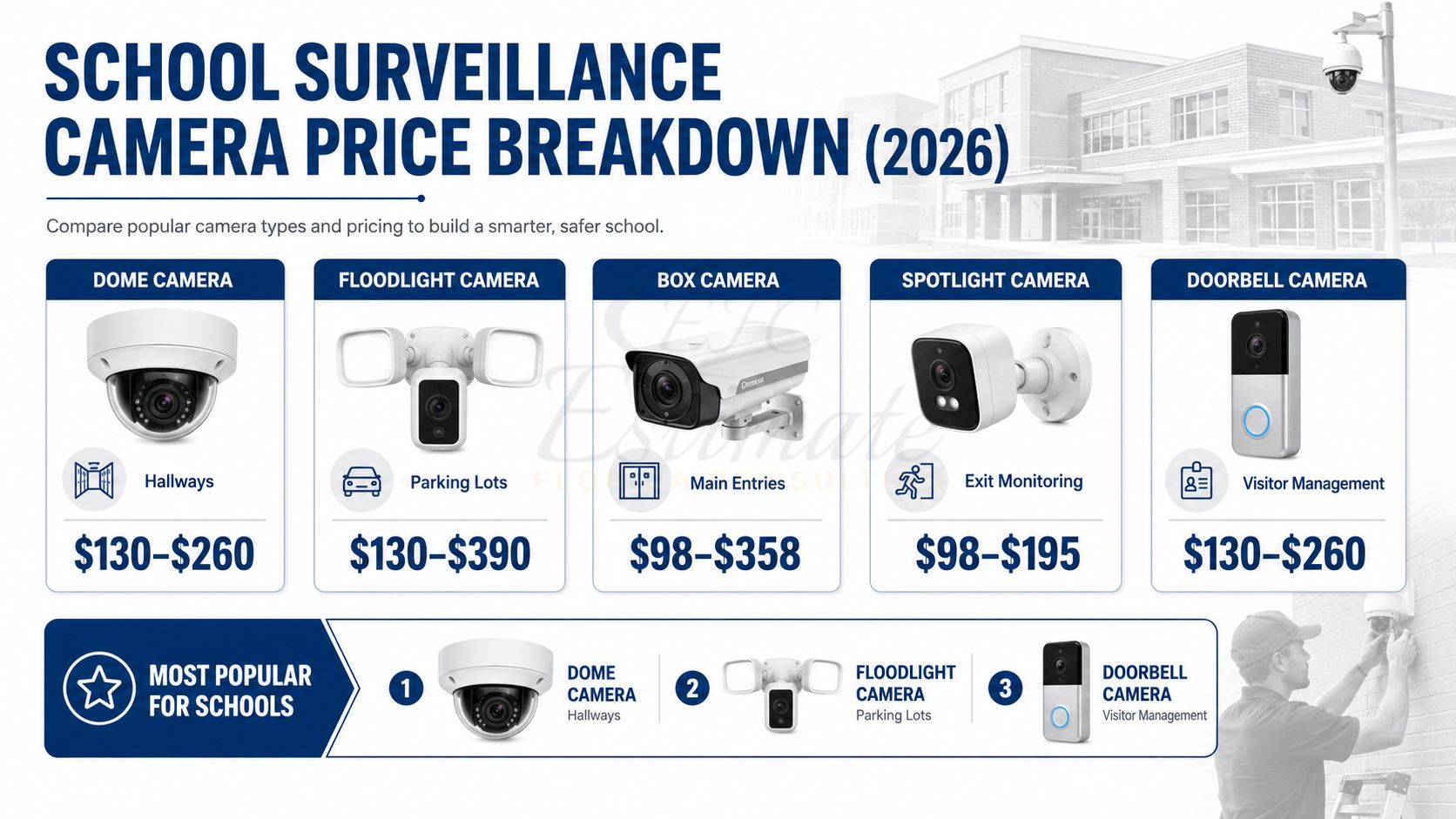
In the United States, a security camera typically costs $30 to $500 per camera, depending on its resolution, power source, storage method, night vision, artificial intelligence features, and weather rating. A complete residential system commonly costs $200 to $2,500, including cameras, recording equipment, storage, accessories, and installation.
Here is a practical breakdown of typical U.S. prices:
| Security camera option | Typical equipment cost | Typical installed cost |
|---|---|---|
| Basic indoor Wi-Fi camera | $25–$75 | $75–$200 |
| Outdoor Wi-Fi camera | $50–$250 | $125–$400 |
| Battery-powered camera | $50–$300 | $100–$450 |
| Wired PoE camera | $75–$350 | $200–$600 |
| Doorbell camera | $50–$350 | $100–$500 |
| Pan-tilt-zoom camera | $100–$600+ | $250–$900+ |
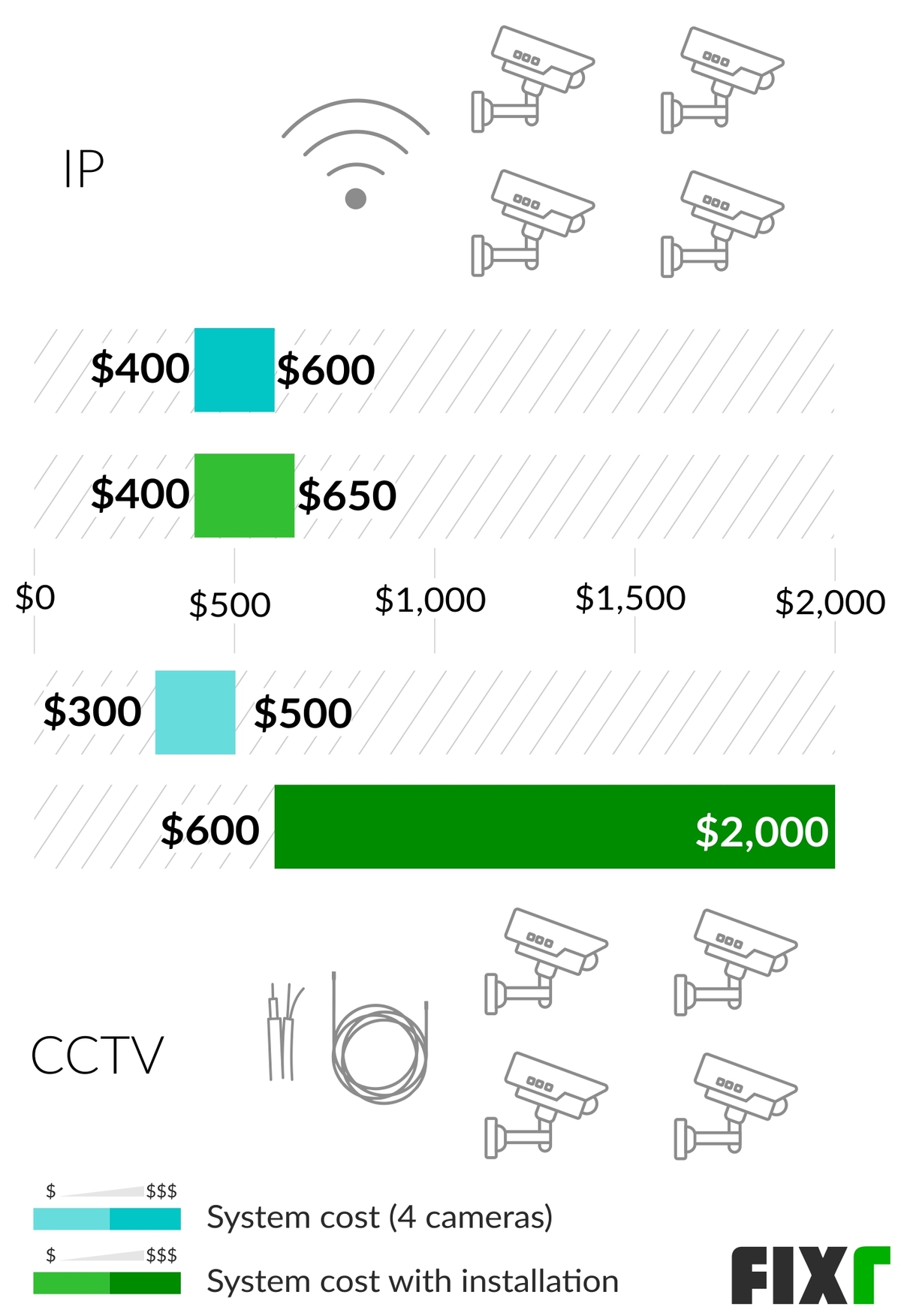
| Four-camera home system | $200–$1,000 | $600–$2,000 |
| Professional eight-camera system | $800–$3,000+ | $2,000–$6,000+ |
These are broad U.S. market estimates rather than guaranteed quotes. Retail promotions, labor rates, home construction, cable-routing difficulty, storage requirements, and subscription plans can change the final price substantially.
Introduction
The cheapest way to monitor a U.S. home is usually one or two Wi-Fi cameras that record to a cloud service or microSD card. The most expensive option is a professionally installed, wired system with several high-resolution cameras, local recording, backup power, and remote monitoring.
The camera price itself is only part of the budget. Buyers should also account for:
- Installation and cable routing
- Cloud recording or local storage
- Video doorbells and floodlights
- Network equipment
- Replacement batteries
- Professional monitoring
- Electrical work
- Privacy and data-security settings
- Maintenance and future upgrades
The right system depends less on buying the highest camera resolution and more on choosing the appropriate power, recording, coverage, and installation method for the property.

Source: Bing
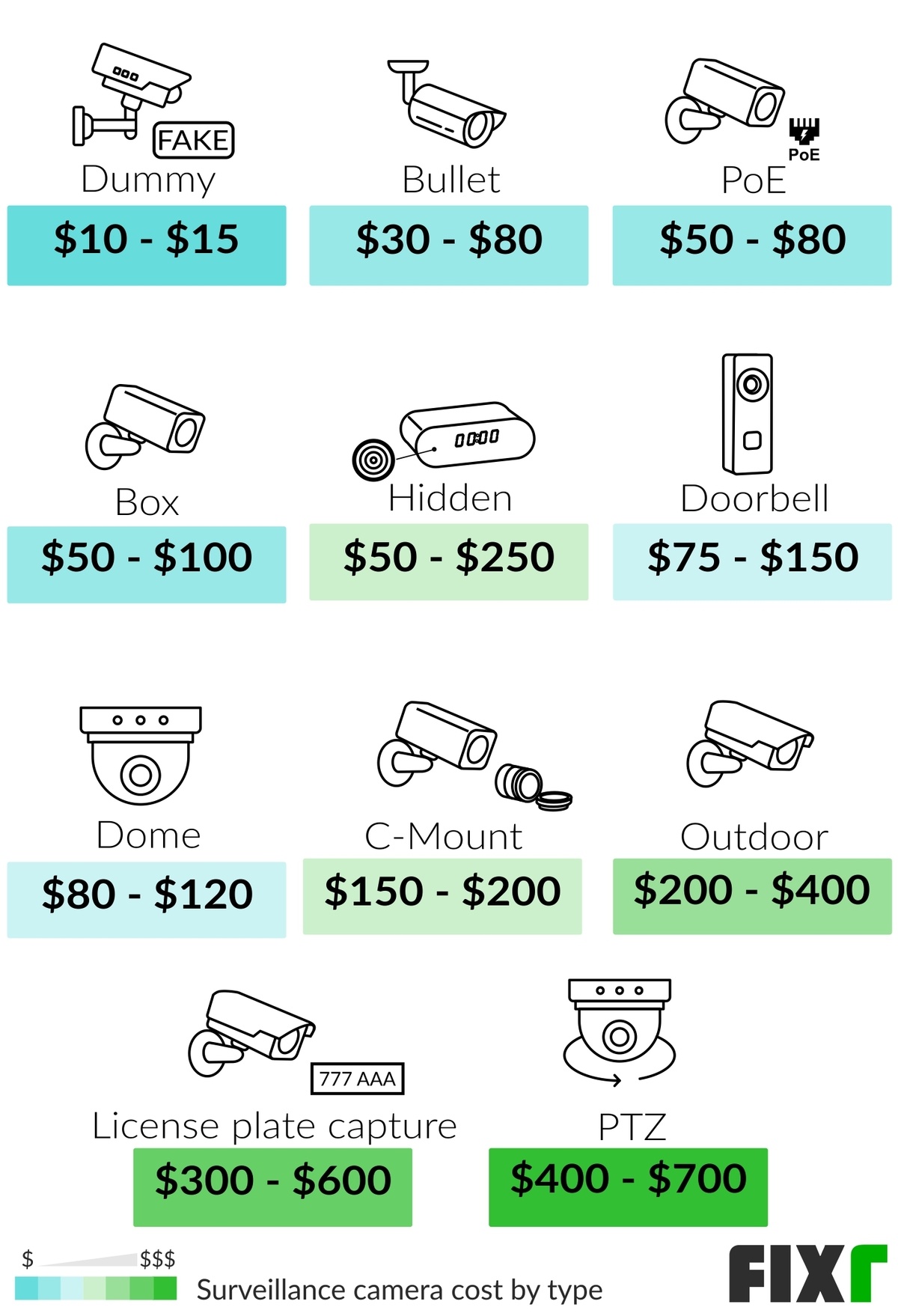
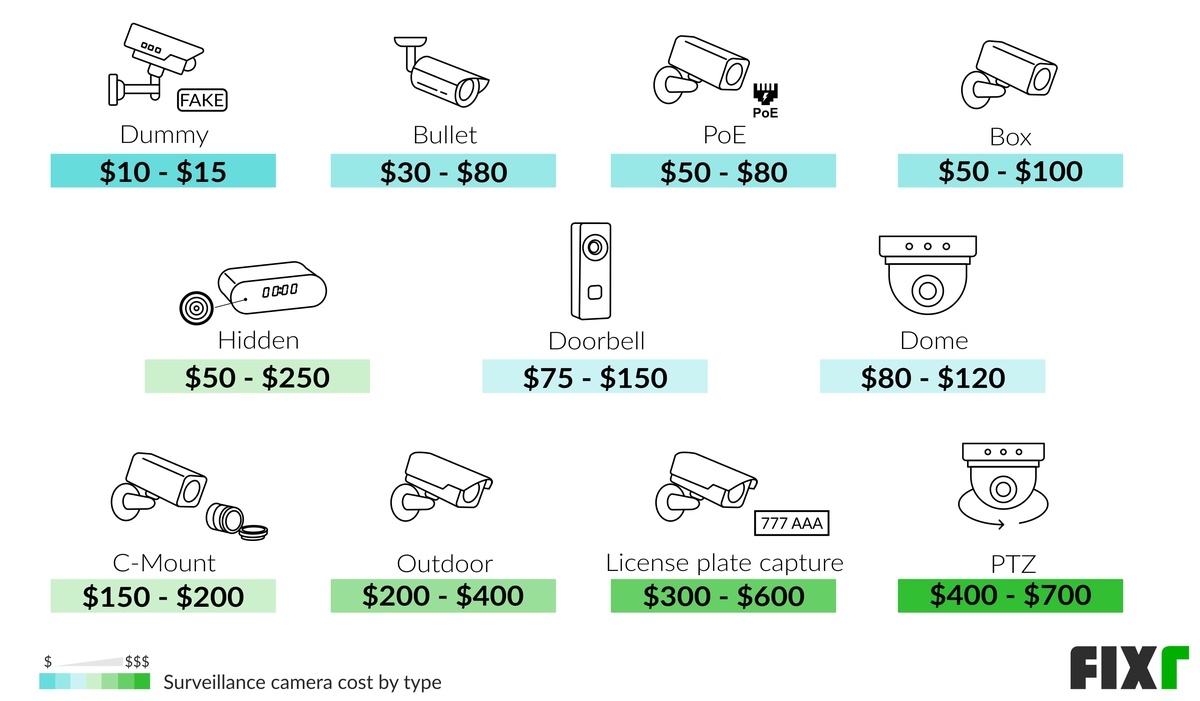
Typical Security Camera Prices by Type
The camera type has a major effect on both the upfront price and the long-term cost. Indoor cameras are generally the least expensive, while weather-resistant, motorized, commercial-grade, and specialty cameras cost more.
Indoor Wi-Fi cameras: $25 to $150
Basic indoor cameras usually cost $25 to $75. Models with higher resolution, improved microphones, privacy shutters, local storage, or advanced detection often cost $75 to $150.
Indoor cameras are suitable for:
- Entryways
- Living rooms
- Home offices
- Garages with reliable Wi-Fi
- Monitoring pets, children, or caregivers
They generally do not require professional installation. Most plug into a wall outlet and connect through a mobile app.
The main hidden cost is often cloud storage. Some cameras offer limited live viewing without a subscription but charge monthly fees for saved recordings, person detection, or longer video history.
Outdoor cameras: $50 to $300
Outdoor cameras commonly cost $50 to $300. The price increases when a camera includes:
- Weather resistance
- Infrared night vision
- Color night vision
- Stronger Wi-Fi hardware
- A built-in spotlight
- Two-way audio
- Person, vehicle, or package detection
- Wider viewing angles
- Higher-resolution recording
Outdoor cameras should be rated for exterior use. An indoor camera placed under a porch may still be exposed to humidity, temperature changes, dust, or insects and may not be covered by the manufacturer’s warranty.
Battery-powered cameras: $50 to $300
Battery cameras typically cost $50 to $300, not including replacement batteries or an optional solar panel.
They can reduce installation costs because they do not require a power cable. However, the total cost may be higher over time if:
- The camera records frequently
- The location has heavy activity
- Cold weather reduces battery life
- The camera is mounted in a difficult-to-reach location
- Replacement batteries are proprietary
- Solar charging is ineffective because of shade
Battery cameras are convenient for rental properties, detached structures, and locations where running cable would be difficult. They are less suitable for continuous recording unless the specific model supports constant power and the manufacturer allows it.
Wired PoE cameras: $75 to $350 each
Power over Ethernet, or PoE, cameras use an Ethernet cable to carry both network data and electrical power. Individual cameras often cost $75 to $350, while a complete wired system can cost much more after adding a network video recorder, cables, switches, and labor.
PoE systems are often chosen for:
- New construction
- Larger homes
- Properties needing continuous recording
- Homes with unreliable Wi-Fi
- Users who prefer local storage
- Commercial buildings and small businesses
The installation is more complex, particularly when cables must pass through finished walls, attics, crawl spaces, brick, or concrete.
Video doorbells: $50 to $350
Video doorbells generally cost $50 to $350. Installation may add $50 to $200 if existing doorbell wiring is usable. A new transformer, wiring, masonry work, or electrical work can increase the total.
A video doorbell is not a direct replacement for a full outdoor camera system. It normally covers the front-door approach but may not show:
- Side gates
- A driveway
- A broad front-yard area
- Packages placed outside the camera’s field of view
- Activity outside the doorbell’s detection zone
Pan-tilt-zoom cameras: $100 to $600 or more
Pan-tilt-zoom, or PTZ, cameras can move horizontally, vertically, or both. Some models also include optical zoom. Typical prices range from $100 to $600 or more.
PTZ cameras can cover a large area, but one moving camera may not replace several fixed cameras. If the camera is pointed in one direction when an incident occurs elsewhere, it may not capture the event. Fixed cameras provide continuous coverage of specific zones.
Source: Bing
Security Camera Installation Costs
Installation commonly costs $100 to $300 per camera for straightforward residential work. Difficult installations can cost $300 to $600 or more per camera, especially when the installer must route cable through finished structures or add electrical service.
A typical U.S. installation quote may include:
- Mounting the camera
- Running cable
- Connecting the camera to power or a recorder
- Configuring the mobile app
- Adjusting the viewing angle
- Testing video and motion alerts
- Sealing exterior penetrations
It may not include:
- New electrical circuits
- Network upgrades
- Lift or ladder charges
- Attic or crawl-space access fees
- Wall repair and painting
- Permits
- Data or cellular service
- Long-term monitoring
DIY installation
DIY installation may cost only $0 to $100 beyond the equipment, assuming the homeowner already has a suitable drill, ladder, Wi-Fi network, and electrical outlets.
DIY is usually easiest when:
- The camera is battery-powered
- Existing outdoor power is available
- The mounting surface is accessible
- No new wiring is required
- The homeowner can safely work at the installation height
Avoid climbing roofs, working near service panels, drilling near unknown wiring, or modifying electrical circuits without the appropriate knowledge. A licensed electrician may be necessary for new circuits, hardwired power, or work near the home’s main electrical equipment.
Professional installation
Professional installation often costs $600 to $2,000 for a four-camera residential system and $2,000 to $6,000 or more for larger or commercial installations.
Labor prices vary by region. Installation tends to cost more in major metropolitan areas and when the property has:
- Brick, stone, stucco, or concrete walls
- Multiple stories
- No accessible attic or crawl space
- Long cable runs
- Detached garages or gates
- Limited electrical outlets
- Poor Wi-Fi coverage
- A need for concealed cabling
Ask for a written quote that separates equipment, labor, storage, monitoring, taxes, permits, and future service charges.

Source: Bing
Monthly and Long-Term Security Camera Costs
The ongoing cost can matter more than the camera’s purchase price. A low-cost camera with a monthly subscription may cost more over several years than a higher-priced camera with local storage.
Cloud storage subscriptions: about $3 to $20 per month
Cloud plans commonly cost approximately $3 to $20 per month, depending on the provider, number of cameras, recording history, and included features.
A subscription may unlock:
- Saved video clips
- Longer video history
- Person, vehicle, animal, or package detection
- Activity zones
- Extended video length
- Video downloads
- Multi-camera coverage
Some services charge per camera, while others offer a household or multi-camera plan. Always check whether the advertised price is introductory, whether it applies to one camera or several, and what happens to recordings if the subscription ends.
Professional monitoring: about $20 to $60 per month
Professional monitoring plans generally cost $20 to $60 per month, although some systems can cost more when they include cellular backup, video verification, equipment leasing, or broader alarm services.
Monitoring is different from camera notifications. With self-monitoring, the homeowner receives an alert and decides what to do. With professional monitoring, a monitoring center may contact designated people or emergency services according to the service agreement and local procedures.
Before subscribing, review:
- Contract length
- Cancellation terms
- Activation fees
- Cellular backup
- Dispatch procedures
- False-alarm policies
- Battery and internet-outage behavior
- Whether cameras are included or purchased separately
A camera system alone does not guarantee police, fire, or emergency response.
Local storage and recording equipment
Local storage can reduce or eliminate monthly cloud fees, but it requires an upfront investment.
Typical costs include:
- MicroSD card: $10–$50
- Network video recorder: $100–$500
- Surveillance hard drive: $60–$250
- Network switch: $30–$150
- External backup drive: $70–$250
A local recorder can provide more control over video retention, but it is not automatically immune to theft, damage, ransomware, or equipment failure. A recorder located in the same room as the cameras may be lost along with the cameras during a burglary.
Use storage designed for continuous recording when a camera records 24 hours a day. Standard computer drives and inexpensive memory cards may not tolerate the same workload.
Source: Bing
What Affects the Price of a Security Camera System?
The largest cost differences come from coverage, recording requirements, power, infrastructure, and features.
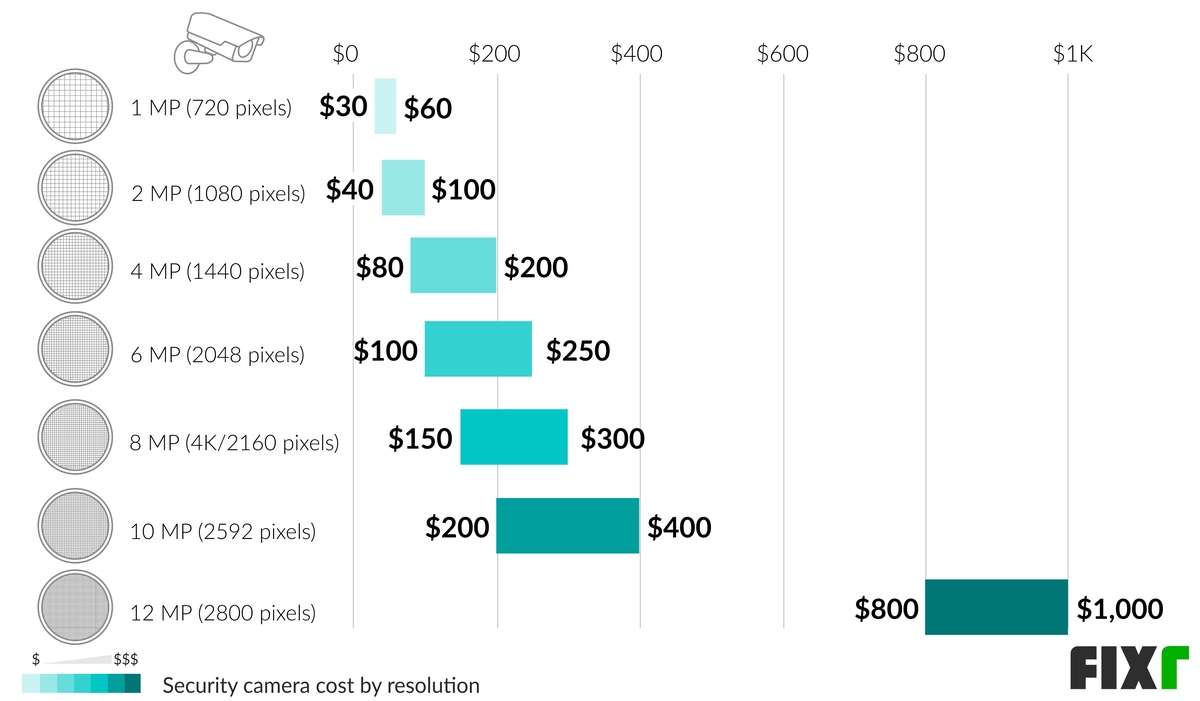
Resolution
Common consumer options include 1080p, 2K, and 4K. Higher resolution can make faces, license plates, and distant objects easier to identify, but only when lighting, lens quality, placement, and viewing distance are also suitable.
Higher resolution usually increases:
- Camera cost
- Storage consumption
- Network bandwidth
- Processing requirements
- Download time for recorded clips
A 4K camera pointed at a wide driveway may not provide useful identification if it is mounted too far away or aimed toward glare. Camera placement often matters as much as resolution.
Night vision and lighting
Infrared night vision is usually included in outdoor cameras, but performance varies. Built-in spotlights can produce color video at night, although they may attract attention, disturb neighbors, or create glare on nearby surfaces.
Night performance depends on:
- Ambient lighting
- Infrared range
- Reflective surfaces
- Weather
- Lens quality
- Camera placement
- Motion distance from the camera
A camera facing a bright porch light, streetlamp, or reflective wall may produce less useful footage than expected.
Field of view and camera count
A wide-angle camera can cover more area, but very wide views may make people and objects appear smaller. A narrow-angle camera may provide better detail in a driveway or walkway but cover less space.
For many homes, the practical layout may include:
- One front-door or porch camera
- One driveway camera
- One backyard or side-gate camera
- One garage or rear-entry camera
The number of cameras should be based on required coverage, not on a standard package size.
Artificial intelligence features
Person, vehicle, animal, and package detection can reduce unnecessary notifications. These features may be included in the camera price, processed locally, or restricted to a paid subscription.
AI detection is not perfectly accurate. Shadows, weather, insects, headlights, and partially obscured people can cause missed events or false alerts. Treat AI alerts as a convenience rather than a guaranteed security function.
Connectivity
Wi-Fi cameras are generally easier to install, but they depend on wireless coverage and network reliability. PoE cameras require cabling but can provide a more consistent connection.
A camera far from the router may need:
- A mesh Wi-Fi node
- An access point
- A wired network connection
- A cellular model
- A different mounting location
A weak signal can cause delayed notifications, dropped video, failed firmware updates, and incomplete recordings.
Weather and temperature rating
Outdoor cameras should be suitable for the local climate. In the United States, buyers may need to consider:
- Freezing temperatures
- Extreme heat
- Humidity
- Rain and wind
- Snow and ice
- Salt air near the coast
- Dust or wildfire smoke
Weather resistance does not mean a camera can be submerged, pressure-washed, or installed without sealing cable openings.
Source: Bing
Sample Security Camera Budgets
The following examples are hypothetical planning estimates. Actual prices depend on the selected brands, installation conditions, and local labor rates.
Budget 1: One-camera apartment setup
| Item | Estimated cost |
|---|---|
| Indoor Wi-Fi camera | $40 |
| MicroSD card or basic cloud plan | $15–$40 |
| Optional mounting accessory | $0–$25 |
| Estimated first-year total | $55–$105 |
This setup can monitor an entryway or common room but may not cover a building entrance or shared hallway. Renters should review lease rules before mounting exterior equipment or drilling into walls.
Budget 2: Two-camera homeowner setup
| Item | Estimated cost |
|---|---|
| Outdoor camera | $100 |
| Video doorbell | $150 |
| Chime or transformer accessory | $0–$75 |
| Cloud storage for one year | $36–$240 |
| DIY installation supplies | $25–$75 |
| Estimated first-year total | $311–$640 |
This arrangement may cover the front door and driveway, but the final coverage depends on mounting height and camera angles.
Budget 3: Four-camera wired system
| Item | Estimated cost |
|---|---|
| Four PoE cameras | $400–$1,200 |
| NVR and hard drive | $200–$600 |
| Cable, connectors, and network equipment | $100–$300 |
| Professional installation | $600–$2,000 |
| Estimated total | $1,300–$4,100 |
A wired system may have a higher initial cost but can avoid recurring cloud charges and support continuous recording.
Budget 4: Eight-camera small-business system
| Item | Estimated cost |
|---|---|
| Eight commercial or advanced PoE cameras | $1,200–$4,000 |
| NVR and storage | $500–$1,500 |
| Network equipment and cabling | $300–$1,000 |
| Professional installation and configuration | $1,500–$5,000 |
| Estimated total | $3,500–$11,500 |
Businesses may also need signage, privacy masking, retention policies, access controls, backup power, and assistance with applicable workplace or local requirements.

Source: Bing
How to Calculate the Total Cost
Use this basic formula:
Total first-year cost = cameras + recorder or storage + accessories + installation + subscriptions + taxes and fees
For a longer ownership estimate, use:
Five-year cost = equipment + installation + five years of subscriptions + replacement batteries or storage + maintenance
Example calculation
Suppose a homeowner buys three outdoor Wi-Fi cameras at $120 each, pays $10 per month for cloud storage, and installs them without professional help:
- Cameras: 3 × $120 = $360
- Mounting and cable supplies: $60
- Cloud storage: $10 × 12 months = $120
- First-year total: $360 + $60 + $120 = $540
A five-year estimate would be:
- Equipment and supplies: $420
- Cloud storage: $10 × 60 months = $600
- Five-year total: $1,020, before tax and replacement costs
If the same system requires professional installation at $150 per camera, add $450, bringing the first-year total to approximately $990.
The calculation shows why monthly fees, not just the purchase price, should be included when comparing systems.
Source: Bing
Wired vs. Wireless Security Cameras: Which Costs Less?
Wireless cameras usually cost less to install, while wired cameras may provide a better long-term fit for continuous recording and larger properties.
| Factor | Wireless camera | Wired PoE camera |
|---|---|---|
| Upfront installation | Usually lower | Usually higher |
| Network dependence | Wi-Fi required | Ethernet required |
| Battery replacement | May be required | Usually not required |
| Continuous recording | Model-dependent | Commonly supported |
| Best for | Apartments, rentals, simple setups | Larger homes, businesses, permanent systems |
| Main limitation | Signal and battery reliability | Cable installation |
| Storage | Often cloud-based | Often local or hybrid |
A wireless system is not necessarily cable-free. It may still require power cables, a strong Wi-Fi signal, and a nearby outlet. A battery camera avoids a power cable but introduces charging and battery-replacement requirements.
Choose wired cameras when reliability, continuous recording, and long-term ownership matter more than simple installation. Choose wireless cameras when flexibility, rental compatibility, and minimal construction work are more important.
Source: Bing
Ways to Reduce Security Camera Costs
You can lower the total cost without simply choosing the cheapest camera.
Buy fewer cameras with better placement
A carefully positioned camera can cover a door, walkway, and part of a driveway. However, do not rely on a single movable camera to cover several areas at different times.
Use local storage when appropriate
Local storage may reduce monthly fees, but protect the recorder, maintain backups, and confirm that the camera supports the storage method you plan to use.
Compare the five-year cost
A $50 camera with a $10 monthly subscription costs approximately $600 in subscription fees over five years. A $150 camera with no required subscription may cost less overall, depending on storage and feature differences.
Use existing wiring carefully
Existing doorbell wiring or network cabling may reduce installation costs. Confirm voltage, transformer capacity, connector compatibility, and manufacturer requirements before connecting equipment.
Avoid unnecessary features
PTZ movement, 4K resolution, cellular connectivity, and advanced AI detection can be valuable, but they are not necessary for every entry point. Match features to the security problem.
Request itemized installation quotes
An itemized quote makes it easier to compare installers. Ask whether the quote includes cable, connectors, mounting hardware, recorder configuration, app setup, wall repair, permits, and future service.
Source: Bing
Common Security Camera Buying Mistakes
The most common mistake is comparing camera prices without comparing the complete ownership cost.
Ignoring subscription requirements
Some cameras require a subscription for recorded video or advanced detection. Confirm what remains available if the subscription is canceled.
Assuming Wi-Fi works everywhere
Test Wi-Fi at the proposed mounting location before drilling or purchasing multiple cameras. A strong signal inside the home does not guarantee a strong signal outside through walls.
Choosing resolution instead of placement
A high-resolution camera cannot compensate for an obstructed view, poor lighting, excessive distance, or an unsuitable lens angle.
Forgetting power and weather exposure
A nearby outlet may not be weather-protected, and an exterior extension cord may not be an appropriate permanent solution. Use equipment and installation methods designed for outdoor conditions.
Overlooking privacy
Do not aim cameras into neighbors’ private areas, bedrooms, bathrooms, or spaces where people reasonably expect privacy. Mask private zones in the camera app when possible. Businesses should also review workplace, customer, and local privacy requirements.
Failing to secure accounts
Change default passwords, use unique credentials, enable multifactor authentication, update firmware, and limit shared access. A camera connected to the internet should be treated like any other networked device.
Expecting a camera to prevent every incident
Cameras document activity and may deter some unwanted behavior, but they do not replace locks, lighting, access control, alarm systems, or emergency planning.
Source: Bing
How to Choose a Security Camera Budget
Start with the area you need to monitor and the event you want to capture.
A reasonable decision sequence is:
- Identify the coverage zone. Choose the doors, driveway, yard, garage, or interior areas that matter most.
- Decide whether continuous recording is necessary. Motion-only recording may be adequate for many homes; businesses or high-risk locations may need continuous recording.
- Check power and network availability. Determine whether the location has safe power and reliable Wi-Fi or Ethernet.
- Choose cloud, local, or hybrid storage. Compare recurring fees, retention time, privacy preferences, and failure risks.
- Estimate installation difficulty. Include ladders, cable routing, wall materials, and electrical work.
- Calculate at least one year of ownership cost. Include subscriptions and replacement batteries.
- Secure the system. Use strong account security, current firmware, and restricted sharing.
- Test the finished view. Confirm that faces, vehicles, and approach paths are visible in both daytime and nighttime conditions.
For many U.S. homeowners, a practical starting budget is $300 to $800 for one or two cameras or $1,000 to $2,500 for a professionally installed four-camera system. Larger homes, businesses, and properties requiring long cable runs may need substantially more.

Source: Bing
Frequently Asked Questions
Is it cheaper to install security cameras yourself?
Usually, yes. DIY installation can avoid approximately $100 to $300 or more per camera in labor. The savings are greatest with battery or plug-in cameras that do not require new wiring. Professional help may still be worthwhile for high-mounted cameras, electrical work, complex cable runs, or systems that require reliable continuous recording.
How much does it cost to install four security cameras?
A four-camera installation commonly costs $600 to $2,000 for labor, excluding equipment. Including cameras, a recorder, storage, cables, and accessories, a typical residential total may range from $1,000 to $4,000. Difficult construction, long cable routes, and commercial-grade equipment can increase the price.
Do security cameras use a lot of electricity?
Most individual cameras use relatively little electricity, but total consumption depends on the camera type, resolution, night lighting, recording schedule, and number of devices. Wired cameras and systems with infrared lights or spotlights may use more power than battery cameras in standby mode. Battery cameras shift some of the cost from electricity to charging or replacement batteries.
Are security camera subscriptions worth paying for?
A subscription may be worthwhile if you need remote video history, advanced detection, longer retention, or cloud backup. It may be less attractive if you prefer local storage, do not need saved recordings, or are comparing several cameras over many years. Check the plan’s per-camera limits and what features stop working after cancellation.
Do security cameras lower homeowners insurance?
Some insurers may offer discounts for qualifying alarms or monitored security systems, but discounts vary by insurer, policy, equipment, monitoring status, and state. A camera alone may not qualify. Ask the insurance company for its current requirements before buying equipment for a discount.
How long should security camera footage be stored?
The appropriate retention period depends on the purpose of the system. A homeowner may need only a few days of motion clips, while a business may require a longer documented policy. Longer retention increases storage costs and privacy exposure. Set retention based on a specific need rather than storing everything indefinitely.
Key Takeaways
- A single security camera in the U.S. usually costs $30 to $500, depending on its design and features.
- A complete home system commonly costs $200 to $2,500, while professional and commercial installations can cost much more.
- Installation often adds $100 to $300 per camera, with complex wired work costing more.
- Cloud storage commonly adds $3 to $20 per month, and professional monitoring may add $20 to $60 per month.
- Compare the five-year cost, not only the purchase price.
- Camera placement, lighting, network reliability, and secure account settings can matter as much as resolution.
- Ask for an itemized quote and verify subscription, storage, warranty, and installation requirements before buying.
Conclusion
The answer to “how much do security cameras cost?” depends on whether you need a simple indoor camera, a few outdoor cameras, or a professionally installed surveillance system. For basic U.S. residential coverage, budgeting $300 to $800 for one or two cameras is often reasonable. A wired four-camera system with professional installation may cost $1,000 to $4,000, while larger or commercial systems can exceed $5,000.
The most accurate budget includes equipment, installation, storage, monitoring, power, network improvements, maintenance, and replacement costs. Define the areas you need to cover first, then choose the least complex system that reliably records those areas and protects the footage.
