

Have you ever shot a photo that looks too orange? Or maybe it looks too blue? Light changes color all the time. Your eyes fix this fast. Cameras do not. This causes bad colors in your shots. You need to know what is white balance in photography. It helps you fix bad colors today. I am Ellis Evans. I test cameras for TechToGoal. I want to help you take great photos. This guide will make your colors look real and true. Let us dive right in.
Quick Answer
What is white balance in photography? It is a camera tool that makes colors look real. Light can be warm or cool. This tool shifts the colors. It makes white items look pure white. If white looks right, all other colors look right too.
What Is White Balance in Photography Explain in Simple Words
Every light has a tint. The sun gives warm light. A cloud makes cool light. Room lamps give off an orange glow. Your brain knows a white shirt is white. It looks white in any room. But your camera is not that smart. It just sees the tint.
If you shoot under a lamp, the white shirt looks orange. You have to tell the camera the truth. You set the white balance to fix the tint. When you fix the white, the whole scene looks right. Tests by the DxOMark camera sensor testing lab show that true color depth makes a big impact on image score.
Why You Need to Use White Balance Settings
Good colors make great photos. Bad colors ruin a good shot. You can use preset modes. Your camera has modes like Sun, Cloud, or Shade. You can also pick Auto. Many new cameras do this well. But they can still get it wrong. You need to know how to change it.
If you shoot in mixed light, the camera gets confused. A room might have sun from a window and a lamp on a desk. The camera does not know which light to match. You have to take control.

What Is White Balance in Photography Examples
Let us look at some real shots. These examples show how to fix bad light.
-
Sunset glow: A beach photo looks too blue. You change the setting to “Shade”. The sand looks warm and nice again.
-
Indoor party: A room looks too orange. You set the camera to “Tungsten”. The skin tones look real and natural.
-
Snow day: Snow looks blue in the shade. You set it to “Cloudy”. The snow turns pure white.
Using a White Balance Chart or White Balance Card
You can buy a white balance card. It is a gray or white piece of card. You place it in the light. You take a test shot of it. You tell the camera to use that shot. This is a custom white balance chart setup. It makes colors perfect.
Many pros use this step. It saves time later. You do not have to fix colors on your PC. You get it right in the camera.
How to Set White Balance in Videography
Video needs good color too. White balance in videography is very key. You can not fix video colors easy on a PC. You must get it right on set. Light changes when you move around a room.
Set a custom mode before you hit record. This keeps colors the same in every clip. If you use Auto, the colors might shift while you film. This looks very bad. Always lock your color mode for video.
What Is White Balance in Photography Nikon and Canon?
Every brand has menus that look a bit strange. What is white balance in photography Nikon users need to know? Nikon puts a “WB” button right on the back. You hold it and turn the dial. Canon puts it in the quick menu. Sony hides it in the color menu.
The rules are the same for all brands. You match the camera setting to your real light. The Camera & Imaging Products Association sets rules for how files save this color data. All brands use these base rules.
Fixing a White Balance Photo Online
What if you mess up the shot? You can fix a white balance photo online. You can use free web tools. You upload your photo to a site. You click on a spot that should be white. The tool shifts all the colors for you. It is that fast.
But there is a catch. If you shoot in JPEG format, you lose some data. The fix might look fake.
Expert Tip:
Shoot in RAW format if you can. RAW saves all the raw light data from the sensor. You can change the white balance later on your PC. It will not ruin the photo quality at all!
Common White Balance Settings Explained
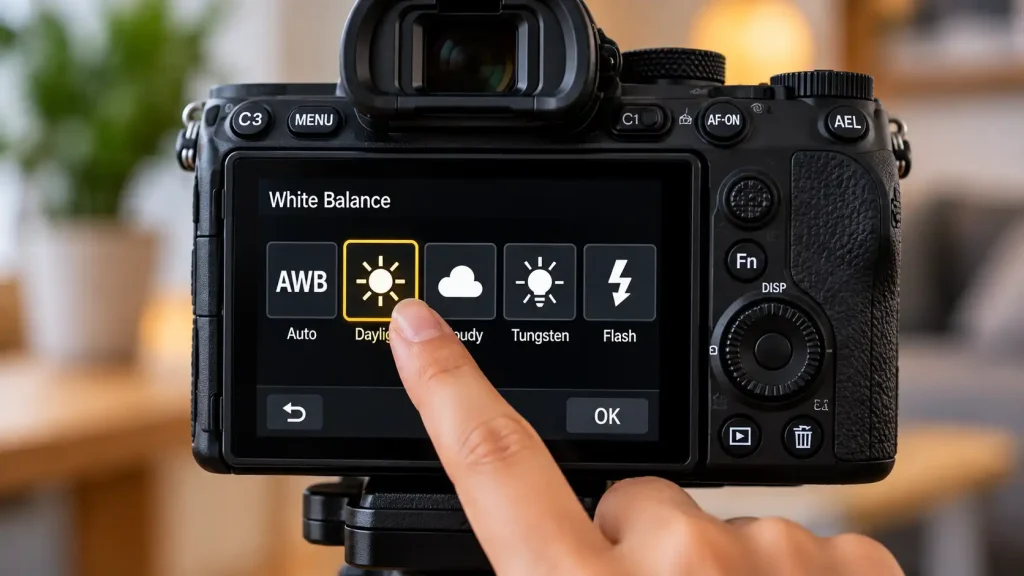
Most cameras share the same basic modes. Here is a helpful guide to the modes you will see.
| Camera Setting | Icon Shape | Best Time to Use It |
| Auto (AWB) | Letters AWB | Good for normal day light. |
| Daylight | A Sun | Use outside on a clear day. |
| Cloudy | A Cloud | Use when the sun is hidden. |
| Shade | A House | Use in the shadows outside. |
| Tungsten | A Light Bulb | Use for warm indoor house lights. |
| Fluorescent | A Long Tube | Use in large office rooms. |
| Flash | A Lightning Bolt | Use when you pop a flash. |
Warning Signs: When Colors Go Wrong
You must watch your screen as you shoot. Look for these warning signs. If you see them, change your mode.
-
Skin looks green or sick.
-
A white wall looks yellow or brown.
-
A dark suit looks purple.
-
The sky looks green instead of blue.
If you see these signs, Auto mode has failed. You must pick a preset mode. Match the mode to the light in the room.
When to Get Professional Help or a Second Opinion
Sometimes, your camera colors always look bad. You might try every mode. The photos still look green or pink. This is a bad sign. The sensor might be broke.
Do not open your camera body. Do not touch the sensor with your bare hands. You could break it for good. Take it to a real repair shop. They have clean rooms and the right tools. An expert can tell you if the sensor is dead.
Common Mistakes Camera Buyers Should Avoid
Do not make these simple errors. They will ruin your shots.
-
Leaving it on Auto: Auto fails in mixed light. Take control.
-
Using Tungsten outside: This turns your whole photo bright blue.
-
Forgetting to change it: If you walk from inside to outside, change the mode.
-
Trusting the screen too much: Sun glare makes the screen look weird. Trust a gray card.
Also See: Best Manual Focus Camera Android: 5 Top Picks 2026
FAQs
What is Kelvin in photography?
Kelvin is a way to measure light heat. Low numbers mean warm light. High numbers mean cool light. You can type a number in to match the light.
Does ISO change white balance?
No, it does not. ISO just makes the photo bright or dark. It does not change the color tint of the light.
Can I use a piece of paper as a white card?
Yes, you can. A plain white piece of paper works in a pinch. A real gray card is better, but paper helps when you need it fast.
Why are my night photos so orange?
Street lamps give off a strong orange tint. Your camera sees this tint. Use the Tungsten mode to cool the shot down and make it look right.
Should I just use Auto mode?
Auto mode is great for simple day shots. But it gets confused easy indoors. It is best to learn how to change it on your own.
Conclusion
Understanding what is white balance in photography changes the way you shoot. You do not have to live with bad, orange photos. You can fix the color right in the camera. Use the preset modes for a fast fix. Use a gray card for perfect color. Check your settings when you move to a new room. Good color makes your art stand out. Go grab your camera now. Test the modes in your living room today. See the clear change for yourself!
