

Introduction
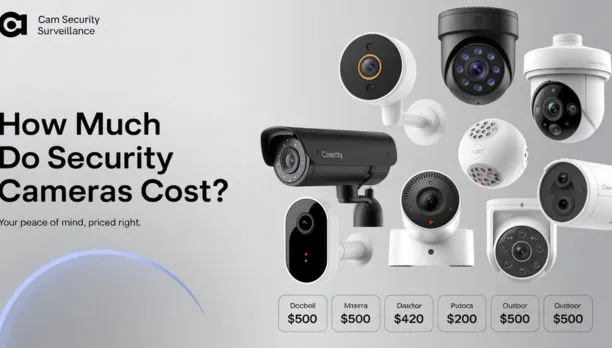
In the United States, surveillance cameras typically cost $30 to $300 per camera for equipment, depending on whether you choose a basic indoor camera, a weather-resistant outdoor model, a doorbell camera, or a professional security camera. A small do-it-yourself system may cost $100 to $600, while a professionally installed multi-camera system commonly ranges from $600 to $4,000 or more.
The purchase price is only part of the budget. You may also pay for:
- Cloud video storage
- Professional installation
- A recording device or network video recorder
- Additional cables, hard drives, or mounting hardware
- Monitoring or artificial-intelligence detection subscriptions
- Electrical or network work
A realistic U.S. budget is therefore:
| System type | Typical equipment cost | Possible installation cost | Ongoing cost |
|---|---|---|---|
| One basic indoor camera | $30–$100 | $0–$150 | $0–$15 per month |
| One outdoor Wi-Fi camera | $70–$250 | $0–$250 | $0–$15 per month |
| Video doorbell | $50–$300 | $0–$250 | $0–$15 per month |
| Two- to four-camera DIY system | $150–$800 | Usually self-installed | $0–$30 per month |
| Wired four- to eight-camera system | $500–$2,500 | $500–$2,000 | $0–$30 per month |
| Professionally installed system | $1,000–$4,000+ | Often included or separately quoted | $20–$100+ per month |
These are planning ranges, not guaranteed quotes. Prices vary by brand, resolution, storage method, labor rates, property layout, and whether the cameras need new electrical or network wiring.
Source: Bing
What Determines the Price of a Surveillance Camera?
The largest cost differences come from the camera’s environment, recording method, image quality, power source, and smart features. A camera designed for a covered porch is usually less expensive than one that must operate outdoors in severe weather, record continuously, and connect to a wired recorder.
Camera type
Common surveillance camera categories include:
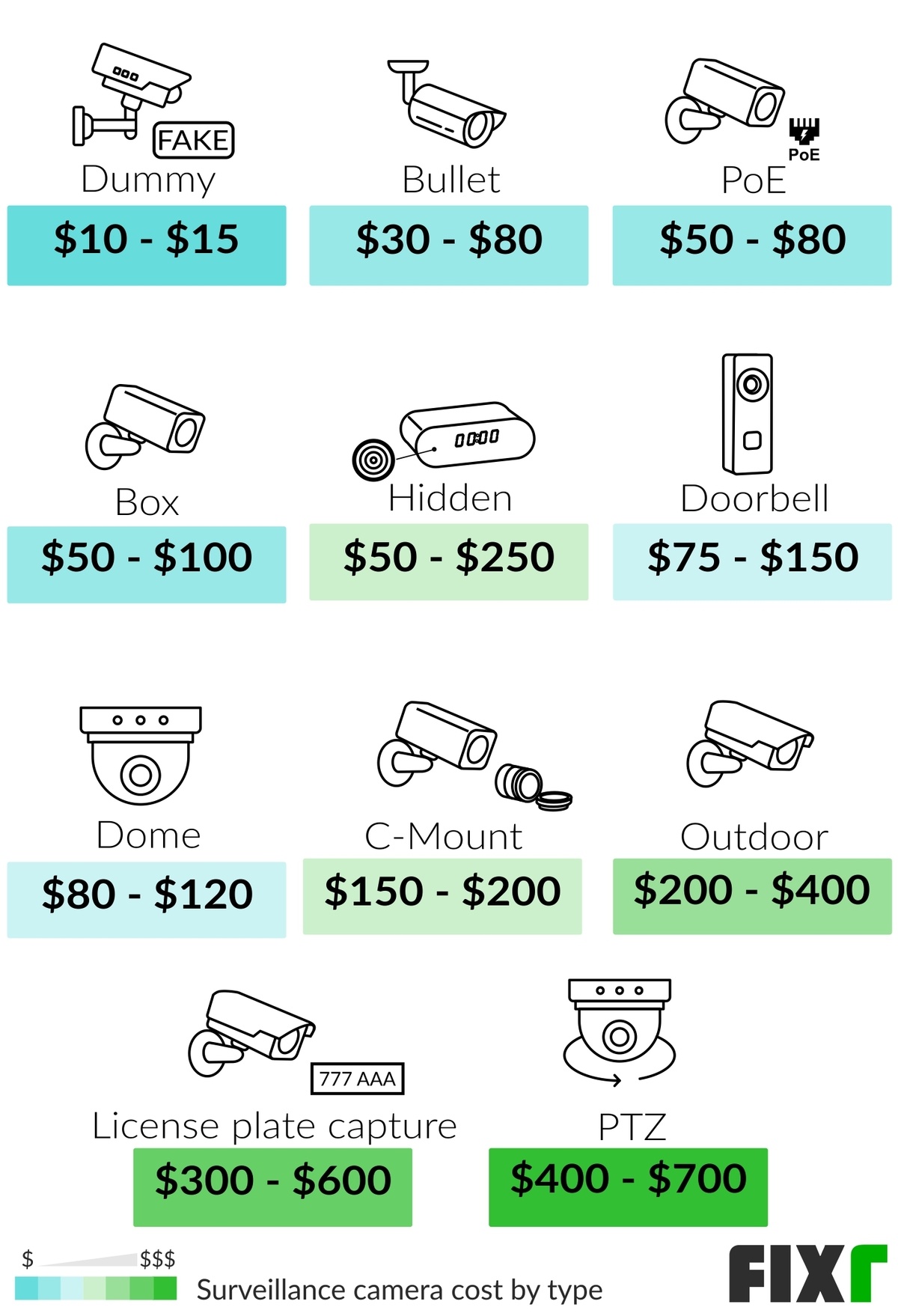
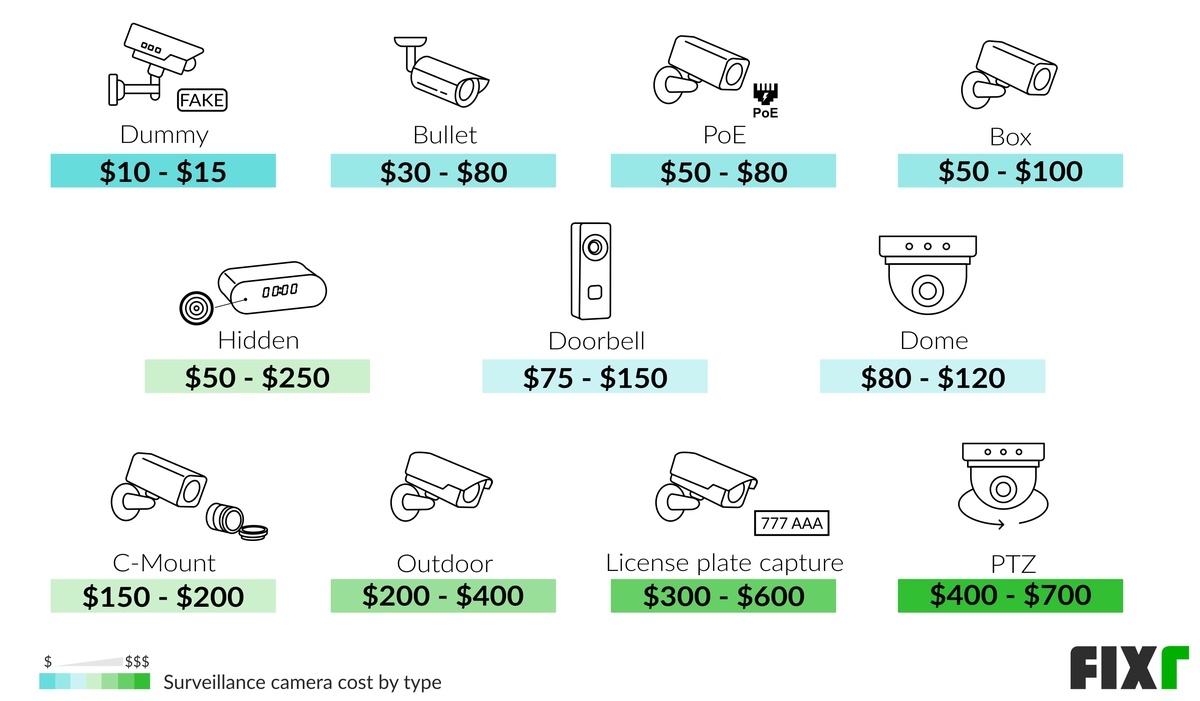
- Indoor Wi-Fi cameras: Usually the least expensive option, often priced from $30 to $100.
- Outdoor cameras: Commonly cost $70 to $250 because they need weather-resistant housing, stronger mounting hardware, and sometimes infrared illumination.
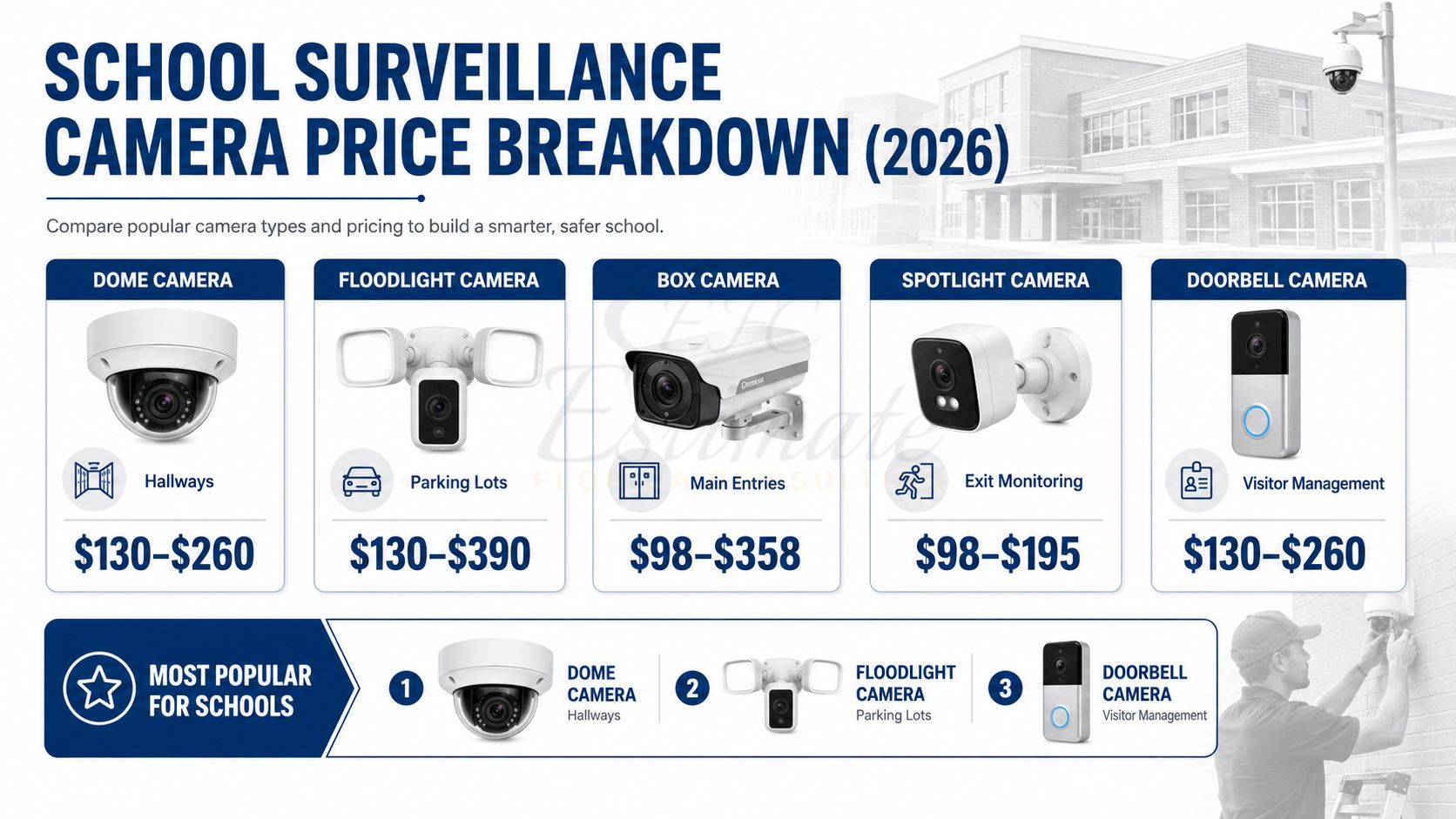
- Video doorbells: Often cost $50 to $300, excluding optional installation and subscription fees.
- Pan-tilt-zoom cameras: Usually cost $100 to $500 or more. They can move or zoom but may require more complicated setup.
- PoE cameras: Power over Ethernet cameras use one Ethernet cable for power and data. Individual cameras often cost $50 to $300, but the system also needs a compatible switch or recorder.
- Professional or commercial cameras: Models with advanced low-light performance, optical zoom, vandal-resistant housings, or specialized analytics may cost several hundred dollars each.
Image resolution and low-light performance
Higher resolution can raise the equipment price, but resolution alone does not guarantee useful evidence. A 4K camera may capture more detail than a 1080p camera under good lighting, but lens quality, field of view, lighting, compression, and camera placement also matter.
Typical consumer resolutions include:
- 1080p: Usually adequate for general awareness and identifying familiar people at short distances.
- 2K or 1440p: Offers more detail without the storage demands of 4K.
- 4K or 8 megapixels: Useful when you need to cover a wider area or preserve detail for digital zoom, but it requires more storage and network capacity.
Night vision can also affect the price. Infrared night vision shows a monochrome image in darkness, while color night vision generally needs ambient light or an integrated spotlight.
Power and connectivity
The easiest cameras to install are not always the cheapest over time.
| Power and connection method | Cost effect | Best suited to |
|---|---|---|
| Plug-in Wi-Fi | Low equipment cost; may need an outdoor-rated outlet | Homes with nearby power |
| Battery-powered Wi-Fi | Easy installation; batteries require replacement or charging | Locations without convenient wiring |
| Solar-assisted | Higher upfront cost; performance depends on sunlight and placement | Outdoor areas with suitable sun exposure |
| PoE Ethernet | Higher installation effort; reliable connection and continuous power | Permanent installations |
| Coaxial wired systems | May use existing cable; replacement parts vary | Homes or businesses with legacy wiring |
Battery cameras can reduce installation costs, but a camera mounted high on a building may require a ladder or professional service whenever the battery needs attention. For a camera that must record continuously, a wired power source is usually more practical.
Storage and recording
You can store video in the cloud, on a memory card, on a local recorder, or through a combination of these methods.
- Cloud storage: Convenient for remote access and off-site backup, but commonly requires a monthly or annual plan.
- MicroSD storage: Avoids some recurring charges, although the card has limited capacity and can fail or be removed with the camera.
- Network video recorder (NVR): Stores footage locally from compatible IP cameras. The recorder and hard drive increase the upfront cost.
- Digital video recorder (DVR): Commonly used with coaxial analog or HD-over-coax cameras.
- Hybrid storage: Uses local recording for continuous footage and cloud storage for alerts or event clips.
A system with no subscription may still have costs. You may need to purchase a high-end memory card, replace a hard drive, or buy a recorder with enough capacity for the number of cameras and desired retention period.
Smart detection features
Person detection, vehicle detection, package alerts, facial recognition, activity zones, and familiar-person alerts can influence both the camera price and the subscription cost.
Some brands include basic alerts without a monthly fee. Others reserve advanced detection or longer video history for a paid plan. Read the current plan terms carefully because features can differ by camera model, region, storage length, and app version.
Source: Bing
How Much Does a Complete Home Surveillance System Cost?
A complete U.S. home surveillance system can cost anywhere from about $150 for a simple DIY setup to more than $4,000 for a professionally installed wired system.
Basic one-camera setup: approximately $30 to $300
A single camera may be enough for:
- An apartment entryway
- A nursery or interior room
- A front door
- A small garage
- A driveway with a clear view
The total may include the camera, a mounting bracket, a memory card, and several months of cloud storage. If the camera needs a new outlet, difficult mounting, or an Ethernet cable run, labor can exceed the equipment price.
Two- to four-camera DIY system: approximately $150 to $800
This is a common starting point for homeowners who want coverage of:
- The front door
- The driveway
- A rear entry
- A garage or side passage
Wireless cameras generally keep installation simple. However, Wi-Fi coverage can become a problem through brick, concrete, metal siding, or long distances. A mesh Wi-Fi system or additional access point may add $100 to $400.
Four- to eight-camera wired system: approximately $500 to $2,500 before labor
A wired system typically includes:
- Four to eight cameras
- An NVR or DVR
- A storage drive
- Ethernet or coaxial cable
- Power supplies or a PoE switch
- Mounts and connectors
- A mobile or desktop viewing app
Wired systems are usually more suitable for continuous recording and larger properties. The installation becomes more expensive when cables must pass through finished walls, attics, masonry, or multiple floors.
Professionally installed system: approximately $1,000 to $4,000 or more
Professional installation is often priced by the number of cameras and the complexity of the property. A quote may include:
- Camera placement planning
- Cable installation
- Drilling and weather sealing
- Network configuration
- Recorder setup
- App configuration
- User permissions
- Basic training
- Warranty service
Large homes, detached buildings, retail locations, offices, and properties requiring long cable runs can exceed these ranges. Commercial surveillance systems may also require access control, backup power, monitored alarms, or compliance documentation.
Source: Bing
Surveillance Camera Cost by Installation Method
The installation method can change the total project cost more than the camera itself.
DIY installation
DIY installation may cost nothing beyond the equipment if the camera uses an existing outlet or battery. A basic setup normally involves:
- Downloading the manufacturer’s app.
- Creating an account and enabling two-factor authentication.
- Connecting the camera to the correct Wi-Fi network.
- Updating the camera firmware.
- Mounting the camera securely.
- Setting the time zone, activity zones, and notification rules.
- Testing live view, recording, night vision, and alerts.
DIY is most appropriate when the camera is accessible, the property has adequate Wi-Fi, and no new electrical or permanent cabling is required.
Professional installation
Professional labor commonly ranges from $100 to $300 per camera, although companies may charge a minimum service fee or quote the project as a package. Difficult wiring, attic access, high mounting locations, masonry, and electrical work can increase the price.
Ask whether the quote includes:
- Cable and conduit
- Exterior-rated connectors
- Weatherproofing
- A recorder and hard drive
- Configuration of remote access
- Disposal of old equipment
- Future service calls
- Warranty coverage
- Sales tax and permit-related costs, if applicable
Do not allow an installer to create unnecessary security risks by leaving exposed cables, using weak mounts, or placing a recorder where a burglar can easily remove it.
Electrical and network work
A surveillance camera may require additional work when:
- There is no nearby outdoor outlet.
- The existing outlet is not protected appropriately for its location.
- Wi-Fi does not reach the camera.
- Ethernet cable must run between floors or buildings.
- The system needs a dedicated circuit or structured wiring.
- A camera must be mounted on masonry, stucco, or a tall structure.
Electrical work should be performed by a qualified professional when it involves new circuits, permanent wiring, service-panel work, or conditions beyond ordinary plug-in installation.

Source: Bing
Monthly and Long-Term Surveillance Camera Costs
The long-term cost depends mainly on storage and service requirements. A camera advertised at $50 may cost considerably more over several years if advanced features require a subscription.
Common recurring expenses
| Recurring item | Typical planning range |
|---|---|
| Cloud storage for one or several cameras | $0–$30 per month |
| Professional alarm or video monitoring | $20–$100+ per month |
| Replacement memory card | $10–$50 periodically |
| Replacement hard drive | $50–$200+ periodically |
| Battery replacement or charging accessories | Varies by model |
| Internet service upgrade | Varies by provider |
| Annual software or extended service plan | Varies by provider |
Cloud subscriptions differ substantially. Some plans charge per camera, while others cover a household or a specified number of devices. Check how many days of video history are retained and whether continuous recording is included.
A three-year cost example
The following is a hypothetical calculation, not a quote:
- Four cameras at $125 each: $500
- Local recorder and hard drive: $350
- Cable, mounts, and accessories: $150
- Professional installation: $800
- Three-year cloud or monitoring plan at $20 per month: $720
Estimated three-year total: $2,520
If the same homeowner installs the cameras independently and avoids cloud storage, the initial cost could be closer to $1,000. The trade-off may be less technical support, less off-site backup, and more responsibility for maintenance.
Source: Bing
How to Choose a Surveillance Camera Without Overspending
Start with the area you need to monitor rather than choosing the highest-resolution camera available.
1. Define the security objective
Decide whether you need to:
- See that activity occurred
- Identify a person at close range
- Read a license plate
- Monitor a package area
- Watch a large yard
- Record continuously
- Receive alerts when a person or vehicle appears
These objectives require different camera placements and specifications.
2. Measure the viewing area
A wide-angle camera may cover more space but show less detail at a distance. A narrow field of view may provide better identification at an entry point but leave blind spots.
For a large area, consider whether multiple fixed cameras would provide better coverage than one motorized camera. A pan-tilt camera can point in different directions, but it may not record every angle at the same time.
3. Select the recording method
Choose cloud storage when remote access and off-site backup are priorities. Choose local storage when minimizing monthly fees and retaining control over recordings matter more. A hybrid system may provide a practical balance.
4. Check compatibility before buying
Verify:
- Wi-Fi frequency requirements
- Whether the camera supports your router
- Power requirements
- Outdoor weather rating
- NVR or DVR compatibility
- Smartphone operating-system support
- Subscription requirements
- Smart-home platform compatibility
- Whether the camera supports continuous recording
A camera that cannot connect reliably or cannot record in the desired mode is not a bargain.
5. Budget for maintenance
Include the cost of:
- Cleaning the lens
- Recharging or replacing batteries
- Updating firmware
- Replacing memory cards
- Replacing recorder hard drives
- Maintaining outdoor seals and mounts
- Reviewing privacy and account settings
Source: Bing
Common Mistakes That Increase Surveillance Camera Costs
Buying cameras before planning placement
A poorly placed camera may point into glare, capture too much sky, or fail to cover the intended entrance. Repositioning may require new holes, longer cables, or another camera.
Choosing wireless cameras where Wi-Fi is unreliable
A wireless camera still needs a stable network connection. Test signal strength at the planned mounting location before permanently installing the device.
Ignoring the cost of subscriptions
Compare the three-year cost, not only the purchase price. A low-cost camera with a required subscription may cost more than a higher-priced model with local storage.
Using indoor equipment outside
Indoor cameras are not designed for rain, condensation, freezing temperatures, or direct sunlight. Outdoor use can cause premature failure and may void the warranty.
Treating resolution as the only measure of quality
A high-resolution camera cannot compensate for poor lighting, a dirty lens, excessive distance, or a badly chosen angle.
Leaving accounts insecure
Change default passwords, use unique credentials, enable two-factor authentication, install firmware updates, and limit access to people who need it. A camera connected to the internet is part of your home network and should be secured accordingly.
Recording private areas
Do not point cameras into bedrooms, bathrooms, neighboring homes, or areas where people reasonably expect privacy. Audio recording can create additional legal concerns because U.S. state laws differ. Before recording conversations, review applicable federal and state rules and obtain legal advice when the situation is unclear.
Source: Bing
U.S. Privacy and Legal Considerations
Camera ownership is generally legal in the United States, but the way a camera is positioned and used can create privacy, employment, landlord-tenant, or audio-recording issues.
Before installation:
- Avoid areas where people have a reasonable expectation of privacy.
- Check state rules governing audio recording and consent.
- Review local rules, lease terms, and homeowners association requirements.
- Tell household members, employees, contractors, or guests about recording policies when appropriate.
- Use privacy masking or activity zones to exclude neighboring property.
- Secure stored video and restrict account access.
- Establish a retention period instead of keeping footage indefinitely.
Video and audio laws are fact-specific. A camera aimed at your front walkway is different from one aimed through a neighbor’s window, and a video-only system may raise different issues from a system that records sound. Consult a qualified attorney for disputes, workplace monitoring, multi-unit housing, or recordings involving private conversations.

Source: Bing
Frequently Asked Questions
Is it cheaper to buy a security camera or a complete system?
One camera is cheaper initially, but a complete system can offer better value when you need coverage at several locations. A complete system may include a recorder, mounting hardware, and shared storage, reducing the need to buy those items separately.
Do surveillance cameras require Wi-Fi?
No. Wired PoE, coaxial, and some cellular cameras can operate without household Wi-Fi. However, remote viewing usually requires an internet connection or cellular service.
How much does it cost to install four security cameras?
A four-camera installation may cost approximately $400 to $1,500 in labor, with higher prices for difficult wiring, masonry, multiple floors, or new electrical work. Equipment can add another $500 to $2,000 or more, depending on the cameras and recorder.
Are wired or wireless cameras cheaper?
Wireless cameras are usually cheaper and easier to install when power and Wi-Fi are already available. Wired cameras often cost more to install but can provide a more stable connection and are generally better suited to continuous recording.
Can I use surveillance cameras without a monthly fee?
Yes. Look for cameras that support local microSD recording, an NVR, or a DVR without requiring a cloud plan. Confirm that important features—such as person detection, video downloads, and remote access—are available without a subscription.
How many cameras does a typical house need?
The number depends on the property, not the house size alone. Many homeowners begin with two to four cameras covering entrances and vulnerable access points. Larger properties may need additional cameras for side yards, detached garages, driveways, and blind spots.
How long should surveillance cameras last?
Consumer cameras may need replacement sooner because of battery degradation, software support changes, weather exposure, or failing storage. Wired cameras and recorders can last longer when protected from moisture and heat, but no lifespan is guaranteed. Check the manufacturer’s warranty and software-support policy before buying.
Key Takeaways
- A basic surveillance camera in the U.S. commonly costs $30 to $300.
- A DIY multi-camera setup often costs $150 to $800.
- A professionally installed system commonly costs $1,000 to $4,000 or more.
- Cloud storage, monitoring, batteries, hard drives, and installation can materially increase the total cost.
- Wired systems are usually more installation-intensive but can be better for continuous recording.
- Wireless systems are convenient, but they depend on reliable Wi-Fi and power.
- Compare total ownership cost over at least three years rather than focusing only on the camera’s sticker price.
- Check privacy, audio-recording, landlord, HOA, and workplace rules before installation.
Conclusion
For most U.S. homes, a practical surveillance camera budget is $150 to $800 for a DIY setup or $1,000 to $4,000 for a professionally installed system. The right price depends on the number of locations, the need for continuous recording, network reliability, storage preferences, and installation difficulty.
Before purchasing, map the areas you need to monitor, decide whether local or cloud storage fits your needs, confirm compatibility, and request an itemized installation quote when professional work is necessary. This approach helps prevent paying for features you will not use while avoiding a system that cannot provide reliable coverage where it matters.
