What Is a PoE Switch: A Power over Ethernet (PoE) switch is a networking device that can deliver both data and electrical power to compatible devices through a single Ethernet cable. Unlike a traditional network switch, which primarily handles data communication, a PoE switch can power devices such as IP security cameras, wireless access points, VoIP phones, and other network-connected equipment without requiring a separate power cable for each device.
PoE switches have become especially popular in security camera systems, where multiple IP cameras may need to be installed in different locations. Instead of running separate power and network cables to every camera, a PoE switch can provide both through one Ethernet connection.
In this guide, we’ll explain what a PoE switch is, how a PoE switch works, the different types of PoE switches, their key benefits and uses, and the important factors to consider before buying one. Whether you’re setting up a home security camera system, expanding an office network, or simply learning how Power over Ethernet works, this guide will help you understand the technology and choose a PoE switch that fits your needs.
What Is a PoE Switch?
A PoE switch (Power over Ethernet switch) is a network switch that can transmit both data and electrical power through a single Ethernet cable to compatible devices. Unlike a standard network switch, which primarily handles network data, a PoE switch can supply power to devices such as IP security cameras, wireless access points, VoIP phones, and other PoE-enabled equipment.
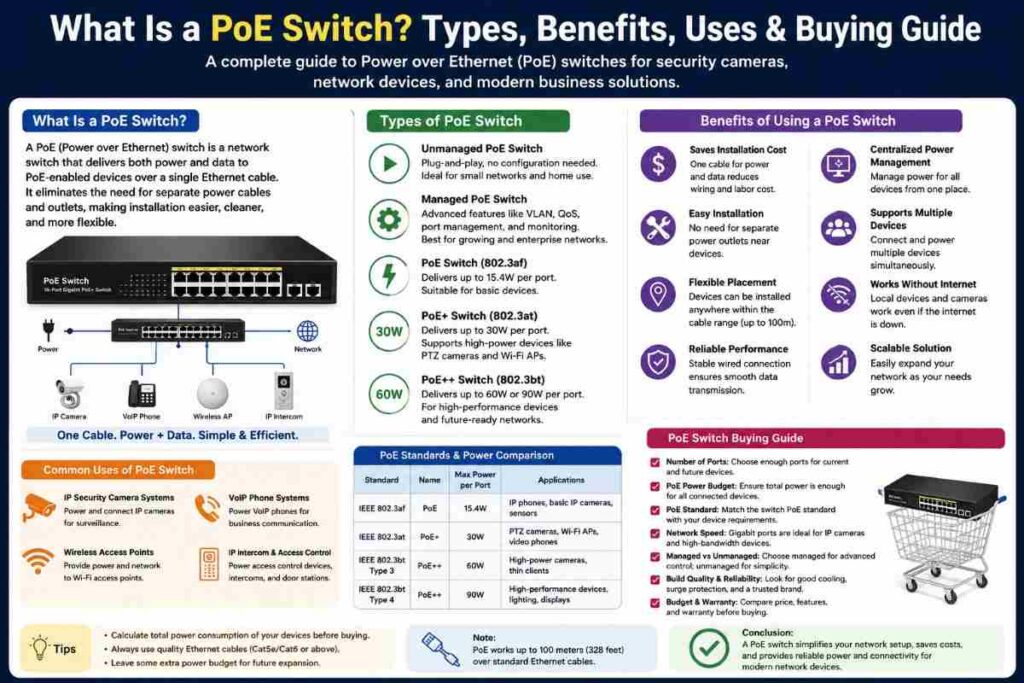
This eliminates the need to run a separate power cable to each device, making installation cleaner, easier, and more flexible. A PoE switch typically connects to a router, NVR, or other network equipment and then distributes network connectivity and power through its PoE ports.
For example, when you connect a PoE security camera using an Ethernet cable, the same cable can carry the camera’s video data and provide the electrical power it needs to operate. The amount of power available depends on the PoE standard and the switch’s overall PoE power budget.
One of the biggest advantages of a PoE switch is that it simplifies the installation of multiple network devices. Instead of installing separate electrical outlets near every IP camera or wireless access point, you can run Ethernet cables from a central PoE switch.
This is particularly useful for security camera systems, offices, warehouses, smart buildings, and large homes where devices may be installed far from traditional power outlets. PoE switches are available in different configurations, including managed and unmanaged models, 4-port, 8-port, 16-port, 24-port, and larger switches.
They also support different PoE standards, such as IEEE 802.3af (PoE), 802.3at (PoE+), and 802.3bt (PoE++), which provide different levels of power to connected devices. When choosing a PoE switch, it’s important to check the number of devices you need to connect, their power requirements, network speed, Ethernet cable length, and the switch’s total PoE budget.
How Does a PoE Switch Work?
A PoE switch works by transmitting both network data and electrical power through the same Ethernet cable. This allows a single cable to connect and power compatible devices such as IP security cameras, wireless access points, and VoIP phones.
📌Read More👉What is a 4K camera?
The switch receives data from a router, NVR, or other network device, while its PoE circuitry supplies the appropriate amount of power to connected devices. Here’s how the process works step by step:
The PoE Switch Connects to the Network
First, the PoE switch is connected to your existing network, typically through a router, NVR, or another network switch. This connection allows the PoE switch to communicate with other devices on the network and transfer data between connected equipment. However, the switch itself does not necessarily need an internet connection to provide power or communicate locally with compatible devices.
The Ethernet Cable Carries Data and Power
Once a PoE-compatible device is connected to a PoE port, a single Ethernet cable carries both electrical power and network data. This is the main advantage of Power over Ethernet technology because you don’t need a separate power adapter and network cable for each device.
The Switch Detects the Connected Device
A standards-compliant PoE switch doesn’t simply send power to every connected Ethernet device. It first checks whether the connected device is compatible with the appropriate PoE standard. This detection process helps prevent power from being unnecessarily delivered to devices that don’t support PoE.
The PoE Switch Supplies the Required Power
After detecting a compatible PoE device, the switch supplies electrical power through the Ethernet connection. Common standards include 802.3af PoE, 802.3at PoE+, and 802.3bt PoE++, with newer standards supporting higher power requirements for devices such as advanced cameras and wireless access points.
Data Travels Between the Device and Network
At the same time that the Ethernet cable delivers power, it carries network data between the connected device and the PoE switch. For example, an IP security camera sends its video stream through the Ethernet cable to the switch, which then forwards that data to an NVR, computer, or other destination on the local network.
The Switch Manages Power Distribution
A PoE switch has a specific PoE power budget, which determines how much total power it can provide across all of its PoE ports. The switch manages this available power so that connected devices receive the amount they need without exceeding the system’s overall capacity.
The PoE Switch Can Support Multiple Devices
One of the biggest benefits of a PoE switch is its ability to power and connect several devices from a central location. An 8-port PoE switch, for example, can potentially connect multiple IP cameras, access points, or other PoE devices simultaneously, depending on its port configuration and power budget.
The Switch Continues Operating Locally Without Internet
A PoE switch does not inherently require the internet to supply power or transfer data across a local network. If you’re using PoE security cameras with an NVR, for example, the cameras can communicate with the NVR through the local network even when the internet connection is unavailable.
PoE Standards Determine Compatibility and Power
The PoE standard supported by both the switch and connected device determines how much power can be delivered. IEEE 802.3af is designed for lower-power devices, while 802.3at (PoE+) provides more power for equipment with higher requirements. 802.3bt (PoE++/higher-power PoE) can deliver substantially more power and is useful for advanced devices that require greater electrical capacity.
The PoE Switch Sends Data to the Correct Destination
After receiving data from a connected PoE device, the switch examines the network information and forwards the data to the appropriate port or destination. In a security camera installation, this means video from each IP camera can be sent to the NVR or computer responsible for recording and monitoring.
What Are Common Types of PoE Switches?
PoE switches come in several types, and each one is designed for different networking needs, device requirements, and installation environments.
📌Read More👉Best Alternative of 8k Security Camera System
The main differences include how the switch is managed, how much power it can provide, how many devices it can support, and which PoE standard it uses. Understanding these common types can help you choose the right PoE switch for security cameras, wireless access points, VoIP phones, or other network devices.
Unmanaged PoE Switch
An unmanaged PoE switch is the simplest type of PoE switch and is designed for plug-and-play installation. It automatically provides network connectivity and power to compatible PoE devices without requiring complicated configuration.
These switches are a good choice for home users and small businesses that want to connect IP security cameras or other PoE devices without managing advanced network settings. They are generally affordable, easy to install, and require very little maintenance.
Managed PoE Switch
A managed PoE switch provides greater control over your network and connected devices. Through a web interface or management software, you can configure features such as VLANs, port settings, traffic monitoring, power management, and network security.
Managed PoE switches are particularly useful for larger security camera systems, offices, and commercial networks where administrators need to monitor and control individual ports. Although they typically cost more than unmanaged models, their advanced features make them more flexible for complex installations.
Smart or Web-Managed PoE Switch
A smart PoE switch, sometimes called a web-managed switch, sits between unmanaged and fully managed models in terms of features and complexity. It provides a web-based interface for configuring common networking functions without the advanced configuration options found on enterprise-grade managed switches.
PoE+ Switch
A PoE+ switch supports the IEEE 802.3at standard and can provide more power than traditional 802.3af PoE. This additional power capacity makes PoE+ suitable for devices such as PTZ security cameras, advanced wireless access points, video phones, and other equipment with higher power requirements.
PoE++ Switch
A PoE++ switch supports the IEEE 802.3bt standard and is designed for devices requiring substantially more power. Depending on the implementation, 802.3bt includes higher-power modes commonly referred to as Type 3 and Type 4. These switches can support demanding devices such as advanced PTZ cameras, high-performance wireless access points, video-conferencing equipment, and some other high-power network devices.
Gigabit PoE Switch
A Gigabit PoE switch provides PoE power while supporting Gigabit Ethernet speeds, typically up to 1,000 Mbps on compatible ports. This can be particularly useful for high-resolution IP security cameras because 4K video streams can consume significant network bandwidth. A Gigabit PoE switch can also help reduce network bottlenecks when several cameras are sending high-quality video to an NVR or other recording device.
Fast Ethernet PoE Switch
A Fast Ethernet PoE switch generally supports network speeds of up to 100 Mbps on its Ethernet ports while also providing PoE power. These switches can work well with basic IP cameras and other low-bandwidth devices, but they may be less suitable for larger systems using multiple high-resolution cameras.
PoE Switch With SFP Ports
Some PoE switches include SFP (Small Form-factor Pluggable) ports in addition to standard Ethernet ports. SFP ports allow the switch to connect to compatible fiber-optic or other SFP-based network links, making them useful for extending networks over longer distances.
Benefits of Using a PoE Switch
A PoE switch offers several advantages by combining network connectivity and electrical power through a single Ethernet cable. This makes it particularly useful for IP security cameras, wireless access points, VoIP phones, and other network devices that need both data and power. Here are the key benefits of using a PoE switch.
Power and Data Through One Cable
One of the biggest benefits of a PoE switch is its ability to deliver both electrical power and network data through a single Ethernet cable. This eliminates the need for separate power adapters and network cables for compatible devices such as IP security cameras, VoIP phones, and wireless access points. As a result, installation becomes cleaner, simpler, and more organized.
Easier Security Camera Installation
PoE switches make IP security camera installation much easier because each compatible camera can receive power and transmit video through the same Ethernet cable. You don’t need to install a separate electrical outlet near every camera. This is especially useful for outdoor cameras, ceiling-mounted cameras, and cameras installed in locations where access to electrical power is difficult.
Reduces Cabling and Installation Costs
Since one Ethernet cable handles both power and data, a PoE system can reduce the amount of wiring and additional electrical hardware required. This can lower installation costs, particularly when setting up multiple cameras or network devices across a large property. It also reduces cable clutter and makes the overall installation look more professional.
Provides Reliable Wired Connectivity
A PoE switch provides a stable wired network connection compared with wireless connectivity. Ethernet connections are generally less affected by Wi-Fi interference, physical obstacles, and wireless congestion. For security cameras, this reliable connection helps maintain consistent video transmission and reduces the possibility of wireless connectivity problems.
Supports Multiple Devices
A single PoE switch can power and connect multiple compatible devices at the same time. Depending on the model, you can find 4-port, 8-port, 16-port, 24-port, and larger PoE switches. This makes them a practical solution for multi-camera security systems, offices, warehouses, and commercial networks.
Works Without Internet
A PoE switch does not require an internet connection to provide power or communicate with devices on a local network. For example, PoE security cameras can send video to an NVR through a local network even when the internet is unavailable.
Simplifies Power Management
A PoE switch provides a centralized power source for connected devices, making it easier to manage and troubleshoot your system. Some managed PoE switches allow you to monitor individual ports, control power delivery, and identify connected devices.
Makes the System Easy to Expand
PoE switches make it easier to expand your network or security camera system in the future. If your switch has unused ports and enough available PoE power budget, you can add compatible cameras or other PoE devices without installing an entirely new power infrastructure.
The main advantage of using a PoE switch is its ability to combine power delivery and network connectivity through a single Ethernet cable. This simplifies installation, reduces cable clutter, provides reliable wired communication, and makes it easier to deploy devices in locations without convenient electrical outlets.
Best PoE Switch for Different Usage Scenarios
The best PoE switch depends on how you plan to use it, how many devices you need to connect, and how much power those devices require. A small home security system doesn’t need the same type of switch as a large business network or a professional IP camera installation. Below are some common usage scenarios and the type of PoE switch that works best for each one.
1) Best PoE Switch for Home Security Cameras
For a basic home security camera system, an 8-port unmanaged Gigabit PoE switch is often a practical choice. It can provide power and network connectivity to several IP cameras through Ethernet cables while remaining relatively simple to install and manage. Look for adequate PoE power, Gigabit ports, and compatibility with your cameras’ PoE standards. Having a few unused ports also gives you room to add additional cameras later.
2) Best PoE Switch for Small Businesses
Small businesses typically benefit from a managed or smart PoE switch with 8 to 16 ports. In addition to powering security cameras, the switch may need to support wireless access points, VoIP phones, and other network devices. Management features such as VLAN support, traffic monitoring, and port controls can help separate different types of network traffic and make the system easier to manage as the business grows.
3) Best PoE Switch for Large Security Camera Systems
For large surveillance installations, a 16-, 24-, or 48-port managed PoE+ switch can be a better option. These switches provide more ports, higher power budgets, and greater control over individual connections. If the system includes multiple 4K cameras, PTZ cameras, or cameras with powerful infrared lighting, pay particular attention to both the per-port power limit and the total PoE power budget.
4) Best PoE Switch for 4K IP Cameras
A Gigabit PoE+ switch is a strong choice for multiple 4K IP cameras because high-resolution video can require considerable network bandwidth. Gigabit Ethernet helps provide sufficient capacity for transmitting multiple high-quality video streams to an NVR or other recording device. The switch should also have enough PoE power to operate all connected cameras simultaneously.
5) Best PoE Switch for PTZ Security Cameras
PTZ cameras can require more power than basic fixed cameras because they may operate motors, infrared illumination, heaters, microphones, or other features. For these installations, a PoE+ or PoE++ switch may be appropriate, depending on the camera’s exact requirements. Always check the camera’s specified power consumption and match it with the switch’s per-port output and total PoE budget.
6) Best PoE Switch for Wireless Access Points
If you’re using a PoE switch primarily to power Wi-Fi access points, choose a Gigabit PoE+ model with enough power capacity for your access points. Higher-end Wi-Fi equipment may have greater power requirements, so checking compatibility with the access point’s supported PoE standard is essential. A managed switch can also provide useful VLAN and traffic-management capabilities for larger wireless networks.
7) Best PoE Switch for VoIP Phones
For offices with multiple VoIP phones, an 8-, 16-, or 24-port PoE switch can simplify deployment by providing power and network connectivity through each phone’s Ethernet connection. A managed PoE switch is often preferable in business environments because features such as VLANs and Quality of Service (QoS) can help prioritize voice traffic and improve network organization.
8) Best PoE Switch for Outdoor Security Cameras
Outdoor camera installations require a switch that can reliably handle the environmental conditions of the installation location. If the switch itself will be installed outdoors, look for an outdoor-rated PoE switch with appropriate weather protection and a suitable operating-temperature range. If the switch remains indoors, a standard high-quality PoE switch can power outdoor cameras as long as the Ethernet cabling and outdoor camera connections are properly protected.
9) Best PoE Switch for Remote or Long-Distance Cameras
For cameras located far away from the main networking equipment, consider a PoE solution designed for extended Ethernet distances, or use appropriate network extenders, fiber uplinks, or intermediate switches. Standard copper Ethernet runs are generally limited to around 100 meters (328 feet) between network devices. For longer installations, simply using an excessively long Ethernet cable isn’t the ideal solution because signal and power limitations can become an issue.
10) Best PoE Switch for a Growing Network
If you expect your network or security camera system to expand, choose a PoE switch with extra ports, a generous power budget, and Gigabit connectivity. For example, if you currently need six ports, an 8-port switch may work, but a 16-port model could provide more room for future cameras and other PoE devices. Investing in additional capacity upfront can prevent the expense and inconvenience of replacing the switch later.
Things to Consider When Choosing the Best PoE Switch
Choosing the right PoE (Power over Ethernet) switch requires balancing your current hardware setup with future network expansion. Here are the 8 key factors to evaluate before making a purchase:
Number of PoE Ports
Consider how many devices you need to connect before choosing a PoE switch. If you’re installing four security cameras, a 4-port switch may be sufficient, but an 8-, 16-, or 24-port model is better for larger systems or future expansion. It’s often wise to choose a switch with a few extra ports so you can add more PoE devices later without replacing the entire switch.
PoE Power Budget
The PoE power budget determines how much total power the switch can provide to all connected devices. Add up the power requirements of your cameras, access points, VoIP phones, or other PoE devices and make sure the switch has enough available power. A higher power budget is especially important when using multiple PTZ cameras or other devices with higher power requirements.
PoE Standard
Check which PoE standard your devices support before purchasing a switch. Common standards include IEEE 802.3af (PoE), 802.3at (PoE+), and 802.3bt (PoE++). Higher standards can provide more power, making them suitable for demanding devices such as advanced PTZ security cameras. Choosing a compatible standard helps ensure that every connected device receives sufficient power.
Network Speed
Network speed is another important consideration, particularly for security camera systems. A Gigabit PoE switch can provide speeds of up to 1,000 Mbps on compatible connections and is a good choice for systems using multiple high-resolution IP cameras. For 4K cameras or large networks, Gigabit connectivity can help reduce network bottlenecks and maintain smooth video transmission.
Managed vs. Unmanaged
Decide whether you need a managed or unmanaged PoE switch. An unmanaged switch is simple, affordable, and generally plug-and-play, making it suitable for basic home security systems. A managed switch provides advanced controls such as VLAN configuration, traffic monitoring, port management, and power control, making it better suited to larger or more complex networks.
Ethernet Cable Distance
Consider the distance between the PoE switch and your connected devices. Standard Ethernet installations generally support cable runs of up to 100 meters (328 feet) between network devices under typical conditions. If your cameras are located farther away, you may need suitable network extenders, fiber connections, or another network design rather than simply using a longer copper Ethernet cable.
Reliability and Build Quality
A PoE switch should be reliable enough to operate continuously, especially when it’s powering security cameras 24/7. Look for features such as overheating protection, surge protection, durable construction, and adequate cooling. If the switch will be installed outdoors or in a harsh environment, consider a model specifically designed for outdoor or industrial use.
Price and Future Expansion
Finally, consider the overall cost and future needs rather than choosing the cheapest PoE switch available. Compare the number of ports, PoE power budget, network speed, management features, warranty, and build quality. Spending slightly more on a reliable switch with additional ports and sufficient power capacity can be worthwhile if you plan to expand your security camera or network system later.
PoE switch FAQs
Do PoE switches need an internet connection?
No, a PoE switch does not inherently require internet access. It can provide power and facilitate communication between devices on a local network without an internet connection. For example, PoE security cameras can send video to a local NVR even when the internet is unavailable. Internet access is generally required for remote monitoring, cloud storage, and other online features.
Can a PoE switch power security cameras?
Yes. PoE switches are widely used with IP security cameras because they can provide power and transmit video through the same Ethernet cable. However, you should check that the switch supports the camera’s required PoE standard and provides enough power through both its individual ports and overall PoE budget.
What is the difference between a PoE switch and a regular Ethernet switch?
The main difference is power delivery. A regular Ethernet switch generally transfers network data but does not provide power to connected devices. A PoE switch can provide both data and electrical power through Ethernet, reducing the need for separate power adapters and cables.
How many devices can a PoE switch support?
The number of devices depends primarily on the switch’s number of PoE ports and total power budget. For example, an 8-port PoE switch can generally connect up to eight PoE devices through its PoE ports, provided their combined power requirements don’t exceed the switch’s available power budget.
How far can a PoE switch power a device?
A standard Ethernet connection is generally designed for cable runs of up to 100 meters (328 feet) between network devices. The actual usable distance for PoE can also depend on the Ethernet cable, power requirements, switch specifications, and connected device. For longer distances, PoE extenders, additional network equipment, or fiber-based solutions may be appropriate.
Conclusion
As discussed in this guide, PoE switches are available in different types, including managed, unmanaged, PoE+, and PoE++ models, each designed for different network sizes and power requirements. The right choice depends on factors such as the number of devices, PoE power budget, network speed, supported PoE standard, cable distance, and whether you need advanced network management features.
For a simple home security camera setup, an unmanaged Gigabit PoE switch may provide everything you need. Larger businesses and advanced surveillance systems may benefit from managed PoE+ or PoE++ switches with higher power budgets and additional network controls. Before buying, always check the power requirements of your devices and leave some extra capacity for future expansion.
Ultimately, understanding what a PoE switch is, how it works, its benefits, different types, and important buying considerations will help you make a more informed decision. With the right PoE switch, you can build a cleaner, more reliable, and scalable network while making the installation and management of compatible devices much easier.