
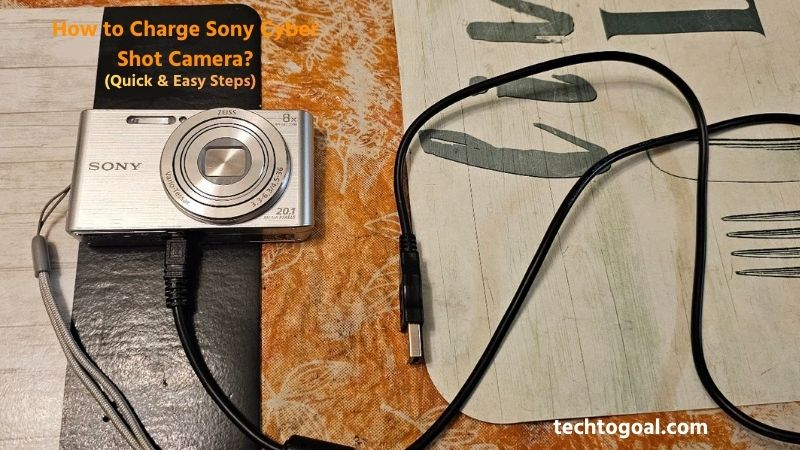
How to Charge Sony Cyber Shot Camera: Charging your Sony Cyber-shot camera correctly is one of the most important steps to ensure smooth performance, longer battery life, and uninterrupted photography sessions.
Whether you’re a beginner using a Cyber-shot for the first time or an experienced user who wants to avoid common charging mistakes, knowing the proper charging method can save you time and frustration.
Sony Cyber-shot cameras come with different charging options depending on the model, including USB charging, AC adapters, and external battery chargers. In this guide, you’ll learn how to charge a Sony Cyber-shot camera safely and efficiently, what accessories you need, and useful tips to keep your battery in top condition.
In this guide, we’ll walk you through quick and easy steps to charge your Sony Cyber-shot camera safely, explain the accessories you may need, and share helpful tips to extend battery life. If you’re looking for a simple and reliable way to keep your Cyber-shot powered up, this article will help you get started in minutes.
How to Charge Sony Cyber-shot Camera
Charging a Sony Cyber-shot camera is a simple process, but because Sony has produced many different models over the years, the method can vary. Most modern Cyber-shot cameras support charging via USB, while older or professional models may require a dedicated external charger.
????Read More????How to Format SD Card Camera in 2026
Here is the complete, step-by-step guide to charging your Sony Cyber-shot camera safely and efficiently.
1. Check Your Sony Cyber-shot Model
Before charging your Sony Cyber-shot camera, it’s important to identify your specific model. Some Cyber-shot cameras support in-camera USB charging, while others require a separate battery charger. Checking the user manual or the label inside the battery compartment helps you avoid using the wrong charging method, which can damage the battery or slow down charging efficiency.
2. Charge Using the USB Cable
Many modern Sony Cyber-shot cameras allow charging directly through a USB cable. Just put the battery into the camera, attach the included USB cable to the camera, and plug the other end into a computer, power bank, or wall adapter. When charging starts, a small indicator light usually turns on, letting you know the camera is receiving power.
3. Use a Wall Adapter for Faster Charging
For quicker and safer charging, it’s best to connect the USB cable to a wall adapter instead of a computer. Wall outlets provide a more stable power supply, reducing charging time and protecting the battery from inconsistent voltage. Using original Sony adapters or certified alternatives ensures optimal charging performance.
4. Charge with an External Battery Charger
Some Sony Cyber-shot models come with a separate battery charger. To use it, remove the battery from the camera, place it into the charger, and plug the charger into a power outlet. External chargers are especially useful if you own spare batteries, as you can charge one battery while using another.
5. Monitor the Charging Indicator
Sony Cyber-shot cameras usually feature a charging indicator light that shows the battery’s status. A steady or blinking light means charging is in progress, while the light turns off when charging is complete. Always unplug the camera once fully charged to prevent unnecessary battery stress.
6. Avoid Charging in Extreme Temperatures
Charging your Sony Cyber-shot camera in extremely hot or cold environments can reduce battery efficiency and lifespan. For best results, charge the camera at room temperature. This helps maintain consistent charging speed and keeps the battery healthy over time.
7. Use Original or Certified Accessories
Using original Sony charging cables, batteries, and adapters is highly recommended. Low-quality or uncertified accessories may cause slow charging, overheating, or long-term battery damage. Certified accessories ensure stable power delivery and improve overall battery safety.
8. Know the Average Charging Time
Charging time varies depending on the battery capacity and power source, but most Sony Cyber-shot cameras take between 2 and 4 hours to fully charge. Charging through a wall adapter is usually faster than using a computer USB port.
How to Charge a Sony Cyber-Shot Camera Without Charger
If you’ve lost your dedicated wall charger or simply forgot to pack it, you can still power up your Sony Cyber-shot using several common alternatives. Most modern Cyber-shot models (especially the RX, WX, and HX series) are designed to support in-camera charging through their built-in USB ports.
Use a Smartphone Wall Adapter and USB Cable
The most convenient way to charge your camera is by using a standard smartphone wall plug and a compatible USB cable (usually Micro-USB or USB-C, depending on your model). Connect the smaller end of the cable to the camera’s “Multi” or “USB” port and the larger end to the wall adapter. This method is highly effective because most modern phone chargers provide a stable 5V output, which is perfect for camera batteries. However, ensure the adapter provides at least 1.5A to 2.0A for a reasonably fast charging speed.
Charge via a Computer or Laptop USB Port
If you have access to a computer, you can use its USB ports as a power source. Simply turn off your camera and connect it to a powered-on laptop or desktop using your USB cable. While this is a safe method, it is generally slower than using a wall outlet because computer USB ports often output lower amperage. Ensure your computer does not enter “Sleep” or “Hibernate” mode during the process, as this will stop the power flow and halt the charging.
Utilize a Portable Power Bank for On-the-Go Power
For photographers traveling or shooting outdoors, a portable power bank is a lifesaver. Just like charging a smartphone, you can plug your Sony Cyber-shot into a power bank. This is an excellent “emergency” solution when you are away from electrical outlets. For the best results, use a high-capacity power bank that supports “Power Delivery” (PD) if your camera model is newer, though standard power banks will still work for most older USB-compatible Cyber-shots.
Try a Universal External Battery Charger
If your specific Sony model is older and does not support in-camera USB charging, a universal battery charger is your best “Plan B.” These chargers have adjustable metal pins that can be aligned to the positive and negative terminals of almost any removable lithium-ion battery. You simply remove the battery from your camera, lock it into the universal cradle, and plug it into a wall socket. This is a great tool to keep in your gear bag as a backup for multiple devices.
Charge Through a USB Wall Socket
Many modern wall outlets come with built-in USB ports. With the help of these USB wall outlets, you may immediately charge your Sony Cyber-shot camera without the need for a conventional charger. Simply plug the USB cable into the wall socket and connect it to the camera for steady and efficient charging.
Use a Car USB Port
If you’re on the road, a car’s USB port can be used to charge your Sony Cyber-shot camera without a charger. Connect the camera using a USB cable and ensure the vehicle is running so the port supplies power. This method is useful during long trips but may charge the battery slowly.
Remove and Charge the Battery Externally (If Available)
Some Cyber-shot batteries can be charged using third-party USB battery docks or universal chargers. These chargers don’t require the original Sony charger and can be powered via USB. Always ensure the charger is compatible with your battery model to avoid damage.
Check the Charging Indicator Light
When charging without a charger, always watch the camera’s charging indicator light. A steady or blinking light means the battery is charging, while the light turning off usually indicates a full charge. Disconnect the camera once charging is complete to protect battery health.
Avoid Unsafe Power Sources
Avoid using unstable or low-quality power sources when charging your Sony Cyber-shot camera. Poor-quality USB ports or damaged cables can cause slow charging, overheating, or battery damage. Stick to trusted power sources for safe and reliable charging.
Important: Keep the Camera Turned OFF
A critical rule for almost all Sony Cyber-shot cameras is that they will not charge while the power is ON. When you connect the camera to a USB power source, the “Charge” lamp (usually an amber or orange light near the port) should light up. If the camera is turned on, it might use the external power to operate, but it won’t actually replenish the battery. Always double-check that the camera is completely switched off to ensure the charging cycle starts correctly.
Quick Tips for Safe Charging:
- Check the Light: If the orange light is flashing rapidly, it means there is a charging error or the battery is too hot/cold.
- Use Quality Cables: Avoid very cheap, unbranded USB cables, as they may not provide enough power or could damage the camera’s port.
- Car Charging: You can also use a car’s USB port or a cigarette lighter USB adapter while traveling.
Add common problems when charging without a charger
While charging your Sony Cyber-shot without the original adapter is convenient, it often comes with a set of technical hurdles. Understanding these common issues can help you avoid frustration and protect your camera’s battery health.
Here are the most common problems you might encounter when using alternative charging methods.
Extremely Slow Charging Speeds: The most frequent complaint when charging via a computer or an older USB hub is the significant increase in charging time. Most standard computer USB 2.0 ports only output 0.5 amps (500 mA), whereas the original Sony wall adapter usually provides 1.5 A to 2.0 A. This means charging through a laptop can take three to four times longer than a wall outlet. To fix this, always try to use a “Fast “Charge”-rated wall adapter or a USB 3.0 (blue) port on your computer.
Camera Power State Conflict: A unique quirk of the Sony Cyber-shot series is that most models will not charge if the camera is turned on. If you plug your camera into a power bank or laptop while you are reviewing photos or changing settings, the battery will continue to drain rather than charge. Users often think their cable is broken when, in reality, they simply need to flip the power switch to “Off” for the orange charging light to activate.
Incompatible or “Data-Only” USB Cables: Not all Micro-USB or USB-C cables are created equal. Some cheap cables or those bundled with low-power electronics are designed only for data transfer or low-current charging. If you use a thin, low-quality cable, the camera may not recognize the power source at all, or the orange light may flash and then disappear. Always use a high-quality, shielded cable to ensure it can handle the power draw required by a camera battery.
Computer “Sleep Mode” Interruptions: If you are charging your camera via a laptop, the power flow usually stops the moment the laptop closes its lid or enters Sleep/Hibernate mode. Many photographers leave their camera plugged in overnight only to find it still dead in the morning because the computer cut off power to the USB ports to save its own battery. You must adjust your computer’s power settings to “Stay Awake” or ensure it is plugged into a wall outlet during the process.
Flashing Amber Error Light: If you notice the amber/orange charging light is flashing rapidly, the camera is signaling a charging error. This usually happens when the voltage is unstable or the battery temperature is too high or too low. This is common when using “dirty” power sources like cheap car adapters or when charging in direct sunlight. If this happens, unplug the camera, let it cool down, and try a different, more stable power source.
Insufficient Power from “Underpowered” Adapters: Using a very old smartphone charger (like the small 5W cubes) might not provide enough “juice” to jumpstart a completely depleted Sony battery. If your battery has been dead for months, it may require a higher-wattage charger to wake up the internal circuitry. If your camera isn’t responding to a standard USB port, try a modern tablet charger or a high-output power bank to give it the necessary boost.
Quick Troubleshooting Checklist
- Solid Orange Light: Everything is working correctly.
- No Light: Check if the camera is OFF or try a different cable.
- Flashing Light: The power source is unstable or the battery is too hot.
Add common charging mistakes to avoid
To keep your Sony Cyber-shot battery healthy and prevent permanent damage to your camera’s internal circuitry, you must avoid several common pitfalls. Many users unintentionally shorten their battery life or risk hardware failure by following improper charging habits.
Here are the most common charging mistakes you should avoid.
Using Non-Certified or Cheap Third-Party Chargers: The biggest mistake many photographers make is buying the cheapest possible replacement charger or cable online. While they may look identical to Sony’s original gear, cheap third-party accessories often lack overcharge protection and stable voltage regulators. Inconsistent power delivery can overheat the battery or, in the worst-case scenario, cause a short circuit that fries your camera’s motherboard. Always invest in high-quality, certified accessories to protect your expensive equipment.
Charging in Extreme Temperature Environments: Lithium-ion batteries are highly sensitive to temperature. A common mistake is leaving a camera to charge in a hot car or near a sunny window. Charging in high heat accelerates the chemical breakdown of the battery, leading to swelling or reduced capacity. For maximum longevity, always charge your camera in a cool, dry, and well-ventilated area.
Letting the Battery Drain to 0% Frequently: Many people believe they should wait until a battery is completely dead before charging it; this is a myth based on old battery technology. For modern Sony Cyber-shot batteries, “deep discharging” (letting it hit 0%) is actually harmful.
If a lithium-ion battery stays at zero for too long, it can enter a “deep discharge state” where it can no longer accept a charge. It is much better to top up your battery when it reaches 15–20% rather than letting it die completely.
Leaving the Camera Plugged In After Full Charge: Many users leave their camera connected to power even after it’s fully charged. Over time, this habit can stress the battery and reduce its overall lifespan. Once the charging indicator shows a full charge, unplug the camera to maintain long-term battery performance.
Using a Computer with Low USB Power Output: Charging through a computer USB port is convenient, but not all USB ports provide enough power. Low-output ports can cause extremely slow charging or interrupt the process. If possible, use a wall outlet or power bank for faster and more reliable charging.
Ignoring the Charging Indicator Light: Failing to pay attention to the charging indicator light can lead to confusion about whether the camera is charging properly. A blinking or steady light usually means charging is in progress, while the light turning off indicates a full battery. Always check the indicator to avoid incomplete charging.
Turning On the Camera While Charging: Using the camera while it’s charging slows down the charging process and can generate extra heat. This habit may reduce battery efficiency over time. To charge your Sony Cyber-shot camera properly, keep it powered off until the battery is fully charged.
Charging with a Damaged USB Cable: A damaged or loose USB cable can cause unstable charging, power interruptions, or even electrical damage. If your Sony Cyber-shot camera charges inconsistently, inspect the cable and replace it if necessary. Using a high-quality cable ensures safe and steady power delivery.
Draining the Battery Completely Every Time: Allowing the battery to drain to 0% before charging may shorten its lifespan. Lithium-ion batteries perform best when kept at moderate charge levels. Try recharging your Sony Cyber-shot camera when the battery drops to around 20–30% instead of waiting until it’s fully drained.
Ignoring the “Power Off” Rule: As mentioned previously, a very common mistake specific to Sony users is trying to charge the camera while it is still switched on. Even if you aren’t actively taking photos, having the LCD screen or the internal processor active generates heat. Charging and discharging simultaneously creates excessive thermal stress. To ensure a safe and efficient charge cycle, always make sure the power switch is in the “OFF” position before plugging it in.
FAQs
Can I charge my Sony Cyber-shot camera using a power bank?
Yes, you can safely charge your Sony Cyber-shot camera using a power bank. Make sure the power bank provides stable output, and use a good-quality USB cable for efficient charging.
Is it safe to charge a Sony Cyber-shot camera overnight?
Charging overnight is not recommended. Even though modern cameras have charging protection, leaving the camera plugged in for long hours can slowly reduce battery lifespan over time.
Can I use my phone charger to charge a Sony Cyber-shot camera?
Yes, a phone charger can be used as long as it has a compatible USB output and meets the camera’s power requirements. However, using original or certified accessories is always safer.
Why is my Sony Cyber-shot camera charging very slowly?
Slow charging can be caused by low-power USB ports, damaged cables, or charging while the camera is turned on. Switching to a wall adapter and turning off the camera usually solves this issue.
Can I use the camera while it is charging?
Some Sony Cyber-shot models allow usage while charging, but it is not recommended. Using the camera during charging increases heat and slows down the charging process.
What does the blinking charging light mean on a Sony Cyber-shot camera?
A blinking or steady charging light usually indicates that the battery is charging normally. Once the light turns off, the battery is typically fully charged.
Can I charge the battery without inserting it into the camera?
Yes, if you have a compatible external or third-party battery charger, you can charge the battery separately without placing it inside the camera.
Conclusion
Properly charging your Sony Cyber-shot camera is essential to ensure reliable performance, longer battery life, and uninterrupted photography. Whether you use a wall adapter, USB cable, power bank, or external charger, following safe charging practices can prevent common issues like slow charging, overheating, or battery damage.
Always pay attention to the charging indicator, use original or certified accessories, and avoid extreme temperatures to keep your battery healthy. By understanding the right charging methods and avoiding common mistakes, you can make sure your Sony Cyber-shot camera is always ready to capture your favorite moments without any interruptions.
