Choosing the right security camera can feel overwhelming—especially with so many options available today. From wireless indoor cameras to advanced outdoor surveillance systems with AI detection, every model comes with different features, benefits, and limitations. Whether you’re protecting your home, office, or business, the camera you choose will directly impact how effectively you can monitor activity, deter intruders, and ensure safety.
A smart security camera system is no longer a luxury—it’s a necessity. But how do you decide which camera is truly right for you? Should you go for a wired or wireless system? Do you need night vision, cloud storage, two-way audio, or motion alerts? And what about image quality, viewing angles, and weather resistance?
This ultimate buying guide will simplify everything. Here, you’ll learn exactly what to look for, the key features that matter, and how to match a security camera to your unique needs and budget. Whether you’re a first-time buyer or upgrading an old system, this guide will help you make a confident, informed decision.
How to choose a security camera?
With so many possibilities, from cloud-based cameras to professional monitoring systems, selecting the best security camera might be intimidating. Making an informed choice that strikes a balance between quality, usefulness, and affordability will be made easier if you are aware of your particular requirements, such as resolution, night vision, and storage.
📌Read More👉What is a Home Security System?
Professional Surveillance System or Cloud Based Security Camera?
You’ve been investigating which of the many and intricate surveillance camera options will be best for you. If you’ve experimented with a Nest Cam or other “cloud camera” solutions, you’ve discovered that the recurring costs quickly mount up and that video recording with cloud cameras depends on your internet speed.
Although they sound great, security cameras that record to the cloud are rather expensive for customers on a tight budget. Purchasing a camera and then paying monthly fees to record each one is absurd. The owner of a house or place of business may choose the best security cameras and take advantage of resolutions up to UltraHD 4K with a professional HD camera system.
Cloud-based cameras and other home consumer goods are unable to provide 4K resolutions with smooth video recording. The main recording component of a professional security camera system is a Digital Video Recorder (DVR) or Network Video Recorder (NVR), which records all of the video from wired cameras without requiring recurrent monthly fees.
Once you get familiar with the lingo used in the security camera market, professional systems which initially seem intimidating become easier to understand. Installing the cameras and running the wiring is the most difficult aspect of building your own security system. If that proves to be too challenging, you can just contract out the task to a local IT firm or handyman who is experienced with the procedure, and you may start taking advantage of your newfound protection.
Asking yourself why you need cameras and what you want to watch with them can help you select the finest security cameras for your needs. Asking yourself these questions is the greatest way to master the language used in the security camera market, so let’s get started.
How far do you want to see?
When looking for cameras, it’s important to know what you want them to do. Do you want to watch during the day, at night, or both? Cameras work similarly to the human eye during the day, but their resolution restricts how far they can view. Cameras can see five to ten feet less in the dark than they can during the day. For instance, a camera that can see a face up to 40 feet away during the day will be able to see it well at a distance of 30 to 35 feet at night.
Recall that the image you see at night is often in black and white rather than color. The camera’s night vision is made possible by infrared LEDs, which allow it to see in low light. The region the camera is aimed at is illuminated with light that only the camera can see thanks to infrared LEDs around the lens. As seen on the right, all that people might be able to see is a slight red glow surrounding the camera.
It’s crucial to comprehend the following fundamental ideas in order to determine how far certain cameras can see:
- Resolution
- Lens
- Infrared Night Vision
Resolution: The Difference Between Confusion and Conviction
When choosing a security camera, resolution plays the biggest role in how clearly you can see objects at a distance. High resolution means sharper details, which helps you identify faces, license plates, clothing, and suspicious activity turning confusion into conviction.
A low-resolution camera may show you that “someone” is there, but not “who” they are or what exactly they’re doing. For long-distance monitoring, at least 1080p (Full HD) is recommended, while 2K, 4K, and above offer far better accuracy. The higher the resolution, the more you can digitally zoom into footage without losing clarity.
If you want reliable surveillance over large yards, driveways, farms, or business properties, investing in a higher-resolution camera ensures your footage remains useful, detailed, and legally dependable.
Camera Lens: Optical Zoom vs. Digital Zoom
The type of lens your camera uses determines how far and how clearly you can view distant objects. Optical zoom uses physical lens movement to magnify an image without losing quality, making it ideal for long-range surveillance.
This type of zoom provides crisp, detailed footage whether you’re watching something 20 feet away or 200 feet away. On the other hand, digital zoom simply enlarges the pixels of an existing image, which often results in blurry or grainy footage especially at greater distances.
While digital zoom is fine for general home monitoring, optical zoom is essential if you need precise monitoring of entry points, gates, parking lots, or wide outdoor areas. For the best results, choose a camera with varifocal lenses or PTZ (Pan–Tilt–Zoom) features that allow flexible zooming and wide area coverage.
Infrared Night Vision
Distance visibility doesn’t just matter in daylight your camera must also perform well in the dark. Infrared night vision allows cameras to capture clear footage even in pitch-black environments. High-quality night vision uses powerful IR LEDs or advanced EXIR technology to illuminate far distances without visible light.
If your property is large or you need long-range monitoring, pay attention to the night vision range listed in camera specifications. Some basic models offer 30–50 feet, while advanced long-range cameras can reach 100–300 feet or more. Strong night vision helps you see intruders, animals, or vehicles clearly when you need it most.
For even better clarity, look for models that support color night vision, which uses low-light sensors or spotlights to maintain color details at night. With strong infrared capabilities, your camera becomes a 24/7 security tool that never misses important details.
Which type of security camera is ideal for you: PTZ, dome, or bullet?
Once the placement of the cameras has been determined, you may select the style. Security cameras come in a variety of forms. The optimal camera for the system you are building may be found in these examples and explanations.
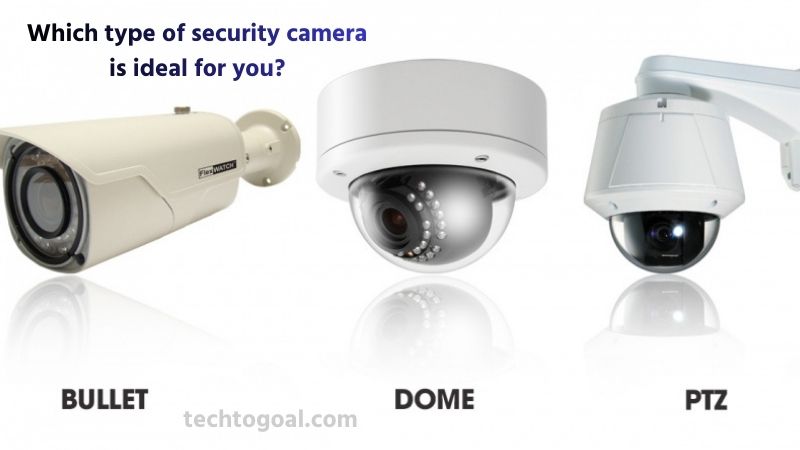
Bullet Camera
A bullet camera is a long, cylindrical security camera designed for long-distance monitoring and outdoor surveillance. Its narrow shape allows room for a larger lens, making it ideal for capturing clear images over extended ranges. Bullet cameras are typically mounted on walls or poles, providing a visible presence that can deter intruders.
They usually come with strong weatherproof housing and IR night vision, making them highly reliable in harsh environments. If you need a camera to monitor driveways, parking lots, fences, or wide-open spaces, a bullet camera is often the best choice due to its durability and excellent long-range performance.
Dome Camera
A dome camera features a compact, rounded design enclosed in a dome-shaped casing. This discreet appearance makes it less noticeable and ideal for indoor environments like offices, retail stores, hotels, and restaurants. Dome cameras offer a wide field of view and are resistant to vandalism because their dome cover protects the lens from tampering.
The camera angle is hard to determine from the outside, which adds an extra layer of security by keeping intruders guessing. These cameras also reduce lens glare and are great for wide, indoor coverage with a clean, modern look.
Turret Camera
The benefits of both dome and bullet cameras are combined in a turret camera, also referred to as a “eyeball camera.” It has an exposed lens like a bullet camera but sits inside a ball-and-socket design for easy manual adjustments. Turret cameras are favored for their sharp image quality, excellent night vision, and minimal IR glare compared to dome cameras.
They are easier to clean and do not suffer from the fogging issues sometimes seen in domes. Whether indoors or outdoors, turret cameras are extremely versatile and provide great performance without drawing too much attention.
Pan-Tilt-Zoom (PTZ) Camera
A PTZ camera offers advanced functionality by allowing users to remotely pan, tilt, and zoom for dynamic monitoring. This makes PTZ cameras ideal for large areas such as industrial sites, warehouses, parking lots, stadiums, or city surveillance.
The powerful optical zoom lets you capture clear details from long distances, while the wide rotation range covers vast areas with fewer cameras. Many PTZ models support smart tracking, automatically following people or vehicles as they move. If you need flexible, automated, and professional-grade surveillance, a PTZ camera is unmatched.
Next-Generation Security Cameras
Surveillance technology is always changing to satisfy customer needs, just like any other technology. Speaking of demand, the market for cameras has grown to include small businesses and homes in addition to the usual big corporate, military, wacky uncle, and government customers.
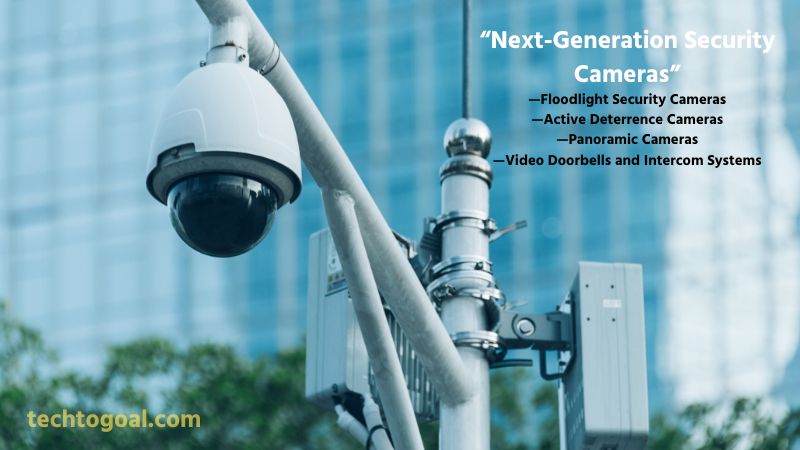
Many camera developments to meet the demands of homes have resulted from this shift into more popular sectors. Among the popular choices are doorbell-style cameras, floodlight cameras, and panorama cameras. Although these cameras may be used with a XVR DVR via a computer network, they are best utilized in an NVR system. Keep in mind that these cameras are only compatible with Ethernet wiring.
Floodlight Security Cameras
Floodlight security cameras combine bright LED floodlights with a high-resolution camera to provide strong illumination and active monitoring in one device. These cameras automatically activate when motion is detected, capturing clear details even at night while simultaneously deterring intruders with intense lighting.
Many modern floodlight cameras support features like two-way audio, sirens, smart alerts, and AI motion detection to differentiate between people, vehicles, and animals. They are ideal for entryways, backyards, garages, and dark outdoor areas where both visibility and security are essential. If you want a camera that boosts safety while enhancing nighttime visibility, a floodlight camera is an excellent choice.
Active Deterrence Cameras
Active deterrence cameras are designed to stop threats before they occur using visible and audible warning features. These cameras integrate spotlight LEDs, loud sirens, voice warnings, and flashing lights that activate automatically when suspicious motion is detected. The goal is to discourage intruders from advancing, reducing the risk of break-ins or property damage.
Equipped with advanced AI analytics, these cameras can detect unusual activities, send instant alerts, and record high-quality video in real time. They are a powerful option for homes, warehouses, construction sites, parking lots, and any area that benefits from proactive security rather than just passive monitoring.
Panoramic Cameras
Panoramic security cameras offer ultra-wide coverage using fisheye lenses or multi-sensor designs that capture a 180° or full 360° view. Instead of installing multiple cameras, a single panoramic unit can monitor large indoor or outdoor spaces with minimal blind spots. These cameras are particularly useful in shopping malls, warehouses, airports, corporate buildings, and public areas where comprehensive visibility is crucial.
Many models support de-warping technology, allowing users to view different angles clearly from a single image. With fewer cameras to manage and maximum area coverage, panoramic cameras offer cost efficiency, superior situational awareness, and advanced surveillance flexibility.
Video Doorbells and Intercom Systems
Video doorbells and smart intercom systems have become essential for modern home and business security. These devices allow users to see, hear, and speak to visitors in real time through their smartphone or connected screen, even when they are away.
Equipped with motion alerts, night vision, and cloud or local storage options, video doorbells act as the first line of defense at your entrance. Advanced intercom systems support multiple access features like keypads, RFID cards, facial recognition, and remote door unlocking. They enhance convenience while improving visitor management and perimeter security.
For homeowners, apartments, and offices, these systems provide a smart, user-friendly, and highly efficient security solution.
What type of wiring to use?
Whether you currently have a security camera system and the sort of cameras you intend to utilize will determine the kind of wiring you require. For security camera installations, RG59U coaxial and Ethernet (CAT5e or CAT6) cables are typically used. IP cameras use network cabling, whereas analog and HD-over-coax cameras use RG59U coax.
📌Read More👉AI Security Camera: The Complete Beginner’s Guide
Nevertheless, network cables may also be used with HD-over-coax systems by using a specific adaptor called a video balun. Ethernet and coaxial cables come in pre-terminated lengths with connectors or in bulk rolls.
HD Over Coax vs IP Cameras
When choosing wiring for a security system, it’s important to understand whether you’re using HD over Coax cameras or IP cameras, as each requires different cable types. HD over Coax cameras such as TVI, CVI, and AHD use coaxial cables (RG59 or RG6) to transmit video signals, often paired with additional power cables.
These systems are ideal for upgrading older analog setups because you can reuse existing coax wiring. In contrast, IP cameras use Ethernet cables (Cat5e, Cat6, or higher) to deliver video, power, and data through a single cable using PoE (Power over Ethernet).
IP wiring is easier to install, supports longer distances, and offers higher resolution and advanced features. Choosing the right type depends on your current system and future upgrade plans.
Weather Resistance
For outdoor installations, ensuring weather resistance in your wiring is essential. Cables exposed to sun, rain, heat, and moisture can deteriorate quickly if not properly protected. Outdoor-rated Ethernet cables (Cat5e/Cat6) feature UV-resistant jackets and waterproof coatings that prevent cracking or water intrusion.
Likewise, high-quality coaxial cables are designed with thick outer insulation to withstand harsh environments. For added protection, many installers use conduits or run cables through protective tubing to prevent physical damage from animals, weather, or accidental impact. Investing in weather-resistant wiring ensures long-term reliability and stable video transmission.
Cable Quality
Cable quality plays a major role in overall system performance, especially for high-resolution video. Cheap or poorly shielded cables can lead to interference, image distortion, or signal loss over long distances. For Ethernet wiring, it’s best to choose pure copper Cat5e or Cat6 cables, not copper-clad aluminum (CCA), which performs poorly and may overheat when used for PoE.
For HD coax systems, look for RG59 with solid copper center conductors and 95% braided shielding to ensure strong signal delivery. High-quality cables help maintain sharp video, reduce troubleshooting, and extend the lifespan of your security system.
Good Connections
Even the best cables won’t perform well without good connections. Proper connectors such as BNC connectors for coax or RJ45 connectors for Ethernet must be correctly crimped and secured to prevent signal interruptions. A poor connection can result in flickering video, loss of signal, or intermittent camera performance.
Weatherproof junction boxes and sealant protect outdoor connectors from moisture and corrosion. Additionally, using network switches, PoE injectors, or baluns of reputable quality helps maintain stable power and data transfer. Reliable, well-made connections ensure your cameras operate smoothly and deliver consistent, high-quality footage.
How are security cameras recorded?
A security camera can record and save video in a number different methods, which are described below.
📌Read More👉Why You Need a Home Security System In 2026
Record to an Internal Memory Card
Many modern security cameras offer the option to record directly onto an internal microSD memory card, providing a simple and cost-effective storage solution. This method is ideal for users who want a standalone system without separate recorders or monthly cloud fees.
Cameras with built-in card slots typically support capacities ranging from 16GB to 512GB or higher, depending on the model. Recording can be continuous or motion-based, with advanced models offering AI event filtering to save only important clips. While convenient, memory card recording is best suited for smaller setups since storage fills quickly and may require manual management. It also works as a reliable backup method if the main recorder or network fails.
Record to a PC
Security cameras can also record footage directly to a PC or dedicated server using specialized VMS (Video Management Software). This approach offers flexibility, allowing users to view multiple cameras, customize recording schedules, set motion detection zones, and store large files on computer hard drives.
PC-based recording is ideal for businesses or tech-savvy homeowners who want advanced features, such as remote access, AI analytics, or multi-monitor viewing. However, the PC must remain powered on and connected to the network at all times, and performance depends on the computer’s processing power and storage capacity.
While this method can be highly customizable, it may require more maintenance and technical knowledge compared to standalone recorders.
Record to a Standalone Security Video Recorder
The most common and reliable method is to record footage using a standalone security video recorder, such as an NVR (Network Video Recorder) for IP cameras or a DVR (Digital Video Recorder) for coaxial cameras. These devices are purpose-built for 24/7 surveillance and support multiple hard drives, high-capacity storage, and powerful processing.
Standalone recorders offer centralized management, allowing you to control all cameras, playback recordings, configure motion detection, and receive alerts from one interface. They also support advanced compression standards like H.265/H.265+ to maximize storage efficiency. With their stability, long-term reliability, and professional performance, standalone recorders are the preferred choice for both home and commercial security systems.
DVR vs NVR — Which One Is Better for You?
When choosing a security camera system, understanding the difference between DVR (Digital Video Recorder) and NVR (Network Video Recorder) is essential for building the right surveillance setup. A DVR system works with analog or HD-over-coax cameras and uses coaxial cables to transmit video signals.
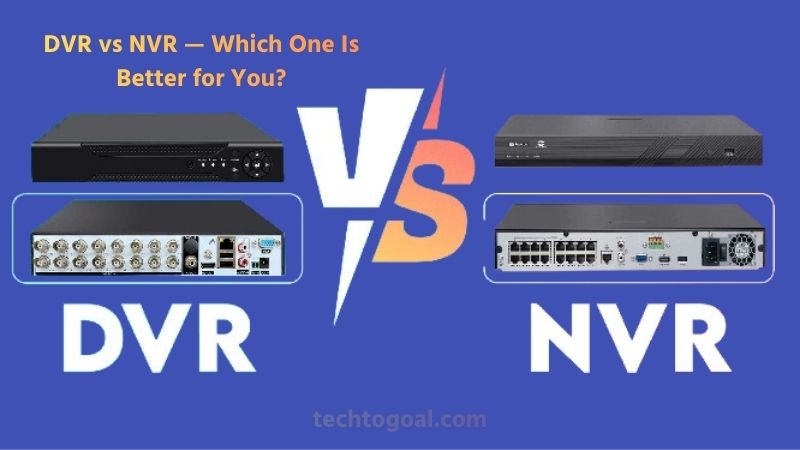
DVRs rely on a separate power connection for each camera and process video signals at the recorder, making them a cost-effective and reliable choice for basic to mid-range surveillance needs. They are easy to install in older buildings where coax wiring already exists, and they deliver stable performance even over long cable distances. However, DVR setups typically offer fewer smart features and lower maximum resolutions compared to NVR systems.
On the other hand, an NVR system is designed for IP cameras, using Ethernet cables (Cat5e, Cat6) that transmit both power and video through a single line with PoE technology. This simplifies installation and reduces cable clutter. NVRs process video at the camera, allowing for higher resolutions such as 4MP, 5MP, 8MP (4K), and beyond.
They also support advanced features like AI motion detection, smart alerts, vehicle/person recognition, and high-quality night vision. Because IP cameras can be placed anywhere on the network, NVR systems are much more flexible and scalable, making them ideal for modern homes and businesses looking for future-ready security.
In summary, DVR systems are best for budget-friendly installations or upgrading older analog setups, while NVR systems are the top choice for high-resolution, smart, and professional-level surveillance. Your decision ultimately depends on your wiring, budget, and long-term security goals.
How much storage should you get?
Choosing the right amount of storage for your security camera system depends on several factors, including the number of cameras, video resolution, frame rate, compression type, and the number of days you want to keep recorded footage. Higher resolutions—such as 4MP, 5MP, 8MP (4K), or 12MP require significantly more storage compared to 1080p.
On average, a typical 4K camera can use up to three times more storage than a 1080p camera. Modern systems use efficient compression formats like H.265 or H.265+, which reduce file sizes without sacrificing quality, allowing you to store more days of recording.
For most homes, 1TB to 4TB is usually enough for 4–8 cameras recording continuously for 10–20 days. Businesses or larger properties may need 6TB, 8TB, or even higher depending on camera count and retention requirements.
If you use motion-based recording instead of 24/7 recording, storage needs can drop by 50–80% because footage is only saved when activity occurs. Remote access, AI detection, and event tagging also help optimize storage by capturing only useful clips. In short, the best approach is to estimate your retention needs, consider your camera resolution, and choose a storage size that leaves room for future expansion.
Pricing and Budgeting
We’ve spoken about the key characteristics of security cameras and what you should anticipate from them, but we haven’t touched on cost. The foundation of each purchase that calls for some degree of preparation is proper budgeting. Prior to seeking to get a surveillance camera system, estimate your costs. Make sure to use product descriptions and video samples from the cameras you prefer to investigate the kind of cameras you require.
Generally speaking, a camera’s price increases with its resolution and level of sophistication. If you are only checking on your dog in the backyard, you don’t need a 12MP or 8MP camera with a 32-channel NVR. A couple 2K 4MP IP cameras and a 4-channel NVR will work perfectly. It might be economical to have capable safety, particularly if you get a security camera system.
FAQs
What is the most important feature to consider when choosing a security camera?
The resolution is one of the most important factors because it determines how clear your video will be. Higher resolution cameras (4MP, 5MP, 4K) capture more detail, making it easier to identify faces, license plates, and objects.
Should I choose a wired or wireless security camera?
Wired cameras offer more reliability and are ideal for long-term setups, while wireless cameras are easier to install but depend heavily on Wi-Fi strength. The best choice depends on your home layout and connection.
Which kind of security camera works best outside?
Outdoor cameras should have weatherproof ratings like IP66 or IP67, strong night vision, and durable housing. Bullet, turret, and PTZ cameras are common outdoor choices.
Should I choose a camera with AI and smart detection?
Smart cameras with AI can detect people, vehicles, packages, and motion more accurately. This reduces false alerts and improves overall security efficiency.
What is the difference between bullet, dome, and turret cameras?
Bullet cameras offer long-range viewing, dome cameras are more discreet and vandal-resistant, and turret cameras provide excellent night vision with flexible installation.
Conclusion
You should now have all the information needed to compare security cameras after reading this article. We’ve covered the various security camera technology, questions to ask yourself, and restrictions to be mindful of. You may now evaluate the prerequisites for choosing and modifying a security system to suit your particular requirements.