
AT&T Security Cameras: In today’s connected world, home and business security is no longer just about installing cameras; it’s about having a smart, reliable system that keeps you protected at all times. AT&T security cameras are designed to combine advanced surveillance technology with dependable connectivity, making them a popular choice for users who value performance, convenience, and peace of mind.
With features like HD video recording, remote monitoring, motion alerts, and seamless integration with smart devices, AT&T security camera solutions aim to deliver modern protection for both indoor and outdoor spaces. Whether you’re looking to secure your home, monitor your business, or keep an eye on loved ones while you’re away, choosing the right security camera system is crucial.
AT&T’s reputation for strong network infrastructure and smart home services makes its security cameras a compelling option for users seeking stability and ease of use. In this guide, we’ll explore AT&T security cameras in detail, covering features, benefits, and what makes them stand out so you can decide if they’re the right fit for your security needs.
What Is an AT&T Security Camera?
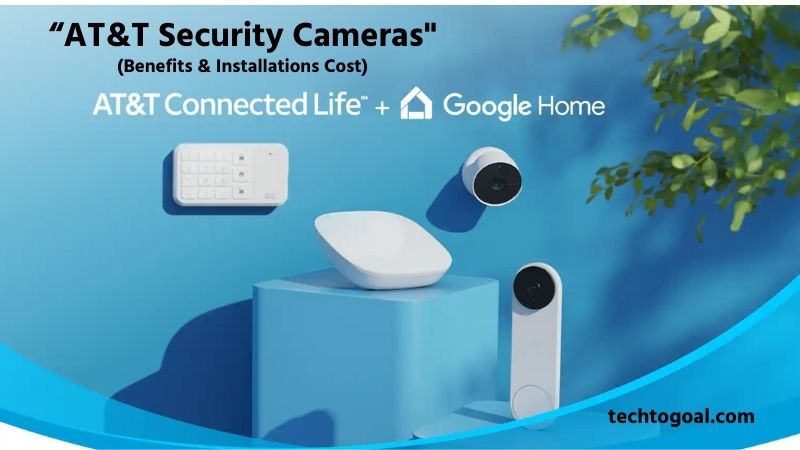
An AT&T security camera is the centerpiece of the newly launched AT&T Connected Life ecosystem, a smart home surveillance solution that prioritizes “unbreakable” connectivity. Unlike traditional cameras that rely solely on your home Wi-Fi, these cameras are designed to stay online even during power outages or internet failures.
📌Read More👉What Are ULEZ Cameras
By partnering with industry leaders like Google Nest and Abode, AT&T provides high-end hardware, including indoor and outdoor cameras and smart doorbells that integrate directly with America’s most reliable 5G and LTE networks.
At its core, an AT&T security camera is a high-definition (HD) monitoring device equipped with Intelligent AI Alerts. This means the camera can distinguish between a person, a pet, a vehicle, or a package delivery, sending real-time notifications to your smartphone.
The standout feature of this system is the cellular backup; if your Wi-Fi goes down, the camera’s security hub automatically switches to the AT&T cellular network, ensuring your home remains protected 24/7. Whether you choose a DIY setup or professional monitoring through Abode, AT&T security cameras offer a seamless blend of smart intelligence and network resilience that is rare in the consumer market.
How Does an AT&T Security Camera Work?
An AT&T security camera works by capturing video footage through its built-in camera sensor and transmitting that data using a stable internet connection, often supported by AT&T’s network services. Once installed and connected, the camera continuously monitors the designated area and records video either continuously or when motion is detected.
Users can access live video feeds and recorded clips remotely through a compatible mobile app or smart home platform, allowing real-time monitoring from anywhere. Most AT&T security cameras use motion sensors and smart detection technology to identify movement and trigger recordings or instant alerts.
When motion is detected, the camera sends notifications to the user’s smartphone, helping them respond quickly to any unusual activity. Advanced models may also include night vision, enabling clear video capture in low light or complete darkness, as well as two-way audio for communication through the camera.
Video footage from AT&T security cameras is typically stored using cloud storage, local storage, or a combination of both, depending on the system setup. Cloud storage allows users to securely save footage online for later review, while local storage options like SD cards provide offline backup.
Integrated with AT&T’s smart home ecosystem, these cameras can also work alongside other security devices such as alarms, sensors, and smart locks, creating a connected and reliable security solution that keeps homes and businesses protected around the clock.
Key Features of AT&T Security Camera
High-Definition Video Quality: AT&T security cameras are designed to deliver clear and detailed HD video footage, allowing users to easily identify faces, movements, and important details. High-resolution recording ensures that critical moments are captured accurately, making it easier to review footage or use recordings as evidence when needed.
📌Read More👉Key Features of Reliable Wireless Dash Cam
Reliable Network Connectivity: One of the standout features of AT&T security cameras is their reliable connectivity, supported by AT&T’s strong network infrastructure. Whether connected through Wi-Fi or cellular services, these cameras provide stable video streaming and consistent performance, reducing the risk of dropped connections or missed recordings.
Smart Motion Detection Alerts: AT&T security cameras use intelligent motion detection technology to monitor activity in real time. When movement is detected, the system instantly sends alerts to the user’s smartphone or device. This helps users stay informed about potential security events without having to monitor the camera constantly.
Night Vision for 24/7 Monitoring: Equipped with infrared night vision, AT&T security cameras can capture clear footage even in low light or complete darkness. This feature ensures round-the-clock protection, making the cameras effective both day and night for indoor and outdoor surveillance.
Remote Access and Mobile App Control: AT&T security cameras can be easily managed through a user-friendly mobile app. Users can view live footage, replay recorded videos, adjust settings, and receive notifications from anywhere, providing complete control over their security system while on the go.
Cloud and Local Storage Options: To ensure flexibility and data safety, AT&T security cameras typically offer cloud storage for recorded footage, with some models also supporting local backup options. This allows users to access past recordings anytime while keeping important videos securely stored.
Two-Way Audio Communication: Many AT&T security cameras come with built-in microphones and speakers, enabling two-way audio communication. This feature allows users to speak with visitors, delivery personnel, or family members directly through the camera, adding an extra layer of convenience and security.
Easy Installation and Integration: AT&T security cameras are designed for straightforward installation and seamless integration with smart home or security systems. With simple setup steps and compatibility with other connected devices, users can quickly build a complete and efficient security solution.
Benefits of AT&T Security Cameras
- Enhanced Home and Business Security: AT&T security cameras provide an added layer of protection by continuously monitoring your property and recording important activities. The presence of visible cameras can help deter potential intruders, while recorded footage offers valuable evidence in case of theft, vandalism, or other security incidents.
- Reliable Remote Monitoring Anytime, Anywhere: With AT&T security cameras, users can monitor their home or business remotely through a mobile app. Live video streaming and instant access to recorded footage allow you to stay connected to your property at all times, whether you’re at work, traveling, or away from home.
- Instant Motion Alerts for Faster Response: Smart motion detection ensures that you receive real-time notifications whenever unusual activity is detected. This allows for quick action, such as checking the live feed, contacting authorities, or alerting family members, helping prevent incidents before they escalate.
- Clear Video Quality Day and Night: AT&T security cameras deliver high-quality video footage with built-in night vision, ensuring reliable monitoring around the clock. Clear visuals make it easier to identify people, vehicles, and activities, even in low-light conditions.
- Seamless Integration with Smart Security Systems: AT&T security cameras are designed to integrate smoothly with smart home and security platforms. This allows users to manage cameras alongside other connected devices, creating a centralized and easy-to-use security system.
- Secure Cloud Storage and Easy Playback: Many AT&T security camera systems offer cloud storage options, allowing recorded footage to be safely stored and accessed whenever needed. Easy playback and video sharing features make it simple to review past events or provide evidence when required.
- Cost-Effective Long-Term Security Solution: By combining advanced features with reliable performance, AT&T security cameras offer a cost-effective security solution over time. Users benefit from durable hardware, consistent software support, and reduced need for frequent replacements or upgrades.
- Peace of Mind for Users and Families: Perhaps the most important benefit of AT&T security cameras is peace of mind. Knowing that your property is being monitored continuously and that you can check in anytime helps reduce stress and provides confidence in your overall security setup.
How to Use & Install AT&T Home Security Cameras
Installing and using AT&T Home Security Cameras (now largely integrated with the Google Nest ecosystem) is designed to be user-friendly, offering a choice between professional help and a DIY approach. Here is a comprehensive guide on how to get your system up and running and how to navigate its features.
📌Read More👉Wired Floodlight Camera: Features, Benefits & Buying Tips
How to Install AT&T Home Security Cameras
Step 1: Choose Your Installation Method
- Professional Installation: Many AT&T plans include or offer professional setup. A technician will mount the cameras, ensure they are within range of the AT&T cellular backup hub, and calibrate the motion sensors.
- DIY Installation: If you are installing a wireless/battery-powered model, you can do it yourself using the AT&T Smart Home Manager or the Google Home app.
Step 2: Syncing the Hardware
Before mounting the camera to a wall, pair it with your network:
- Plug the camera into a power source near your router.
- Open the Google Home or AT&T Digital Life app on your smartphone.
- Scan the QR code located on the back or bottom of the camera.
- Follow the in-app prompts to connect it to your Wi-Fi and the AT&T cellular gateway.
Step 3: Mounting for Optimal View
- Placement: Position the camera 7 to 9 feet above the ground. This height is high enough to avoid tampering but low enough to capture clear facial details.
- Angle: Tilt the camera downward to ensure it covers entry points like doors or windows.
- Signal Check: Before drilling, check the app to ensure the camera has a “strong” signal at that specific location.
How to Use Your AT&T Security System
1. Accessing Live Feed and Playback
Open your mobile app to see a dashboard of all active cameras. You can tap on any camera icon to view a live HD stream. To see past events, use the Timeline feature, which allows you to scroll back through “Event Video History” (clips triggered by motion or sound).
2. Customizing AI Alerts (Activity Zones)
To avoid getting alerts every time a car passes on the street:
- Go to Settings > Events > Seen Events.
- Create activity zones by drawing a box over specific areas (like your front porch).
- The camera will now only notify you if motion is detected inside that box.
3. Two-Way Audio Communication
- Every AT&T/Nest camera comes with a built-in microphone and speaker.
- Press the microphone icon in the app while viewing the live feed.
- You can now talk to delivery drivers or guests or warn off intruders in real time.
4. Arming and Disarming
Through the AT&T interface, you can set “Home,” “Away,” or “Night” modes.
- Away Mode: Maximizes sensitivity and sends instant alerts for any movement.
- Home Mode: Can be configured to turn off indoor cameras to ensure your family’s privacy while keeping outdoor cameras active.
Quick Tips for Success
- Keep it Clean: Wipe the lens with a microfiber cloth every few months to maintain 1080p/4K clarity.
- Check Battery Levels: If using wireless models, set an alert in the app to notify you when the battery hits 20%.
- Update Firmware: Always allow the app to update the camera software to ensure you have the latest security patches.
For the best experience, always follow AT&T’s official installation guidelines and ensure your internet connection is stable. Proper placement, correct settings, and routine maintenance will help your AT&T Home Security Cameras deliver consistent protection and dependable monitoring.
AT&T Security Cameras Total Cost
Understanding the total cost of an AT&T security camera system involves looking at three primary components: equipment, installation, and monthly monitoring service fees. In 2026, AT&T primarily offers security through its “Connected Life” platform, often integrating with premium hardware like Google Nest.
Below is a detailed breakdown of the total costs you can expect.
1. Upfront Equipment Costs
The initial price depends on the number of cameras and the specific models you choose (e.g., indoor, outdoor, or floodlight).
- Basic Indoor Cameras: Usually start around $99 to $150.
- Outdoor/Battery Cameras: Range between $170 and $250.
- Specialized Cameras (Floodlight/Doorbell): Typically cost $180 to $280.
Full Packages: If you purchase a “Smart Security” bundle that includes sensors and a base station along with cameras, equipment costs often start around $500 to $700.
2. Installation and Activation Fees
AT&T systems often require or recommend professional installation to ensure the cellular backup and AI features are calibrated correctly.
- Professional Installation: Generally costs between $99 and $199, depending on the complexity of the setup and the number of cameras being mounted.
- Activation Fee: Some plans may include a one-time activation or “start-up” fee ranging from $35 to $100, though this is sometimes waived during promotional periods.
3. Monthly Subscription and Monitoring Fees
To use the cameras effectively (for cloud storage and professional response), a monthly plan is required.
- Self-Monitoring/Basic Plan: Starts at approximately $10 to $15 per month. This usually covers cloud video history for your cameras.
- Professional 24/7 Monitoring: If you want emergency dispatch services, the cost typically ranges from $25 to $40 per month.
- Cellular Data Fee: Since many AT&T cameras use their 4G LTE/5G network as a backup, there may be a small additional “line fee” or data charge (around $10 to $20) if the camera operates as a standalone cellular device.
4. Estimated Total First-Year Cost
If you are starting with a standard two-camera outdoor setup with professional monitoring:
- Equipment: $400
- Installation: $150
- Monthly Fees ($35 x 12): $420
- Total: ~$970 (plus taxes)
Pro Tips About AT&T Security Camera Systems
- Optimize Camera Placement for Maximum Coverage: Strategic positioning makes a huge difference. For outdoor cameras, place them at entrances, driveways, and vulnerable outdoor spaces. Indoor cameras work best near main hallways and high-traffic areas. Mount cameras at a height that reduces blind spots but still captures faces and activity clearly.
- Use Dual Power Options If Available: If your AT&T security camera supports both wired power and battery backup, use both. Wired power ensures continuous recording, while a backup battery keeps the camera running during power outages. This enhances reliability, especially in areas prone to outages.
- Enable Motion Zones & Adjust Sensitivity: Most AT&T systems allow you to set custom detection zones and motion sensitivity levels in the app. This helps filter out irrelevant movement and reduces false alerts, ensuring you only receive notifications for meaningful activity.
- Keep Firmware and App Updated: Software updates often fix bugs, enhance performance, and improve security. Always install firmware updates for your camera and keep the AT&T security app updated on your phone. This ensures your system stays secure and functions smoothly.
- Secure Your Network for Better Camera Protection: Your camera relies on your Wi-Fi or AT&T network. Use strong passwords, WPA2/WPA3 encryption, and separate guest networks to prevent unauthorized access. Strong network security protects not only your camera feeds but all connected devices.
- Balance Cloud Storage and Local Backup: If your AT&T camera system offers both cloud storage and local storage (like an SD card), use them together. Cloud storage ensures footage is preserved even if the camera is damaged or stolen, while local storage provides immediate access and reduces subscription costs.
- Regular Maintenance: Clean Lens & Check View Angles: Dust, insects, or weather conditions can obscure the camera’s lens. Periodically clean the lens and double-check angles to ensure optimal visibility. This simple step significantly improves video clarity and detection accuracy.
- Test Alerts & Playback Functions Regularly: Occasionally trigger a motion event to make sure alerts are delivered to your phone and video clips are recorded and accessible. Regular testing ensures the system works when you need it most.
- Plan for Low-Light Conditions: If your camera supports night vision or infrared mode, ensure it’s placed where low-light performance matters, like backyards, porches, or poorly lit corridors. Adjust settings to enhance clarity in the dark without overexposing bright lights.
- Take Advantage of Two-Way Audio: Two-way audio allows you to communicate through the camera with visitors, delivery people, or even family members. Use this feature to deter unwanted guests or deliver quick messages without opening the door.
- Check Camera Compatibility Before Upgrading: Before buying extra AT&T cameras or accessories, always verify compatibility with your existing system and mobile app. Not all models or generations integrate perfectly, and mismatched gear can result in connectivity issues.
- Review Your System’s Storage Plan: Whether you’re using AT&T’s cloud storage or your own local solution, understand the retention period and how long recordings are saved. Longer retention plans offer more historical footage but may cost more; choose based on your needs.
- Use Scheduled Recording for Predictable Activity: If your system allows scheduling, enable recording during times when activity is most likely. This helps balance storage space and ensures crucial moments are captured.
- Label Cameras Clearly in the App: Assign descriptive names to each camera within the app. This makes playback navigation and alert identification much easier.
- Consider Professional Monitoring for Extra Security: If peace of mind is your priority, pairing AT&T cameras with professional monitoring services ensures 24/7 support. When unusual activity is detected, operators can respond quickly and coordinate necessary action.
FAQs
Does AT&T provide its own security camera system?
AT&T does not manufacture cameras directly, but it offers security solutions through partnerships with smart home and security service providers. These systems work seamlessly with AT&T internet and mobile networks for dependable performance.
Do AT&T security cameras require an internet connection?
Yes, AT&T security cameras typically require a stable internet connection to stream live video, send alerts, and store footage in the cloud. AT&T’s broadband or wireless network ensures smooth and uninterrupted monitoring.
Can AT&T security cameras work with mobile data?
Many AT&T-compatible security cameras can operate using AT&T mobile data plans, especially in areas where wired broadband is unavailable. This makes them ideal for remote locations, construction sites, or temporary installations.
Are AT&T security cameras suitable for outdoor use?
Yes, several AT&T-supported security cameras are designed for outdoor environments. These cameras usually come with weatherproof housings, night vision, and motion detection to ensure 24/7 outdoor protection.
Do AT&T security cameras support cloud storage?
Most AT&T Security Camera solutions offer cloud storage options, allowing users to save and review recorded footage anytime. Cloud storage plans may vary depending on the service provider and subscription package.
Can I view AT&T Security Camera footage remotely?
Absolutely. AT&T Security Cameras allow remote viewing through mobile apps or web portals. Users can monitor live feeds, play back recordings, and receive real-time alerts from anywhere.
Conclusion
AT&T Security Camera Systems offer a smart and reliable solution for modern home and business security needs. With advanced features like real-time monitoring, motion detection, cloud storage, mobile app control, and seamless network integration, these cameras provide both convenience and peace of mind.
When properly installed and configured, AT&T security cameras can significantly enhance overall safety while allowing users to stay connected to their property from anywhere. By following the pro tips, such as optimizing camera placement, securing your network, keeping software updated, and balancing storage options, you can maximize the performance and lifespan of your system.
Whether you are protecting your home, office, or outdoor spaces, AT&T Security Camera Systems deliver dependable surveillance backed by trusted connectivity. Investing in the right setup today means stronger protection, fewer worries, and greater confidence in your security tomorrow.