
Mini Cube Security Camera: In today’s fast-paced world, keeping an eye on your home or office doesn’t always require bulky equipment or complicated installations. This is where the mini cube security camera comes in a compact yet powerful surveillance solution designed for modern security needs.
Mini cube security cameras are especially valued for their plug-and-play setup, flexible placement options, and reliable indoor monitoring capabilities. Despite their compact form, these cameras often include essential features such as HD video recording, motion detection, night vision, two-way audio, and mobile app control.
In this guide, we’ll explore everything you need to know about mini cube security cameras, from their key features to expert buying tips that help you choose the right model for your needs. If you’re looking for a simple, space-saving, and budget-friendly security solution, this article will help you decide whether a mini cube security camera is the right fit for you.
What is a Cube Security Camera?
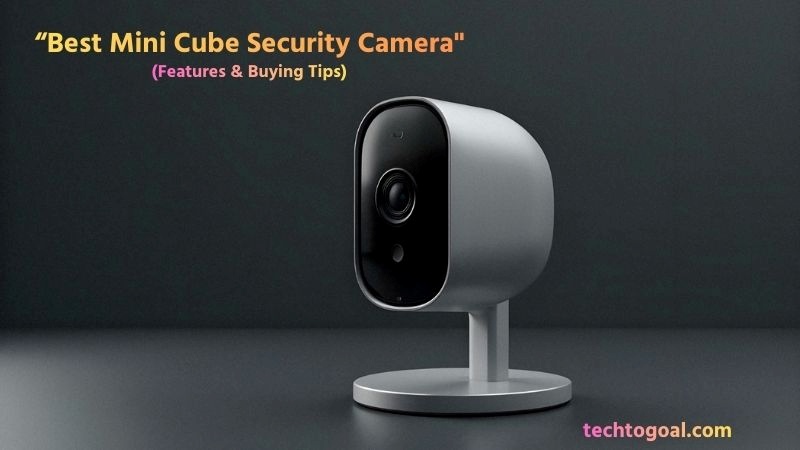
A mini cube security camera is a compact, box-shaped surveillance device designed primarily for indoor monitoring where space and aesthetics are top priorities.
📌Read More👉What Is Night Vision Security Camera
Unlike traditional dome or bullet cameras that can look intimidating, a cube camera features a small, symmetrical form factor typically measuring just a few inches, allowing it to sit discreetly on a flat surface or be mounted to a wall without drawing unwanted attention. Its “all-in-one” design usually integrates a high-definition lens, a microphone, and a speaker into a single, sleek unit, making it an ideal choice for residential and small business environments.
Technically, these cameras are built for versatility. Most cube cameras are Wi-Fi enabled and come with a built-in stand or a magnetic base, offering a “plug-and-play” experience that is perfect for beginners. Despite their miniature size, they are engineered to deliver a wide field of view, often capturing entire rooms from a single corner.
Whether used as a baby monitor, a pet cam, or a hidden security layer, the cube camera bridges the gap between bulky professional systems and portable consumer gadgets, providing high-quality surveillance in a minimalist package.
What Are Key Features of Cube Security Cameras?
Cube security cameras may be small in size, but they are packed with smart and practical features for reliable indoor monitoring. Below are the key features, explained one by one in detailed, human-written, SEO-friendly paragraphs.
- Compact and Discreet Design: One of the standout features of cube security cameras is their compact, box-shaped design. Their small size allows them to blend seamlessly into indoor environments such as living rooms, bedrooms, offices, or shops. This discreet appearance makes them ideal for monitoring without drawing unnecessary attention.
- High-Definition Video Quality: Most cube security cameras offer HD or Full HD video resolution, delivering clear and detailed footage. High-definition video ensures you can easily identify people, movements, or objects in the frame, making these cameras effective for everyday indoor surveillance.
- Wide Field of View: Cube security cameras are designed with wide-angle lenses that cover more area from a single position. A wider field of view helps reduce blind spots and allows one camera to monitor an entire room efficiently, minimizing the need for multiple devices.
- Motion Detection and Alerts: Built-in motion detection is a core feature of cube security cameras. When movement is detected, the camera sends instant alerts to your smartphone. Many models allow customizable motion sensitivity, helping reduce false alarms caused by pets or minor movements.
- Night Vision Capability: For 24/7 monitoring, cube security cameras include infrared (IR) night vision. This feature allows the camera to capture clear footage even in low light or complete darkness, ensuring your space remains protected at all times.
- Two-Way Audio Communication: Many cube security cameras come with built-in microphones and speakers, enabling two-way audio. This allows you to listen and speak through the camera using a mobile app, which is useful for talking to family members, calming pets, or warning unauthorized visitors.
- Smartphone App Control: Cube security cameras are typically controlled through user-friendly mobile apps. These apps allow you to view live footage, receive alerts, adjust settings, and review recordings from anywhere, making remote monitoring simple and convenient.
- Multiple Storage Options: To store recorded footage, cube security cameras often support microSD cards, cloud storage, or both. This flexibility lets users choose between local storage for privacy or cloud storage for easy remote access and backup.
- Easy Plug-and-Play Setup: Cube security cameras are designed for hassle-free installation. Most models require only a power connection and Wi-Fi setup, making them perfect for beginners who want quick and simple security without technical complexity.
- Smart Home Compatibility: Some cube security cameras integrate with smart home platforms like Amazon Alexa or Google Assistant. This allows voice control and automation, adding extra convenience to your home security system.
Cube security cameras offer a perfect blend of simplicity, functionality, and affordability. Their compact design and smart features make them an excellent choice for anyone looking for easy and effective indoor surveillance.
Best Wireless Cube Security Camera: Top 5 Recommendation
Selecting the best wireless cube camera involves balancing size, battery life, and smart features. Here are our top 5 picks that offer the best performance in 2026.
📌Read More👉Wired Floodlight Camera: Features, Benefits & Buying Tips
1. Reolink Argus 3 Ultra
Overview: The Reolink Argus 3 Ultra is often rated as one of the best compact wireless cube security cameras thanks to its 4K ultra-high-definition image quality, intuitive app, and flexible power options. With both battery and optional solar power, this standalone camera delivers crisp day/night footage and smart alerts without the hassle of wiring, ideal for front doors, living rooms, or small outdoor areas.
Key Specifications:
- Resolution: 4K (8 MP) Ultra HD
- Connectivity: Dual-band Wi-Fi (2.4 GHz & 5 GHz)
- Power: Battery / Solar (optional)
- Night Vision: Full-color night vision
- Smart Alerts: AI motion detection with customizable zones
- App: Reolink mobile & desktop access
Pros:
- Stunning 4K clarity: Ultra-high-definition footage captures even fine details like faces and license plates.
- Flexible power options: Battery operation or solar charging means no permanent wiring is required.
- Color night vision: Unlike many standard cameras, it records vivid color footage even in low light.
- Smart detection & alerts: AI-powered motion detection reduces false alarms and sends precise notifications.
Cons:
- Battery dependent: Heavy usage or frequent alerts can drain the battery faster.
- Cloud storage optional fee: Advanced cloud features usually require a subscription.
- Best outdoors on stable Wi-Fi: Performance can dip with weak wireless signals.
2. Blink Mini (3rd Gen)
Overview: The Blink Mini is a compact wireless cube camera with essential security features at a friendly price. It’s ideal for indoor monitoring like living rooms, nurseries, and home offices. While it typically offers 1080p Full HD video, its simple setup, app alerts, and Alexa compatibility make it a great entry-level choice.
Key Specifications:
- Resolution: 1080p Full HD
- Connectivity: Wi-Fi
- Features: Motion detection, two-way audio, cloud storage options
- Compatibility: Works with Alexa
Pros:
- Affordable and reliable: Perfect for beginners or budget setups.
- Compact design: Easy to place anywhere indoors without bulky setup.
- App alerts & Alexa support: Push notifications and voice integration make monitoring intuitive.
Cons:
- Lower resolution: Not as crisp as 2K or 4K models.
- Cloud storage fee for history: Free storage is limited without subscriptions.
- Indoor use only: Not weatherproof for outdoor placements.
3. Aqara Camera Hub G5 Pro
Overview: The Aqara Camera Hub G5 Pro doubles as both a wireless cube camera and a smart home hub. It integrates with Apple HomeKit Secure Video, Google Assistant, and Alexa, making it a powerful choice for tech-savvy users who want a camera that also manages connected devices.
Key Specifications:
- Resolution: ~2.7K (varies by mode)
- Connectivity: Wi-Fi
- Smart Features: Facial, package, baby crying detection
- Smart Hub: Matter controller & Zigbee/Thread border router
Pros:
- Smart home hub functionality: Controls other devices alongside camera duties.
- Multiple smart detections: AI-based alerts without subscription.
- Flexible storage: iCloud, NAS, and local memory variants.
Cons:
- Higher price: Premium features come with a premium tag.
- Spotlight-dependent night vision: Some models rely on spotlight rather than IR.
- App limitations: Some users report complexities in recording management.
4. Imou Cue 2C
Overview: The Imou Cue 2C is a sleek cube-style Wi-Fi security camera offering 1080p to 2K resolution, AI motion detection, two-way audio, and flexible storage. Its simple app and compact form make it perfect for indoor home or small office surveillance.
Key Specifications:
- Resolution: 1080p / 2K
- Connectivity: Wi-Fi
- Features: AI motion alerts, two-way talk, night vision
- Storage: MicroSD + optional cloud
Pros:
- Balanced performance for price: Better resolution than entry models without high cost.
- AI motion alerts: Reduced false notifications.
- Two-way audio: Easy communication through the camera.
Cons:
- Cloud subscription for full features: Optional cloud storage may cost extra.
- Indoor use focus: Not rugged for outdoor use.
- App quality varies: Some user reports note occasional app glitches.
5. Axis Companion Cube LW
Overview: The Axis Companion Cube LW is an enterprise-grade wireless cube camera designed for reliable indoor security with top-tier image processing. With strong motion sensors and Axis’ renowned video quality, it’s a premium choice for small businesses or serious home security setups.
Key Specifications:
- Resolution: 1080p / 2 MP
- Connectivity: Wi-Fi or Ethernet
- Features: IR night vision, WDR (wide dynamic range), PIR motion sensor
- Audio: Built-in mic & speaker
Pros:
- Professional video quality: WDR handles various lighting conditions well.
- Robust motion detection: PIR reduces false alarms.
- Flexible connectivity: Choose Wi-Fi or Ethernet for reliability.
Cons:
- Higher price tier: More expensive than consumer models.
- No advanced cloud AI: Relies on basic mobile alerts.
- Indoor focused: Not built for outdoor weatherproof use.
Quick Recommendation Tips
- Best overall all-rounder: Reolink Argus 3 Ultra—4K, color night vision, flexible power.
- Best budget pick: Blink Mini—affordable, simple, and great for indoor use.
- Best smart hub combo: Aqara G5 Pro—acts as a camera and smart hub.
- Best balanced option: Imou Cue 2C—good features at a mid-range price.
- Best for business level: Axis Companion Cube LW—enterprise-quality indoor monitoring.
Where to Use Cube Security Cameras?
Cube security cameras are versatile, compact, and easy to place, making them suitable for many indoor monitoring needs. Below are the best places to use a cube security camera, explained one by one in detailed, human-written, SEO-friendly paragraphs.
- Living Room: The living room is one of the most common places to install a cube security camera. It helps monitor daily activity, protect valuable items, and keep an eye on visitors when you’re away. Thanks to the camera’s wide field of view, a single cube camera can often cover the entire room effectively.
- Bedroom: Cube security cameras are ideal for bedroom monitoring, especially for added safety or personal security. Many users place them in bedrooms to monitor sleep activity, ensure safety while away, or keep track of children or elderly family members. Their small and discreet design helps maintain privacy when positioned thoughtfully.
- Baby’s Room or Nursery: A cube security camera works perfectly as a baby monitor. Features like live video streaming, motion alerts, night vision, and two-way audio allow parents to check on their baby at any time. The compact size makes it easy to place on shelves or furniture without taking up space.
- Home Office: For remote workers and freelancers, a cube security camera in the home office helps protect laptops, documents, and other valuable equipment. It also allows you to monitor the workspace when you’re away, adding an extra layer of security to your professional setup.
- Pet Monitoring Area: Cube security cameras are excellent for keeping an eye on pets while you’re out. Whether it’s the living room, pet bed area, or feeding station, these cameras let you watch your pets in real time and even talk to them using two-way audio.
- Small Business or Shop Counter: Small shops, cafés, and offices often use cube security cameras to monitor counters, cash registers, or customer areas. Their discreet size helps maintain a professional appearance while still providing reliable surveillance and activity tracking.
- Apartment or Rental Home: Cube security cameras are perfect for apartments and rental homes because they require no permanent installation. Their plug-and-play setup allows tenants to enhance security without drilling holes or making structural changes.
- Entryways and Hallways: Placing a cube security camera in hallways or near entry points helps track movement inside the home. This is useful for monitoring who enters or exits rooms and provides better visibility of indoor activity patterns.
- Elderly Care Areas: Cube security cameras are often used to monitor elderly family members who live alone. They help caregivers check on daily movement and safety remotely, offering peace of mind without being intrusive.
Thanks to their compact size, flexible placement, and smart features, cube security cameras can be used almost anywhere indoors. They are an excellent choice for anyone looking for simple, discreet, and effective indoor surveillance.
How to Install and Set Up a Cube Cam?
Installing and setting up a cube security camera is simple and beginner-friendly. Below is a step-by-step guide, written in clear, human-friendly, and SEO-optimized English, with one point and one detailed paragraph for each step.
- Choose the Right Location: Start by selecting the best place to install your cube cam. Ideally, choose a spot that offers a clear view of the area you want to monitor, such as a living room, entryway, or nursery. Make sure the camera is positioned at eye level or slightly higher for better coverage and avoid placing it directly facing bright light sources like windows.
- Connect the Camera to Power: Most cube cameras need a constant power supply. Plug the camera into a nearby power outlet using the provided USB cable and adapter. Ensure the cable is secured neatly to avoid accidental unplugging, especially in homes with pets or children.
- Download the Mobile App: To begin the setup process, download the official Cube Cam app from the Google Play Store or Apple App Store. This app allows you to control the camera, view live footage, receive alerts, and adjust settings. Always download the app recommended by the manufacturer to ensure compatibility and security.
- Create an Account or Log In: Open the app and create a new account if required. You’ll usually need an email address and a secure password. Logging in allows you to access your cube camera remotely and sync your settings across multiple devices.
- Connect the Cube Cam to Wi-Fi: Follow the in-app instructions to connect your cube cam to a Wi-Fi network. Most cube cameras work best on a 2.4 GHz network. Ensure your Wi-Fi signal is strong in the installation area to prevent connection drops or lag during live streaming.
- Pair the Camera with the App: During setup, the app will prompt you to pair the cube cam. This usually involves scanning a QR code or pressing a reset button on the camera. Once paired, the camera will appear in the app dashboard, confirming successful installation.
- Adjust Camera Angle and Focus: After pairing, physically adjust the camera angle to cover the desired area. Check the live video feed on your phone to fine-tune positioning. Proper alignment ensures you get clear footage and reduces blind spots.
- Configure Motion Detection Settings: Enable motion detection through the app and customize sensitivity levels. Adjust alert zones to focus on important areas and avoid false notifications caused by pets, fans, or moving curtains. This helps improve accuracy and battery efficiency for wireless models.
- Set Up Night Vision and Audio: Activate night vision to ensure clear footage in low-light conditions. If your cube cam supports two-way audio, test the microphone and speaker to communicate with family members, pets, or visitors directly through the app.
- Test the System: Finally, test your cube cam by walking through the monitored area and checking for motion alerts and video recording. Review recorded clips to ensure video quality and notifications are working correctly.
Regularly update the camera firmware and mobile app to keep your cube cam secure and functioning at its best.
How to Choose the Best Cube Security Camera
Choosing a mini cube camera requires a blend of technical knowledge and an understanding of your specific needs. Here are ten critical factors to consider before making your purchase:
📌Read More👉How to Choose the Best Wired Floodlight Camera
1. High-Definition Image Resolution
The quality of your footage is paramount. At a minimum, look for 1080p Full HD resolution to ensure that images are crisp and identifiable. If you need to monitor larger rooms or want to zoom in on faces, consider upgrading to a 2K or 4K cube camera. Higher resolution provides more “pixels” to work with, which is crucial when you need to provide evidence to authorities or identify a stranger.
2. Wide Field of View (FOV)
Since cube cameras are typically stationary (non-rotating), the lens angle is vital. A camera with a wide-angle lens (110° to 160°) can cover an entire living room or office from a single corner. A wider FOV reduces “blind spots” and ensures that you don’t need to buy multiple cameras to monitor a single open space.
3. Reliable Night Vision Capabilities
Security doesn’t stop when the lights go out. Ensure your cube camera is equipped with Infrared (IR) LEDs that provide clear black-and-white footage in total darkness. Check the “night vision range”; a good indoor cube camera should be able to see clearly for at least 20 to 30 feet in the dark to cover the full length of a standard room.
4. Two-Way Audio Communication
A great cube camera acts as a communication bridge. Look for models with a built-in microphone and speaker. This allows for two-way talk, enabling you to talk to your kids after school, warn a pet off the furniture, or even confront an intruder. High-quality audio with noise-cancellation features will make these conversations much clearer.
5. Smart AI Motion Detection
Basic motion sensors can be frustrated by shadows or drifting curtains. Choose a camera that offers AI-powered human or pet detection. This intelligent software analyzes the shapes it sees and only sends an alert to your phone when it detects a genuine person or animal, drastically reducing annoying false alarms.
6. Flexible Storage Options (Local vs. Cloud)
Think about where your data will live. Many users prefer a microSD card slot (up to 256 GB) for local storage because it is a one-time cost and keeps footage private. However, cloud storage is a safer backup if a thief steals the camera itself. The best cube cameras offer a hybrid of both, giving you the ultimate flexibility.
7. Power Source: Wired vs. Battery
Decide between a plug-in (USB-powered) or a battery-operated model. Wired cameras are ideal for 24/7 continuous recording without the worry of charging. Battery-powered models offer total wire-free freedom, making them perfect for temporary spots or high shelves, but they usually only record during motion events to save power.
8. Seamless Smart Home Integration
If you use Alexa, Google Assistant, or Apple HomeKit, ensure your cube camera is compatible. A smart-integrated camera allows you to view live feeds on your Echo Show or Nest Hub with a simple voice command. This makes checking your security much more convenient as part of your existing smart home routine.
9. Magnetic Mounting and Ease of Setup
The “Mini Cube” design is prized for its portability. Look for cameras with a magnetic base or a versatile mounting kit. This allows you to snap the camera onto a refrigerator or a metal file cabinet without drilling holes. Easy QR-code-based setup through a mobile app is also a must-have for a frustration-free experience.
10. Data Privacy and Encryption
Since these cameras are used inside your most private spaces (bedrooms, nurseries, or offices), security is a must. Check if the brand uses AES 128-bit or 256-bit encryption for data transmission. Features like “Privacy Mode,” which physically or digitally shuts off the lens when you are home, are excellent for ensuring your personal life remains private.
FAQs
Are mini cube cameras wireless, or do they need a power cord?
It depends on the model. Some, like the Blink Indoor, are truly wireless and run on batteries. However, many mini cube cameras are “plug-in wireless,” meaning they connect to your internet via Wi-Fi but require a USB cable for continuous power. Always check the power specifications before buying based on your placement needs.
Can a mini cube camera record without Wi-Fi?
Yes, most cube cameras can record without an active internet connection if they have a MicroSD card slot. While you won’t be able to view the “Live Feed” or get instant notifications on your phone without Wi-Fi, the camera will still save the footage to the local memory card for later viewing.
Do mini cube cameras have night vision?
Absolutely. Despite their small size, almost all modern mini cube cameras are equipped with infrared (IR) night vision. This allows them to see in complete darkness, usually up to a range of 20–30 feet, which is more than enough for most indoor rooms.
Can I use a mini cube camera outdoors?
Most mini cube cameras are designed for indoor use only and are not waterproof. Placing them outside can lead to damage from rain or extreme temperatures. If you need outdoor surveillance, look for a cube camera specifically rated IP65 or higher for weather resistance.
Can these cameras be used as a baby monitor?
Yes, they make excellent baby monitors! Because they feature two-way audio and high-definition video, you can hear and speak to your baby. Plus, you can access the feed from your smartphone anywhere, unlike traditional baby monitors that have a limited range.
How much video can a 128GB MicroSD card hold?
For a 1080p camera, a 128 GB card can typically store about 10 to 15 days of continuous footage. If you set the camera to “Motion Detection Only” recording, it can easily store several months’ worth of clips before the oldest footage is overwritten.
Are mini cube cameras easy to hide?
While they are not “spy cameras” (which are often hidden inside other objects), their small 2-inch or 3-inch frames make them very discreet. They can be easily hidden among books, potted plants, or on high shelves, making them perfect for subtle monitoring.
Conclusion
In an era where home security is becoming more personalized and integrated, the mini cube security camera stands out as a versatile champion of indoor surveillance. It effectively shatters the myth that a camera must be large and conspicuous to be powerful.
By combining a discreet, minimalist design with high-end features like AI human detection, two-way audio, and crystal-clear night vision, these tiny devices offer a level of flexibility that traditional security systems simply cannot match.
Ultimately, choosing the best mini cube camera comes down to identifying your primary goal, be it continuous recording, ease of installation, or subscription-free storage. By investing in the right model, you aren’t just buying a gadget; you are gaining a discreet, 24/7 guardian that provides peace of mind without compromising the aesthetics of your home. Small, smart, and subtle, the mini cube camera is truly the future of localized home protection.